By Daniel Rowles, lead trainer at Target Internet and author of Digital Branding (Kogan Page). Last updated: November 2026.
Facebook Marketplace is the buying and selling section built into Facebook, where people and businesses list items for sale to buyers nearby or, in some countries, across the country with shipping. Launched in October 2016, it is free for local sales, while shipped sales through Facebook checkout carry a selling fee.
This guide explains how Facebook Marketplace works for buyers and sellers, what it costs, how businesses can use it as a sales and advertising channel, and how to stay safe. It is written for marketers and small business owners deciding whether Marketplace deserves a place in their sales and media plans.
A short history of Facebook Marketplace
Facebook launched Marketplace on 3 October 2016 as a tab in its mobile app, initially in the US, UK, Australia and New Zealand. According to Meta's launch announcement, the aim was to give a proper home to the buying and selling already happening in Facebook groups, which more than 450 million people visited each month at the time.
Since then Marketplace has moved from a simple local listings board to a commerce channel in its own right. It came to desktop, expanded to many more countries, added shipping and on-platform checkout in some markets, and opened up to business listings and advertising. Meta has said that more than a billion people use Marketplace each month, which puts it among the largest second-hand and local commerce destinations in the world.
For marketers, that history matters because it explains how Marketplace behaves. It is still primarily a local, person-to-person space, and the businesses that do well there tend to match that tone rather than treating it like a conventional online shop. It sits alongside groups, Reels and paid social as one part of a wider Facebook presence, and our social media marketing resources cover how those pieces fit together.
How does Facebook Marketplace work?
Facebook Marketplace works by letting anyone with a Facebook account list an item with photos, a price and a description, which then appears to people browsing or searching nearby. Buyers message the seller through Messenger, and the two agree payment and collection, or the buyer pays through Facebook checkout where shipping is offered.
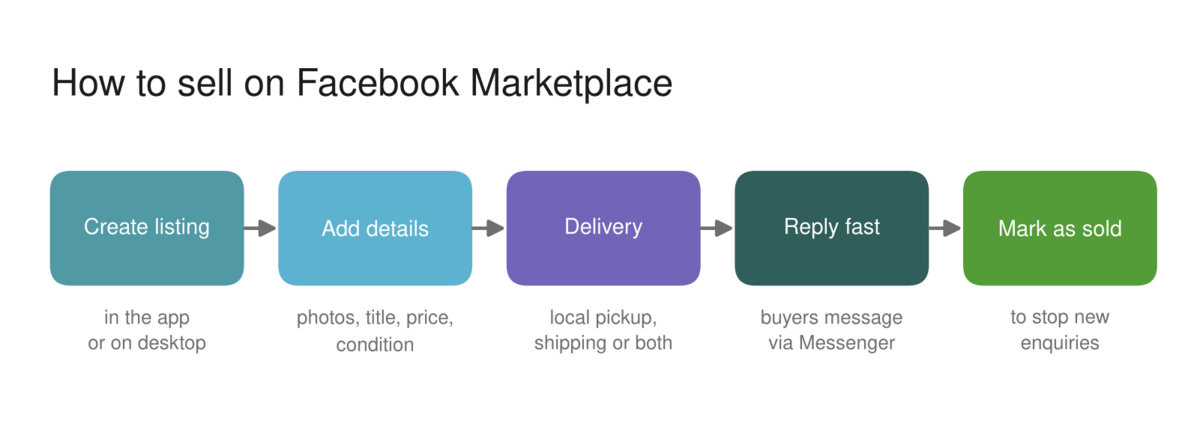
For buyers, the main tools are search, category browsing and location filters. Results are shaped by where you are, what you have looked at before and what you search for, much like the rest of Facebook. For sellers, the process is quick:
- Open Marketplace in the Facebook app or on desktop and choose Create new listing.
- Add clear photos, a specific title, the price, category, condition and a description.
- Choose local pickup, shipping where available, or both.
- Publish the listing, then reply to messages promptly, because response speed affects how buyers see you.
- Mark the item as sold once the sale is complete, so it stops attracting enquiries.
The difference between local and shipped sales is the most important thing to understand, because it changes the fees, the payment method and the protection available.
| Type of sale | How payment works | Fees | Protection |
|---|---|---|---|
| Local pickup | Agreed directly between buyer and seller, usually cash or bank transfer | No listing or selling fee | None from Facebook: the deal is between the two parties |
| Shipped through Facebook checkout (where available) | Buyer pays through Facebook, seller is paid out after dispatch | Selling fee deducted from the payout (in the US, 10% with a minimum of $0.80 since April 2024) | Covered by Facebook's purchase protection policies |
Shipping and checkout are not available in every country, so check what is offered in your market before planning around them. Fees have changed several times since checkout launched, so confirm the current rate in Facebook's seller help pages before you price shipped items.
Is Facebook Marketplace free?
Facebook Marketplace is free to browse and free to list on, and local sales carry no fee. The only standard charge is the selling fee on shipped orders paid through Facebook checkout, which in the US doubled from 5% to 10% in April 2024, with a minimum of $0.80 per order. On a $100 shipped sale with free postage, that means a $10 fee, while the same item collected locally costs the seller nothing.
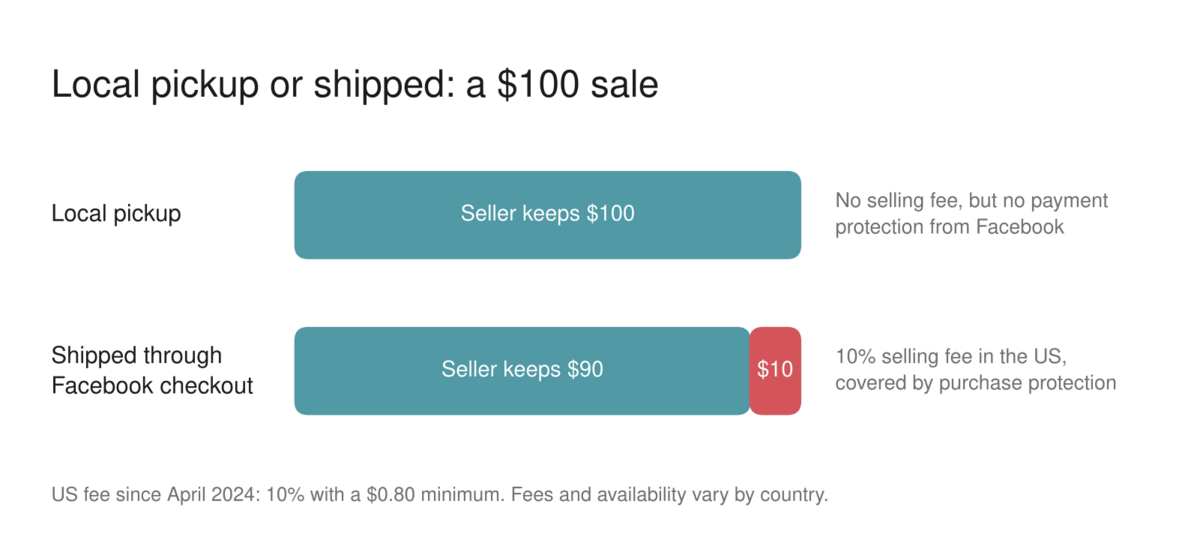
That makes Marketplace unusually cheap for local selling compared with most online marketplaces, which is why it has become the default for bulky, low-value or second-hand items that are expensive to post. The trade-off is that local sales come with no payment protection from Facebook, so the seller and buyer carry the risk themselves.
Sellers can also pay to promote a listing using the Boost listing option, which turns it into an ad shown to more people. That is optional advertising spend rather than a fee for selling.
If you want to build a wider understanding of how Facebook fits into your social media and paid media plans, the Target Internet platform includes our Facebook marketing course alongside other interactive courses, accredited certification, over 400 episodes of the Digital Marketing Podcast, and monthly live masterclasses delivered by working practitioners.
How can businesses use Facebook Marketplace?
Businesses can use Facebook Marketplace in two ways: by listing products for sale, and by advertising to people while they browse. Listing suits businesses with physical stock, especially local retailers, vehicle dealers and property lets in supported markets. Advertising suits almost any business whose customers are in a shopping mindset.
Selling as a business
A business can list items directly from a Facebook Page, or connect a product catalogue through Meta's Commerce Manager so that products appear in a Facebook Shop and, where eligible, on Marketplace. Everything listed must follow Meta's Commerce Policies, which, together with its rules on restricted goods, rule out categories such as weapons, drugs, animals and many regulated products.
The businesses that do best on Marketplace treat it as a conversation rather than a catalogue. Buyers expect quick replies, honest photos and room to ask questions, so a slow or automated-feeling response loses sales to private sellers who answer within minutes.
Advertising on Marketplace
Advertisers can show ads on Marketplace by including the Facebook Marketplace placement in a normal Meta Ads Manager campaign. Meta's documentation describes these ads appearing on the Marketplace home page and while people browse, and the placement has to run alongside Facebook Feed rather than on its own. A separate Facebook search results placement shows ads next to relevant Facebook and Marketplace searches.
Marketplace ads support most campaign objectives, including awareness, traffic, leads and sales. In practice, most advertisers leave Marketplace switched on as part of Advantage+ placements and then check performance by placement, rather than building campaigns specifically for it. If a breakdown shows Marketplace delivering cheap clicks that never convert, that is the point to exclude it.
For a wider view of how Meta approaches measurement and AI in its advertising tools, our interview with Meta's CMO Alex Schultz on The Digital Marketing Podcast is a useful companion to this guide.
How to stay safe on Facebook Marketplace
The safest way to use Facebook Marketplace is to keep payment and messages inside Facebook, meet in public for local sales, and walk away from anyone who pushes you to pay or be paid in an unusual way. Most Marketplace scams rely on moving the conversation or the money somewhere Facebook cannot see it.
These are the warning signs that come up most often:
- A buyer offers to pay more than the asking price, or to send a courier you have never heard of.
- Someone asks you to pay a deposit, or to move to another messaging app or payment method, before you have seen the item.
- A seller refuses to meet or to show the item on a video call, and the price is far below market value.
- You are asked for a verification code sent to your phone, which can be used to take over your accounts.
- The profile is brand new, has no friends or history, or uses stock photos.
For local deals, meet in a busy public place in daylight, bring someone with you for high-value items, and check the item properly before handing over money. For shipped items, only pay through Facebook checkout, because payments made outside it are not covered by Facebook's purchase protection.
Is Facebook Marketplace worth it for marketers?
Facebook Marketplace is worth it for businesses with physical products and a local or price-conscious audience, and it is worth testing as an ad placement for almost everyone else. It is less useful for premium brands, services and digital products, which either cannot be listed or do not suit the bargain-hunting mindset.
The bigger lesson is about where people now start their shopping. A large share of everyday buying journeys begin inside social platforms rather than on search engines or retailer websites, and Marketplace is a clear example of that shift. Our research into how different age groups use social media shows how differently each generation behaves on these platforms, which should shape whether Marketplace is a priority for your audience.
If you sell considered purchases through relationships rather than listings, our complete guide to social selling covers the LinkedIn-led approach that suits B2B and higher-value sales better than Marketplace does.
If you are ready to take a structured approach to building your digital marketing skills, explore Target Internet membership options and discover how the platform's interactive courses, benchmarking tools, podcast, accredited certification and live masterclasses can accelerate where you are heading next.
Frequently asked questions
When did Facebook Marketplace start?
Facebook Marketplace launched on 3 October 2016. It first appeared as a tab in the Facebook mobile app in the US, UK, Australia and New Zealand, and later came to desktop and many more countries. It was created to give a dedicated home to the buying and selling that was already taking place in Facebook groups.
Does Facebook Marketplace charge fees?
Listing and local sales on Facebook Marketplace are free. A selling fee applies only to shipped orders paid through Facebook checkout, in markets where checkout is available. In the US that fee has been 10% of the order, with a minimum of $0.80, since April 2024. Optional Boost listing promotions are charged separately as advertising.
What does FBMP mean?
FBMP is a common abbreviation for Facebook Marketplace. It is used mainly by resellers and in online selling communities, for example when someone says they sell on FBMP or found an item on FBMP. It refers to the same buy-and-sell section inside the Facebook app and website described in this guide.
Can businesses advertise on Facebook Marketplace?
Yes. Businesses can advertise on Marketplace by including the Facebook Marketplace placement in a Meta Ads Manager campaign, where it runs alongside Facebook Feed. Ads appear on the Marketplace home page and while people browse. Sellers can also use the Boost listing button to promote an individual listing to more people.
Is it safe to buy and sell on Facebook Marketplace?
Facebook Marketplace is reasonably safe if you follow basic precautions. Keep messages and payments inside Facebook, meet in busy public places for local sales, inspect items before paying, and never share verification codes. Payments made outside Facebook checkout are not covered by Facebook's purchase protection, so be wary of anyone who insists on another payment method.
About the author
Daniel Rowles is lead trainer at Target Internet and the author of Digital Branding (Kogan Page). He co-hosts The Digital Marketing Podcast and delivers digital marketing and AI training for organisations around the world. He has interviewed Meta's CMO Alex Schultz on the podcast and teaches social media and paid social as part of Target Internet's training programmes. You can find out more on his Target Internet profile.
Bibliography
1. Meta (2016). Introducing Marketplace: buy and sell with your local community. https://about.fb.com/news/2016/10/introducing-marketplace-buy-and-sell-with-your-local-community/
2. Android Authority (2016). Facebook launches e-commerce Marketplace. https://androidauthority.com/facebook-launches-e-commerce-marketplace-719569
3. RetailBoss (2024). Facebook Marketplace fees double from 5% to 10%. https://retailboss.co/facebook-marketplace-fees-double-from-5-to-10-percent
4. Meta Transparency Center (2026). Restricted goods and services. https://transparency.meta.com/policies/community-standards/restricted-goods-services/
5. Relevant Audience (2026). Facebook Marketplace ads: placement, specs and setup guide. https://www.relevantaudience.com/facebook-ads/facebook-marketplace-ads-guide/