This review is part of our SEO tools comparison report. This article has been updated for 2026 and replaces the older review of SE Ranking.
Index
- Introducing the Tool
- The Basics
- Keyword Research
- Competitive Research
- Website Audit
- On-Page Optimisation & Content Creation
- Backlink Analysis
- Reporting & Data Visualisation
- Pricing
- The Final Verdict
- FAQs
Introducing the Tool
SE Ranking is an all-in-one SEO platform built around a simple idea: SEO is something you run, not something you dip into occasionally for data.
From the moment you log in, the product nudges you toward a project-based workflow.
You add a website, connect data sources, track keywords, run audits, monitor backlinks, and report progress, all from within the same environment. The main dashboard is intentionally high-level and portfolio-oriented, designed to show how your sites are performing at a glance before you dive deeper into research. That distinction becomes clearer once you start working with multiple websites or client accounts.
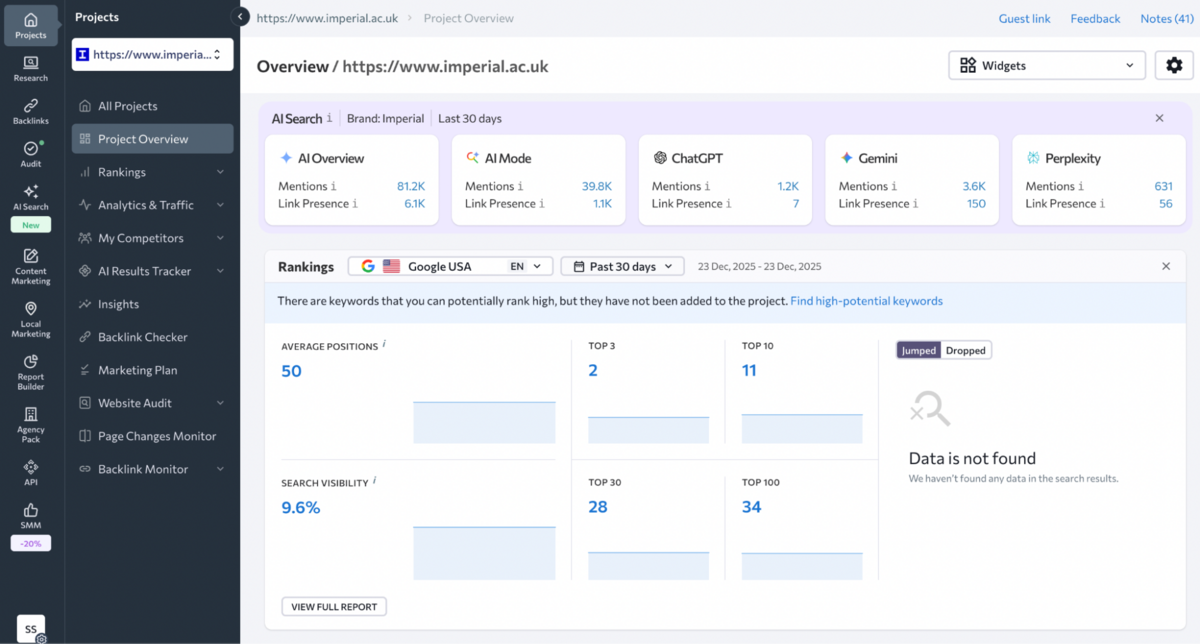
What strikes you immediately is how SE Ranking positions itself in the market.
It's not trying to compete with Ahrefs on backlink depth or Semrush on all-in-one marketing breadth. Instead, it's offering something more accessible: comprehensive SEO tooling without the enterprise complexity or price tag. Whether that trade-off works for you depends entirely on what you're actually trying to accomplish.
This review is part of our 2026 SEO tools review and comparison report, where we put the major platforms side by side. SE Ranking sits in an interesting middle ground. It's more capable than basic rank trackers, more affordable than enterprise suites, but with some noticeable gaps that become apparent once you start pushing the platform harder.
The Basics
Setting Up a Project in SE Ranking
SE Ranking starts with project creation, and the process is refreshingly straightforward compared to some of the bloated onboarding flows we've seen in competing platforms.
You'll specify your website URL (or YouTube channel if that's your focus), name the project, select your target search engine, and add the keywords you want to track. The interface assumes you know what you're doing, but doesn't punish you if you don't - you can finish setup in under two minutes or toggle advanced settings to give the system more context. The advanced settings are where SE Ranking shows some genuine flexibility.
You can define domain scope (with or without subdomains, specific directories, or exact URLs), assign access permissions for team members or clients, and enable automated weekly reports straight to your inbox.
The website audit toggle is particularly useful - flipping it on means SE Ranking automatically scans for technical issues affecting search performance without you needing to manually trigger crawls later. What's genuinely practical here is the project status switch. If you need to pause data collection for a client who's gone quiet or a site undergoing migration, you can disable the project without deleting it entirely. Most platforms force you to either keep burning through credits or lose historical data completely.
Search Engine & Location Targeting
Once you've configured the basic project parameters, the next step is defining where you want to track rankings.
The search engine step lets you monitor performance across Google (desktop and mobile), Yahoo, Bing, and YouTube. Location targeting goes down to the ZIP code level, which matters if you're running hyper-local campaigns or managing franchises across different regions.
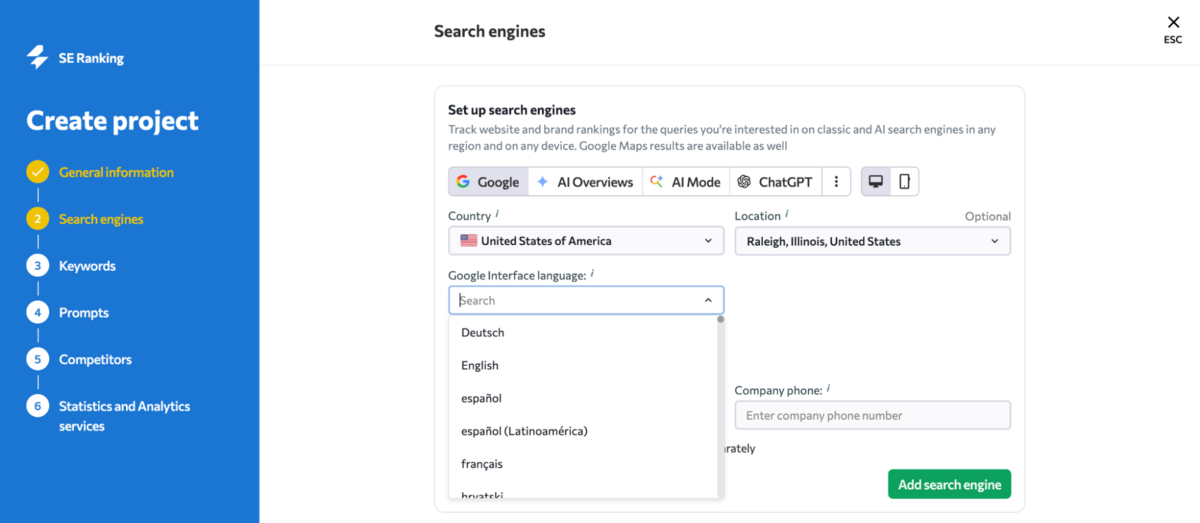
The language selection is useful for multilingual markets. If you're targeting Belgium or Switzerland, where multiple languages dominate, you can specify the exact Google interface language you want to monitor. SE Ranking also lets you track paid Google Ads positions alongside organic results, plus Google Local Pack rankings if you're working with local businesses. The caveat here is that you need to properly specify the business name and phone number for accurate Local Pack data, which adds an extra configuration step most people skip.
You can add multiple search engines and locations to a single project, though you'll want to watch your keyword limits. Each search engine-location combination counts separately, so tracking the same 50 keywords in London, Paris, and Berlin across Google Desktop and Mobile quickly multiplies your usage.
Keyword Research
Once you've got your project running and understand where competitors sit in the landscape, the next logical step is expanding your keyword strategy - and this is where SE Ranking's Keyword Research Tool comes into play.
Keyword Research Tool
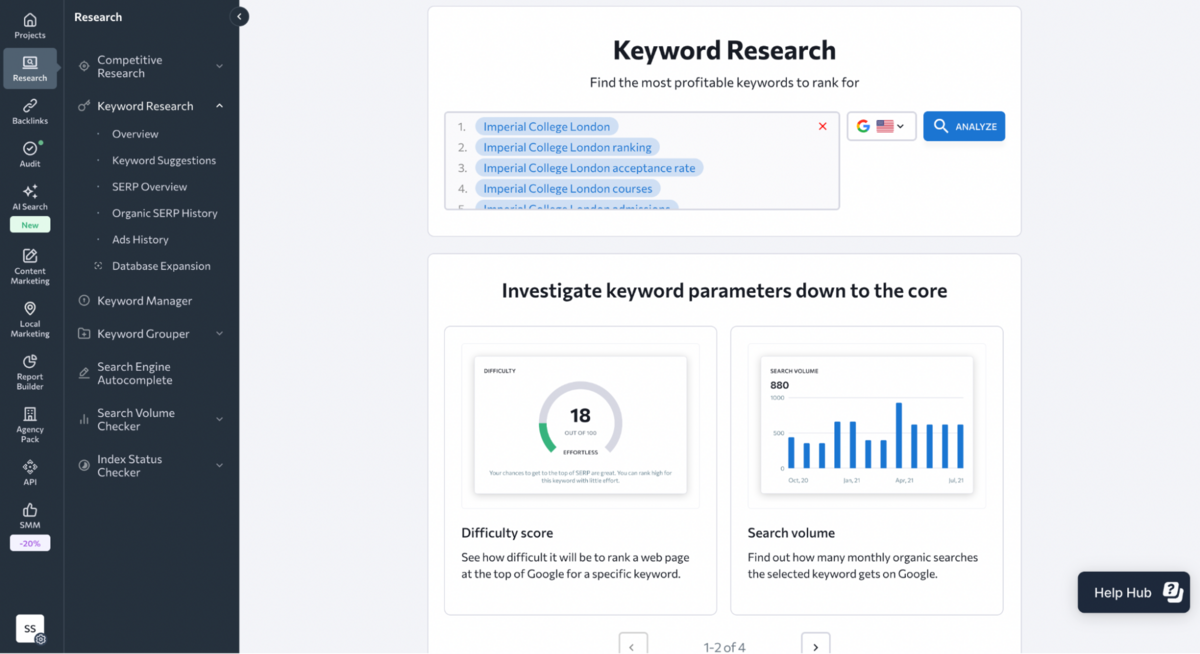
SE Ranking's Keyword Research Tool is built around a fairly standard workflow: enter a keyword, select a country, and analyse. What sets it apart from basic keyword planners is the ability to batch-process multiple keywords at once or upload an entire file for bulk analysis, which saves time if you're auditing an existing keyword list or comparing opportunities across different terms. This feature is also obviously available in the top keyword tools like Semrush & Ahrefs, but not in the lesser competitive tools.
The Overview tab gives you the metrics you'd expect: Keyword Difficulty (how hard it is to rank in the top 10), Search Volume (monthly searches in your chosen region), Cost Per Click, and Google Ads competition level. There's also a seasonal trend graph and global search volume for broader context, plus Search Intent classification that tells you whether users are looking for information, navigation, commercial research, or transactional results.
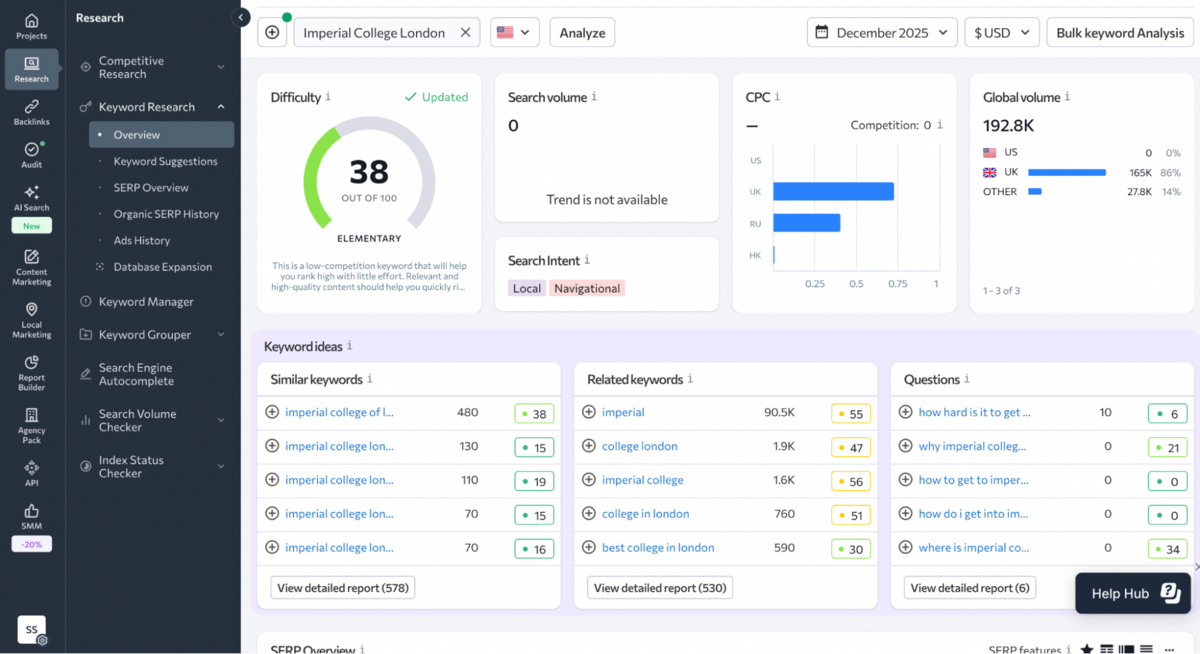
What's genuinely useful here is the historical data access going back to February 2020. If you're trying to understand whether a keyword's popularity is trending up or declining, or if seasonal spikes are predictable, this gives you the context to make smarter content decisions. That said, the interface feels functional rather than sophisticated. Ahrefs and Semrush both present similar data with more visual polish and easier-to-scan layouts.
Further down the Overview page, SE Ranking surfaces new keyword ideas and shows top-ranking websites in both organic and paid search.
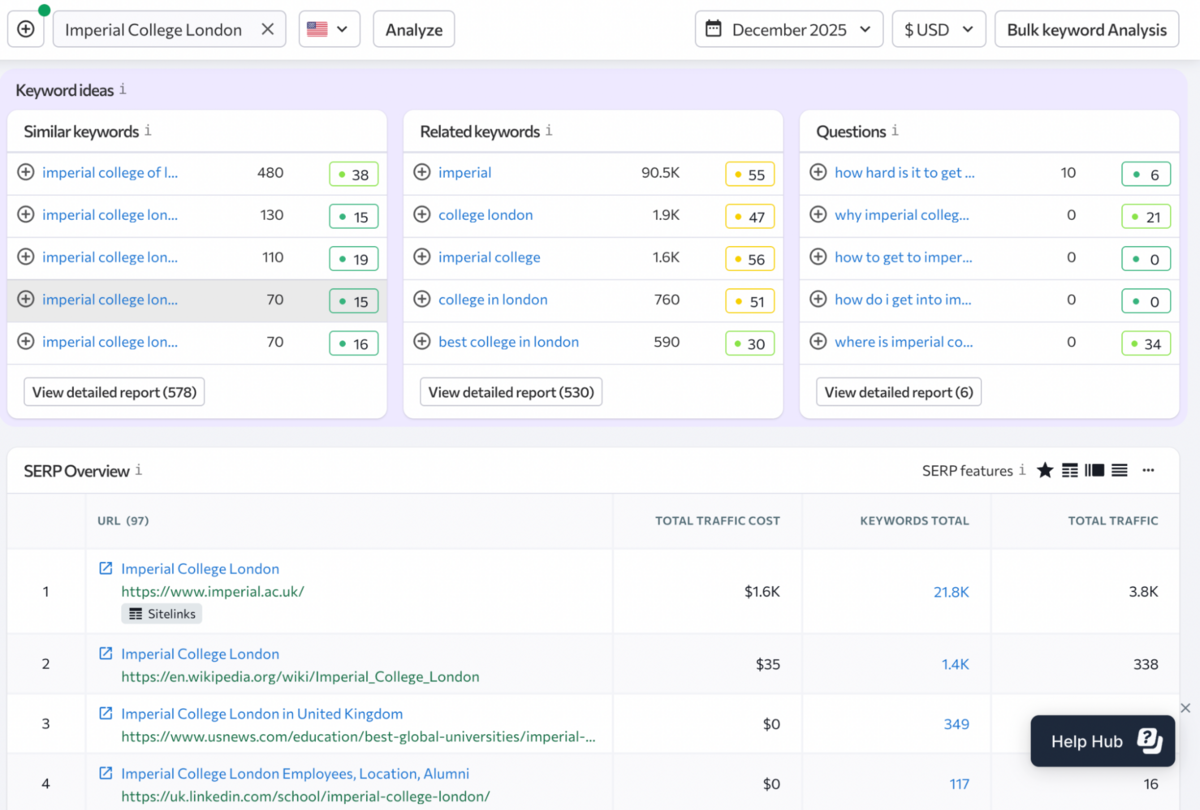
You can click through to detailed reports or navigate via the sidebar, but the workflow feels somewhat fragmented compared to how seamlessly Ahrefs integrates keyword discovery into Site Explorer.
Keyword Suggestions
The Keyword Suggestions tab is where SE Ranking attempts to help you build or expand keyword lists, and it's split into several sub-sections that vary in usefulness.
Similar Keywords shows terms close in meaning to your seed keyword, including variations and different word endings. Each keyword includes difficulty, search volume, CPC, and competition metrics, plus you can view the top 100 search results with traffic forecasts and analyse trend data. It's straightforward but not particularly innovative. Every major SEO tool offers similar keyword variations at this point.
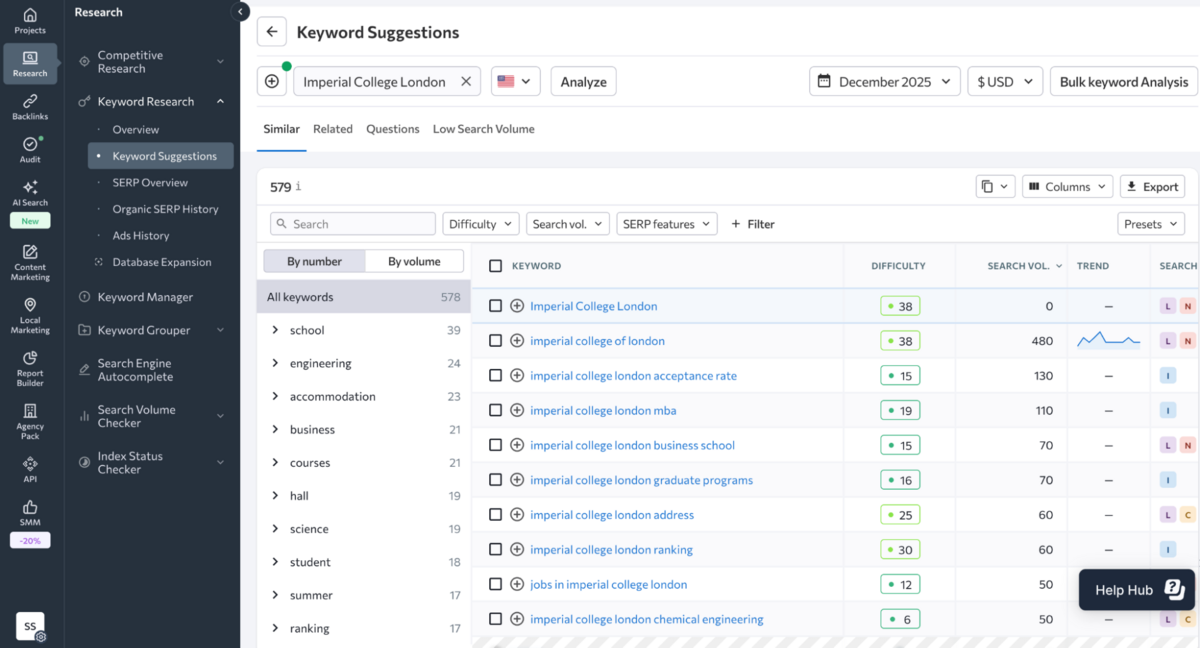
Related Keywords takes a different approach by showing alternate queries that share the same URLs in the top 100 search results. The added Relevance column helps you prioritise which terms are worth targeting, and filtering options let you narrow down by difficulty, volume, or intent. There are also tabs for Questions and Low Search Volume keywords, which can surface long-tail opportunities that higher-volume lists miss.
The filtering and grouping options here are solid, though the interface requires more manual work than Semrush's Keyword Magic Tool, which automatically clusters keywords by topic and lets you export groups with a single click. SE Ranking expects you to do more of the heavy lifting yourself.
SERP Analysis & Competitive Context
Where SE Ranking adds some genuine depth is in the Organic SERP History feature. You can view the top 100 search results for any keyword and compare month-to-month ranking changes going back to February 2020. This is particularly useful for understanding SERP volatility. If rankings shift dramatically every few weeks, you know Google hasn't settled on a clear winner yet, which changes your content strategy.
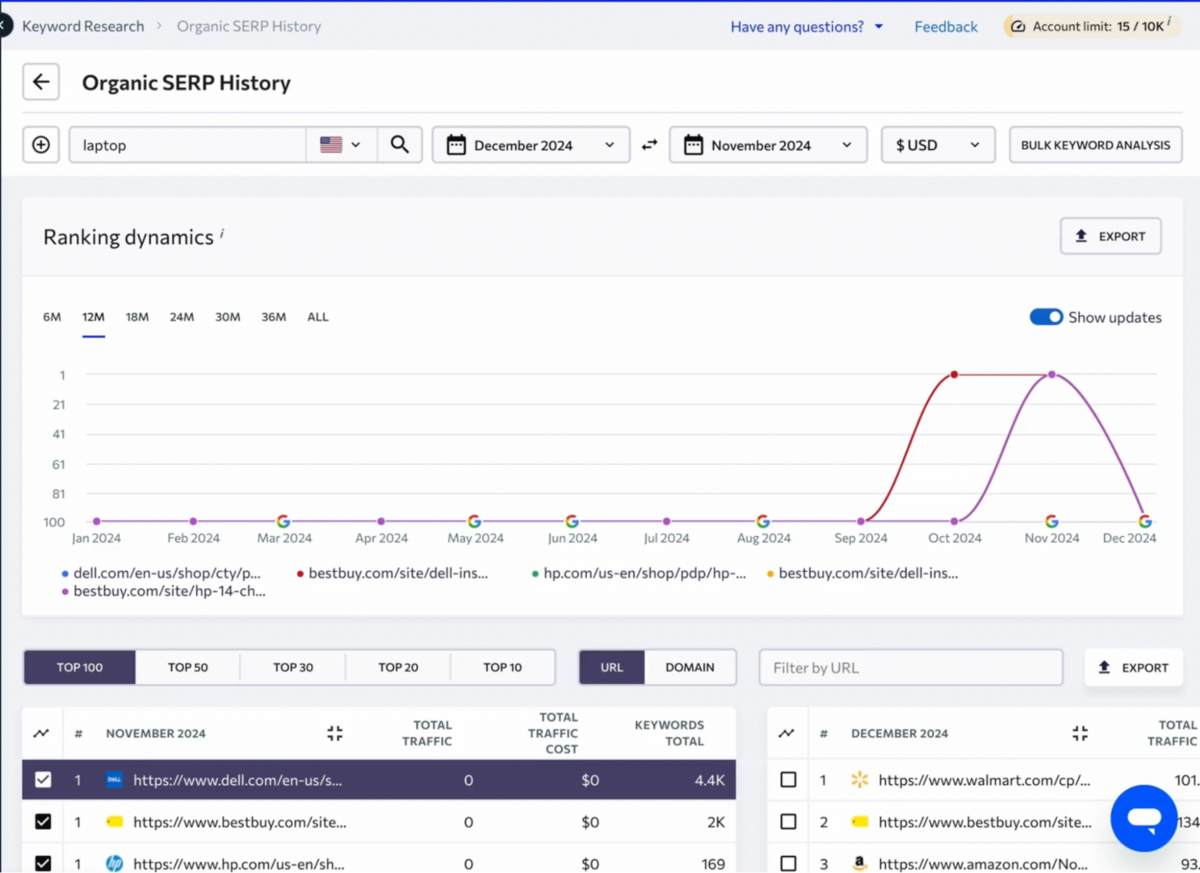
NOTE: Historical data is available only in the higher tiers of plans (the free trial will not give you access to any historical data).
Clicking on individual URLs directs you to the Competitive Research Tool (which we'll cover separately), letting you analyse keyword gaps and competitive positioning without leaving your research workflow. It's a logical integration, though the transition between tools isn't as seamless as what you'd experience in Ahrefs' Site Explorer, where everything lives in one unified interface.
The Ads History tab shows websites targeting your keyword in Google Ads campaigns, including traffic forecasts, estimated monthly costs, and ad copy previews. You can expand individual ads to see historical variations broken down by month, which is useful for understanding commercial intent and borrowing messaging angles for your own content. SpyFu arguably does this better with deeper historical ad data, but SE Ranking covers the basics competently.
Keyword Manager
Another feature worth highlighting is the Keyword Manager, which solves a practical problem most SEO tools ignore: what do you do with promising keywords you're not ready to track yet?
Instead of forcing you to either add keywords to a project (burning through your tracking limits) or lose them entirely, SE Ranking lets you save keyword lists for different regions in one place and monitor how metrics and search results change over time. You can add keywords to projects later when you're ready to track them, or use them as a foundation for new content without committing to full rank tracking.
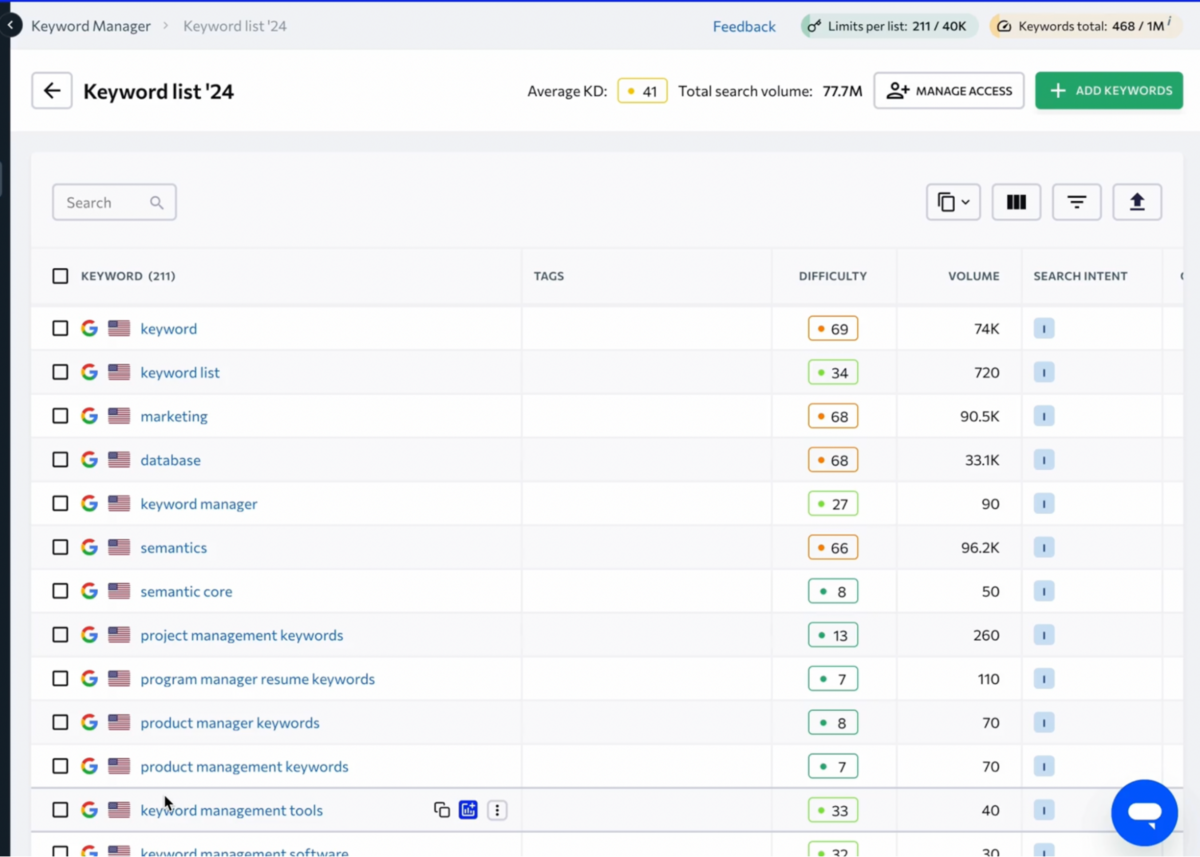
It's a small quality-of-life feature that makes keyword research feel less all-or-nothing, particularly for agencies juggling multiple clients or content teams planning out editorial calendars months in advance.
Keyword Grouper
Beyond the core research tool, SE Ranking offers a separate Keyword Grouper that attempts to organise keywords into clusters based on SERP overlap - the idea being that if two keywords share multiple URLs in their top results, Google considers them topically similar and you can target them with a single page.
The setup requires you to specify grouping accuracy (how many shared URLs are needed to cluster keywords together) and choose between soft grouping (fewer groups with more keywords) or hard grouping (more groups with tightly matched keywords).
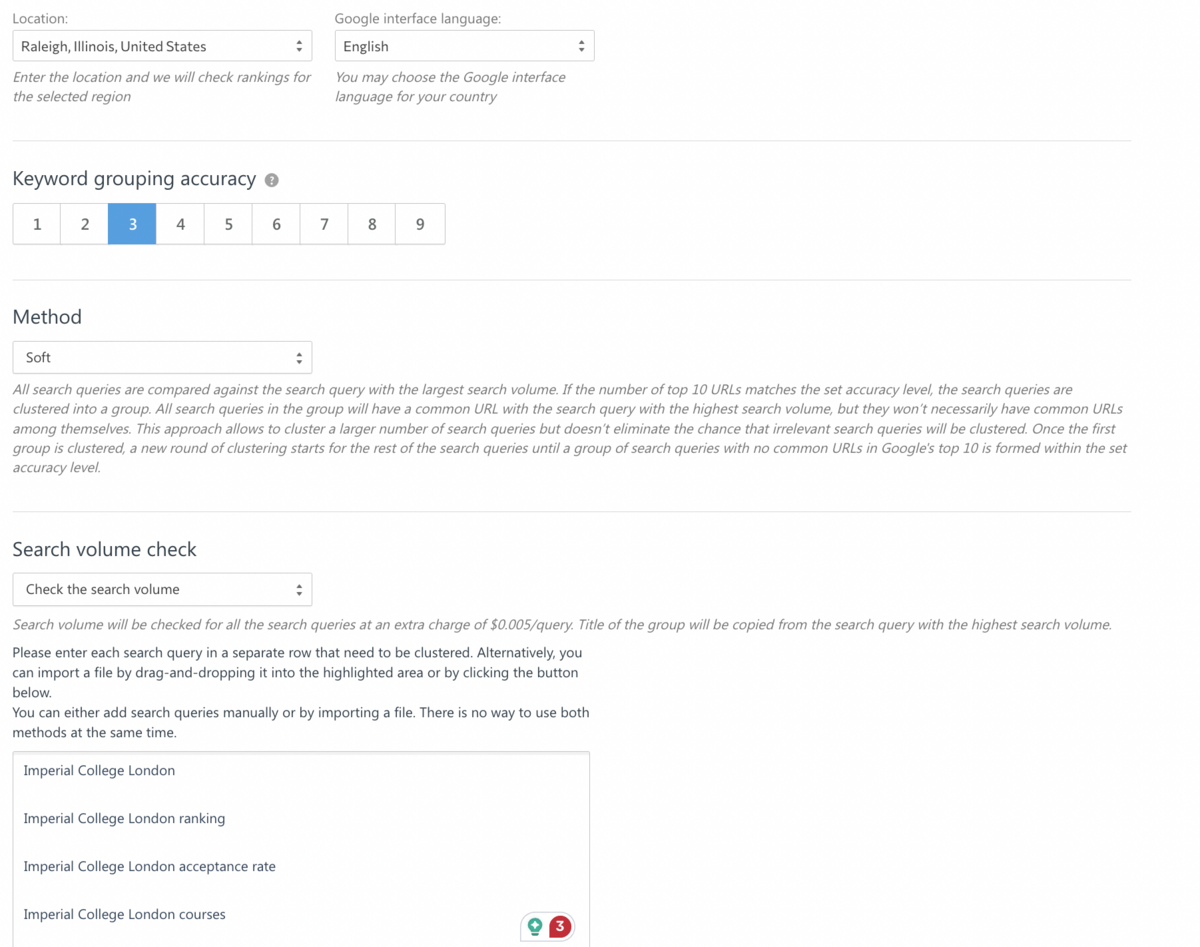
You can also enable search volume checking during the process to filter out low-value terms. Once the grouping runs, you'll see keyword clusters with their combined search volumes, shared SERP competitors, and even keywords highlighted in Google snippets. Ungrouped keywords appear at the bottom, where you can manually assign them or create new clusters.
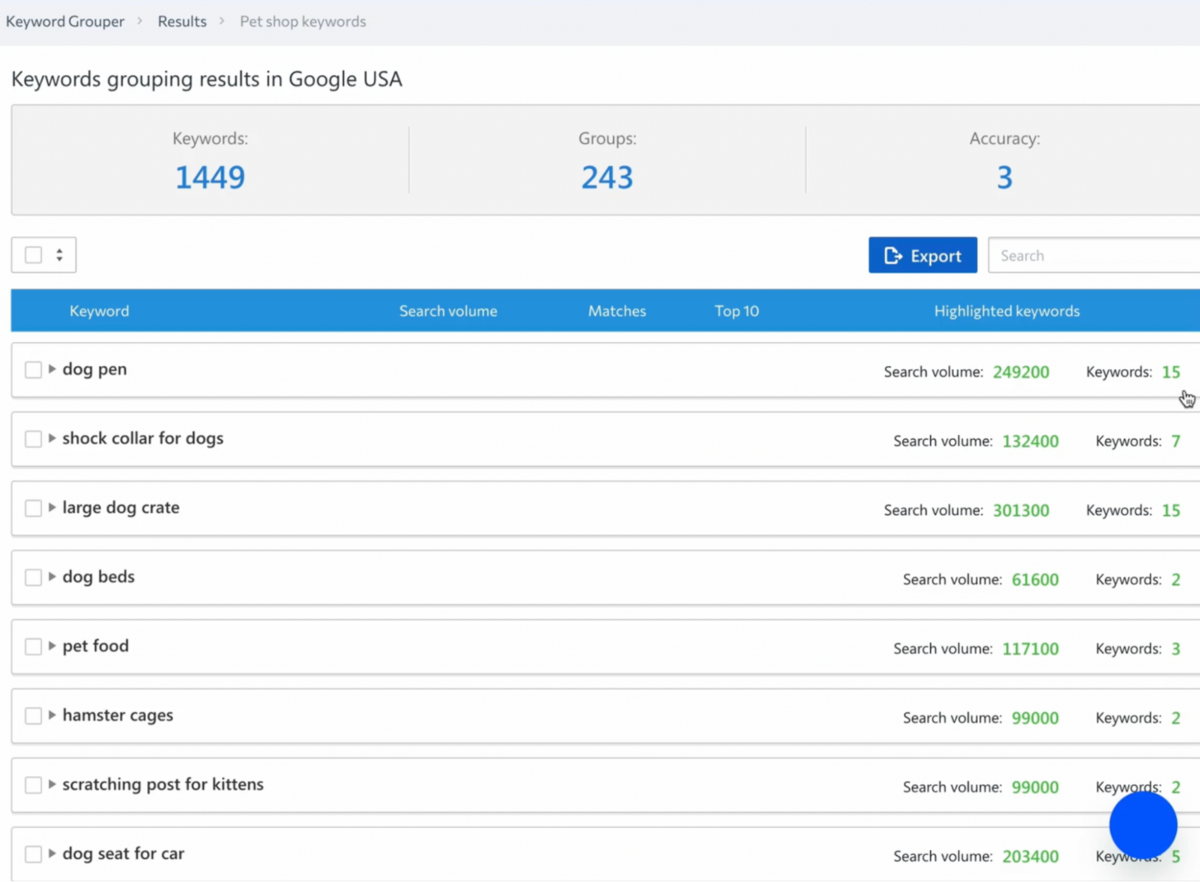
The concept is sound - keyword clustering helps you build more comprehensive content that targets multiple related queries instead of creating separate pages for every variation. The execution, however, feels clunky. Ahrefs handles this more elegantly through Parent Topic clustering in Keywords Explorer, which automatically shows you the broader term driving traffic without requiring separate tool access or manual accuracy calibration. Semrush's Keyword Strategy Builder does something similar with less configuration overhead.
NOTE: This feature is an add-on that adds a minimal charge to your billing, so please use it with caution.
SE Ranking's Keyword Grouper works, but it's another tool you need to learn separately, rather than something woven naturally into your research workflow.
For agencies managing hundreds of keywords across multiple clients, it can save time. For everyone else, it feels like an extra step that more integrated platforms have already solved. The bigger issue with SE Ranking's keyword research capabilities isn't any single feature. It's that the entire experience feels modular rather than cohesive. You're bouncing between Keyword Research, Keyword Manager, and Keyword Grouper, each with its own interface and workflow, whereas Ahrefs and Semrush unify these functions into a single, powerful exploration tool where you don't need to quit the main workflow you started.
The data is accurate, and the historical depth (back to February 2020) is genuinely valuable, but the interface lacks the intuitive visual organisation that makes keyword research actually enjoyable.
Competitive Research
With keyword research mapped out, the natural next step is understanding who you're actually competing against. SE Ranking approaches this from multiple angles, though the execution reveals the platform's core limitation: fragmentation.
Competitive Research Tool
SE Ranking's Competitive Research Tool functions as a domain-level intelligence dashboard. Enter any website, select your target region, and you'll get a bird's-eye view of performance across both organic and paid search. The overview screen shows geographic traffic distribution, Domain and Page Trust Scores (SE Ranking's authority metrics), total organic traffic volume, keyword count, traffic cost estimates, referring domains, and backlink totals.
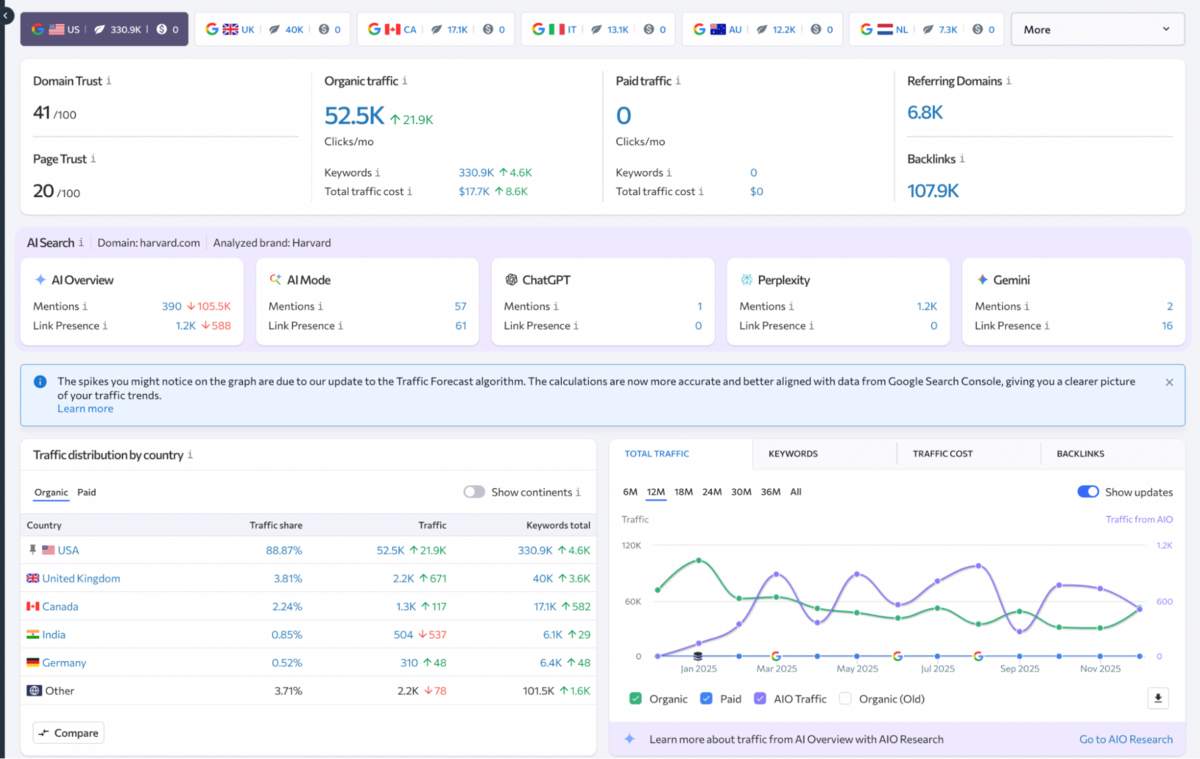
It's a solid starting point for quickly evaluating a competitor's SEO footprint or assessing a potential partnership, but the presentation feels utilitarian compared to the more visually sophisticated overviews in Ahrefs' Site Explorer or Semrush's Domain Overview.
You get the data you need. It just takes more work to interpret it.
Organic Traffic Research
The Keywords tab lists every keyword the analysed site ranks for in the top 100 organic results, complete with position data, search volumes, and SERP features.
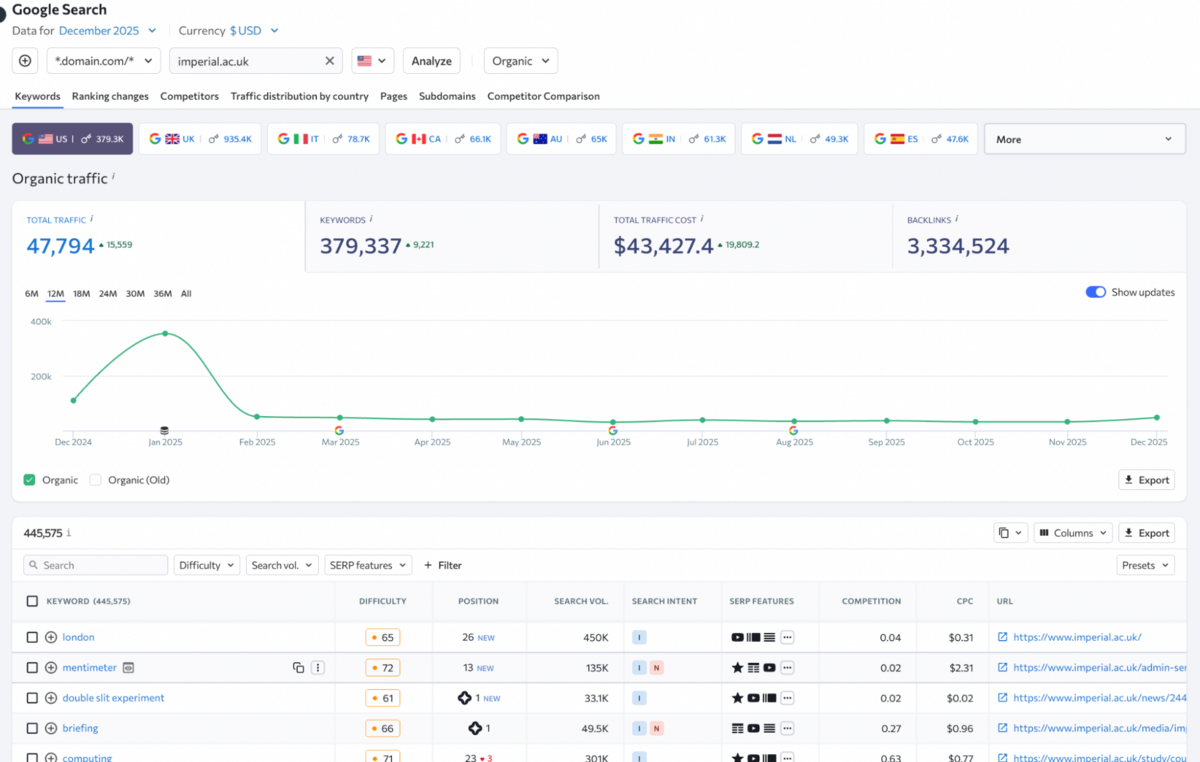
Filtering options let you narrow down by position range, search volume, or keyword difficulty, and there are useful presets for quick analysis. What's practical here is the ability to select keywords and immediately add them to your own project for tracking, save them in the Keyword Manager for later, or use them as the foundation for new content.
It's a straightforward workflow that makes competitive keyword research feel actionable rather than purely informational.
The Competitors tab identifies websites ranking for the same keywords as your analysed domain and surfaces unique keywords your competitors target that you don't. This is where SE Ranking attempts to replicate what Ahrefs does with its Content Gap tool, or Semrush does with Gap Analysis, but the execution feels more manual. You're looking at data tables rather than interactive visualisations, and there's no built-in prioritisation to help you decide which gaps are actually worth pursuing.
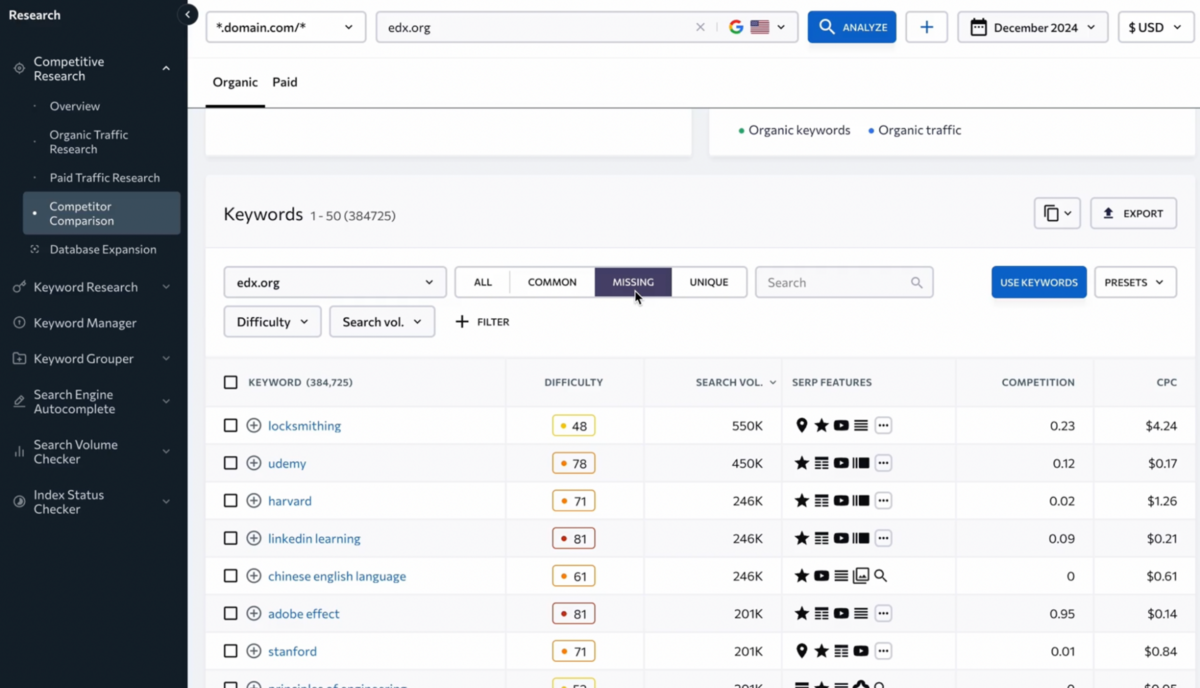
The Pages tab reveals which URLs drive the most organic traffic to the analysed site. This is valuable for reverse-engineering successful content - if a competitor's blog post is pulling thousands of monthly visits, you can analyse it separately using the On-Page SEO Checker (accessed by hovering over the URL) to understand what makes it work. It's a clever integration that reduces friction between competitive research and content optimisation.
Subdomains show traffic distribution across different subdomains, including their individual keyword counts and traffic costs. Useful if you're analysing large sites with separate subdomain strategies (blog.example.com vs. shop.example.com), but not particularly relevant for most small-to-midsize businesses.
The Ranking Changes tab tracks position movements over the past month, letting you spot whether a competitor is gaining or losing ground on keywords that matter to you. It's functional but limited compared to Ahrefs' Historical Data views, which let you analyse ranking shifts across any custom timeframe.
Traffic Distribution by Country visualises geographic traffic sources on a map and lets you compare up to five regions side-by-side. If you're managing international SEO or trying to understand where a competitor is strongest, this adds useful context - though again, the interface feels more basic than what you'd find in enterprise-grade platforms.
Multiple Ways to Identify Competitors
SE Ranking offers several entry points for competitor discovery, though they're spread across different tools rather than unified in one place.
Beyond the Competitive Research Tool itself, you can identify rivals through the Keyword Research Tool by entering a keyword and seeing which sites rank in the top 100 results. The SERP Competitors feature (accessed through your project dashboard) tracks keyword dynamics over time and helps you spot both established leaders and sudden risers in specific SERPs.
The Share of Voice metric measures your website's visibility compared to competitors across your tracked keywords, aggregating both organic and paid presence.
The Visibility Rating (found under My Competitors) shows how your site stacks up against rivals, specifically for your target keywords. The higher the visibility, the more likely a site is to attract traffic and conversions, which makes this a practical metric for prioritising which competitors to monitor most closely.
Where Competitive Research Falls Short
The fundamental issue with SE Ranking's competitive research capabilities is fragmentation.
Competitor discovery happens in the Keyword Research Tool, competitor tracking lives in My Competitors, competitive analysis happens in the Competitive Research Tool, and SERP-level competition appears in SERP Competitors. Each tool works fine in isolation, but together they create a disjointed workflow that requires constant context-switching.
Ahrefs, by contrast, unifies competitive intelligence directly into Site Explorer - you can see organic competitors, content gaps, and backlink intersections without leaving a single interface. Semrush does something similar with its Domain Overview and Competitive Positioning Map, which automatically surfaces your closest rivals and visualises market positioning.
The other limitation is depth.
While SE Ranking shows you which keywords competitors rank for and which ads they're running, it doesn't offer the same level of strategic insight you'd get from Ahrefs' Content Gap analysis or Semrush's Keyword Gap tool, both of which help you prioritise opportunities based on difficulty, search volume, and competitive intensity.
Website Audit
If you're the kind of person who gets excited about crawl budgets and canonical tags, this section is for you.
After understanding your competitive landscape and keyword opportunities, the next critical piece is making sure your site is actually crawlable and technically sound - and this is where SE Ranking's Website Audit tool comes into focus.
Overview & Health Scoring
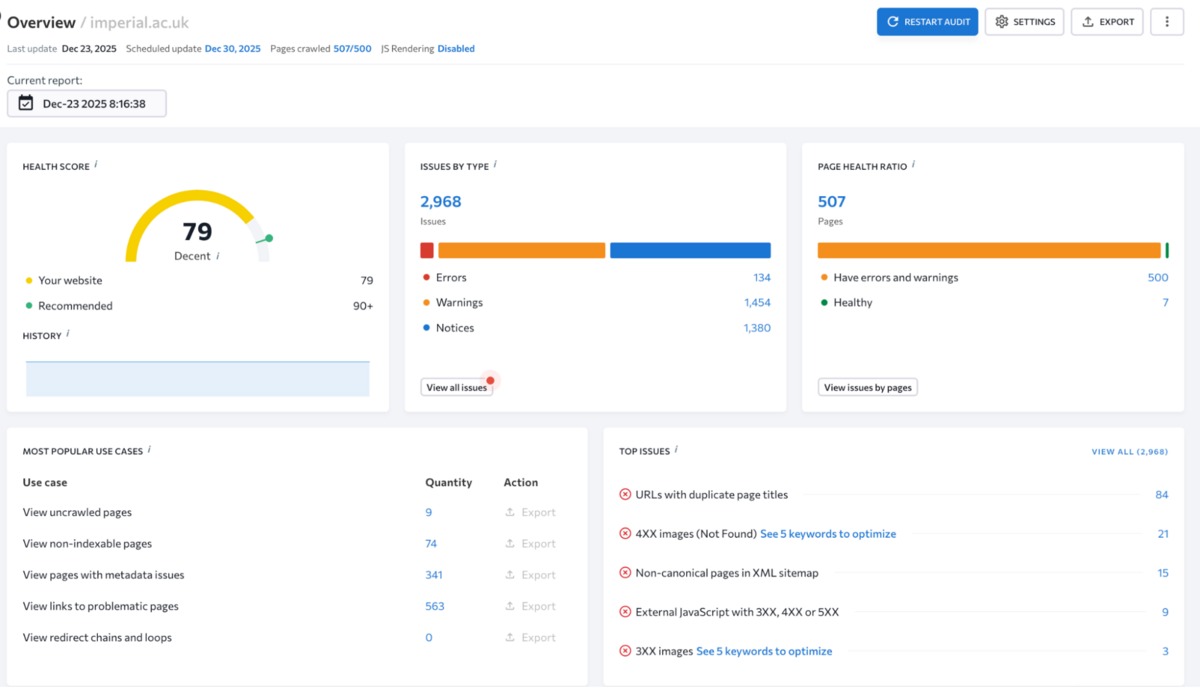
SE Ranking's Website Audit analyses over 110 technical parameters and presents them through a Health Score - a single percentage that reflects overall technical SEO health based on issue severity, significance, and the number of affected pages.
It's a straightforward way to benchmark progress and communicate site health to non-technical stakeholders, though the scoring methodology feels less transparent than Ahrefs' approach, which lets you customise which issues impact the score. The audit can run on projects you've already created or as a standalone report for any domain, which is useful for prospecting new clients or quickly evaluating competitor technical setups.
Key Widgets & Metrics
The Overview tab uses a widget-based layout that surfaces critical issues without requiring you to dig through tables.
Issues by Type breaks down problems into errors, warnings, and notices, with clickable numbers that drill into specific details. Page Health Ratio shows the split between healthy pages and pages with issues, letting you quickly gauge how widespread problems are.
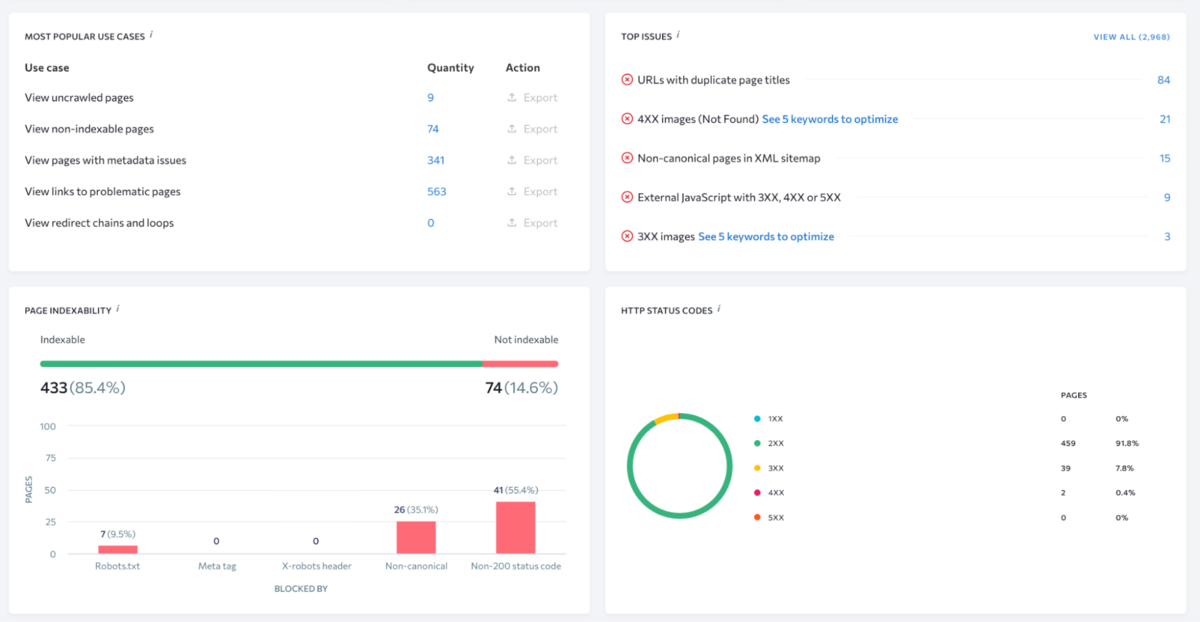
The Most Popular Use Cases widget provides one-click access to pre-filtered views of common issues like uncrawled pages or broken links, which saves time if you're auditing multiple sites with similar patterns.
Top Issues highlights the most critical problems based on significance and quantity, though the prioritisation logic isn't as granular as Ahrefs' issue classification, which factors in potential traffic impact alongside technical severity.
Page Indexability helps identify SEO bottlenecks related to indexing, while HTTP Status Codes breaks down response codes across all pages so you can spot 404s, 301s, and server errors that might be hurting rankings.
Distribution by Category organises issues into buckets like content, meta tags, images, and links, showing how many pages have problems in each area. Green bars indicate categories where all pages pass checks. It's a clean way to prioritise which technical areas need attention first.
Core Web Vitals & Technical Depth
Moving beyond basic issue detection, SE Ranking attempts to address performance and authority signals that impact how search engines evaluate your site.
The Core Web Vitals widget pulls performance data for both desktop and mobile, showing page load times, interactivity (First Input Delay), and visual stability (Cumulative Layout Shift). This is table stakes now that Google uses Core Web Vitals as a ranking factor, though SE Ranking doesn't integrate Lighthouse audits directly like Ahrefs does.
Domain Metrics shows domain expiration date and trust score (SE Ranking's proprietary authority metric), while Page Depth reveals how many clicks it takes to reach pages from the homepage. Deep page depth is a red flag for crawlability and internal linking structure, and SE Ranking surfaces this clearly alongside server response time, redirect counts, and orphan pages excluded from internal link structures.
At the bottom of the Overview, two graphs visualise link distribution by attribute (dofollow, nofollow, UGC, sponsored) and how pages are affected by directives like noindex or robots.txt rules. It's useful context for understanding whether your link equity is flowing properly and whether pages are inadvertently blocked from indexing.
Issue Reports & Remediation
Once you've absorbed the high-level overview, the real work begins in the Issue Reports section - and this is where SE Ranking shows some genuine practicality.
The Issue Reports section provides a detailed breakdown of what's actually broken.
Issues are organised into categories with quick filters for current issues, fixed issues, new issues (identified in the most recent audit), all tracked issues, and turned-off issues that you've chosen to ignore. You can view all issues together or filter by errors, warnings, and notices separately. Each issue includes a description of what's wrong and, more importantly, how to fix it - something that genuinely sets SE Ranking apart from bare-bones technical audit tools.
The menu next to each issue lets you export findings to XLS or CSV, ignore an issue until the next crawl, or permanently disable it if it's irrelevant to your site.
You can also download the full audit report, email it to clients or colleagues, or share access via a guest link without giving them full platform access. One genuinely useful feature here is the ability to generate an XML sitemap directly from the audit tool. You specify which pages to include, configure parameters, and SE Ranking creates the sitemap for you - a small quality-of-life feature that saves time when you're cleaning up site architecture.
Crawled Pages & Resource Analysis
With issues identified and prioritised, SE Ranking lets you drill down into page-level and resource-level details that help you understand exactly what needs fixing and where.
Crawled Pages lists every found page with a breakdown of detected issues.
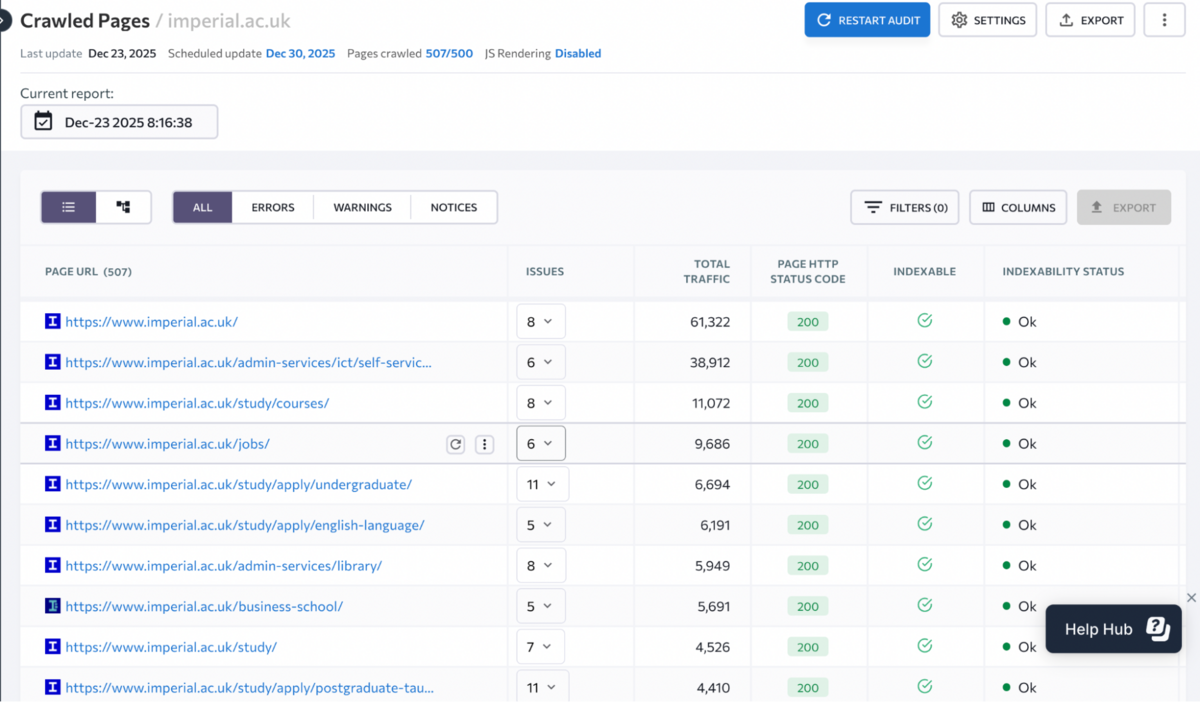
You can click on issue counts to see the full list of problems for each page and filter them by traffic, keyword rankings, or referring pages.
If you're managing a multilingual site or want to analyse specific sections separately, you can view results by directories instead of individual pages. This gives you a structural view of subdomains, categories, and language versions - useful for understanding how different parts of a large site perform technically.
Crawl Comparison & Configuration
The Crawl Comparison section lets you compare multiple audit reports side-by-side to track progress over time.
This is genuinely valuable for demonstrating ROI to clients or understanding whether optimisation efforts are moving the needle, though the interface could be more visual - you're comparing data tables rather than interactive before-and-after dashboards.
Where SE Ranking shows genuine flexibility is in crawl settings, which offer a level of configurability that rivals Ahrefs and surpasses most mid-tier tools.
You can automate audits on weekly or monthly schedules, specify which pages to scan (all pages, all pages with subdomains, specific XML sitemaps, or custom URL lists), and define whether the crawler should respect noindex, nofollow, and robots.txt directives. You can also add rules to include or exclude specific directories, ignore URL parameters to avoid crawling duplicate pages, and exclude external domains that block your bot.
If your site requires authentication, SE Ranking lets you specify a user agent, enable JavaScript rendering, and provide login credentials - the same kind of advanced crawl control that Ahrefs offers, but most competing tools reserve for enterprise plans.
Limits and Restrictions let you set maximum pages crawled, scanning depth, and request rate to the server.
Report Setup allows you to customise parameters like acceptable title length (default is 20-65 characters) so the audit doesn't flag issues that aren't actually problems for your specific site. Finally, Monitored Issues lets you disable irrelevant checks that won't affect your health score.
On-Page Optimisation & Content Creation
Once you've identified technical issues and mapped out keyword opportunities, the obvious next question is: how do you actually optimise individual pages to rank? SE Ranking tackles this through two separate tools - the On-Page SEO Checker for existing content and the SERP Analyser for building new pages from scratch.
On-Page SEO Checker
The On-Page SEO Checker analyses your existing pages against competitors to answer why you're not ranking. You enter a URL, target keyword (plus up to 30 secondary keywords), and get back a quality score based on approximately 80 parameters with specific SEO tasks to improve rankings.
The Competitor Comparison module is where this tool shows genuine utility. You can compare competing pages across Terms (which keywords they use and where), On-Page Metrics (title length, Core Web Vitals, link counts), and Content (title tags, meta descriptions, heading structures). It helps you identify gaps in your own keyword targeting and technical optimisation.
There is an SEO Tasks section that converts your analysis into an actionable to-do list, which you can prioritise, export, or share via a guest link. It's functional and covers the basics, although Ahrefs' Page Inspector offers more visual clarity, and Semrush's On-Page SEO Checker provides more granular recommendations with better prioritisation logic.
SERP Analyser
Where the On-Page SEO Checker diagnoses existing pages, the SERP Analyser helps you build new content based on what's actually ranking.
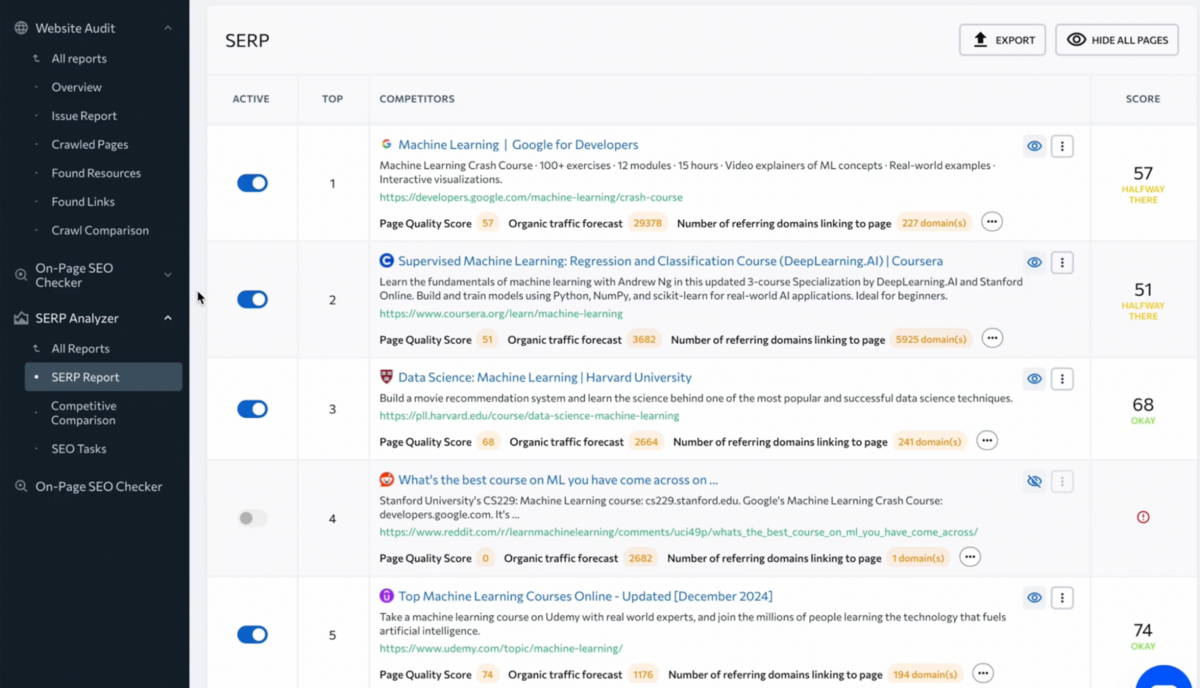
You specify how many top results to analyse (top 10 or top 20), enter up to 5 primary keywords and 30 secondary ones, and SE Ranking crawls those pages to generate insights. The SERP Report shows metrics like title and description length, backlink counts, domain age, and page quality scores across all analysed pages. You can compare patterns (like whether every top-ranking page uses 50-60 character titles and H2 subheadings every 300 words) to identify what works.
Backlink Analysis
SE Ranking's Backlink Checker provides domain-level backlink analysis with the standard metrics you'd expect: Domain Trust and Page Trust scores (SE Ranking's proprietary authority metrics), unique referring domains, total backlinks, anchor text counts, and breakdowns of toxic and broken backlinks.
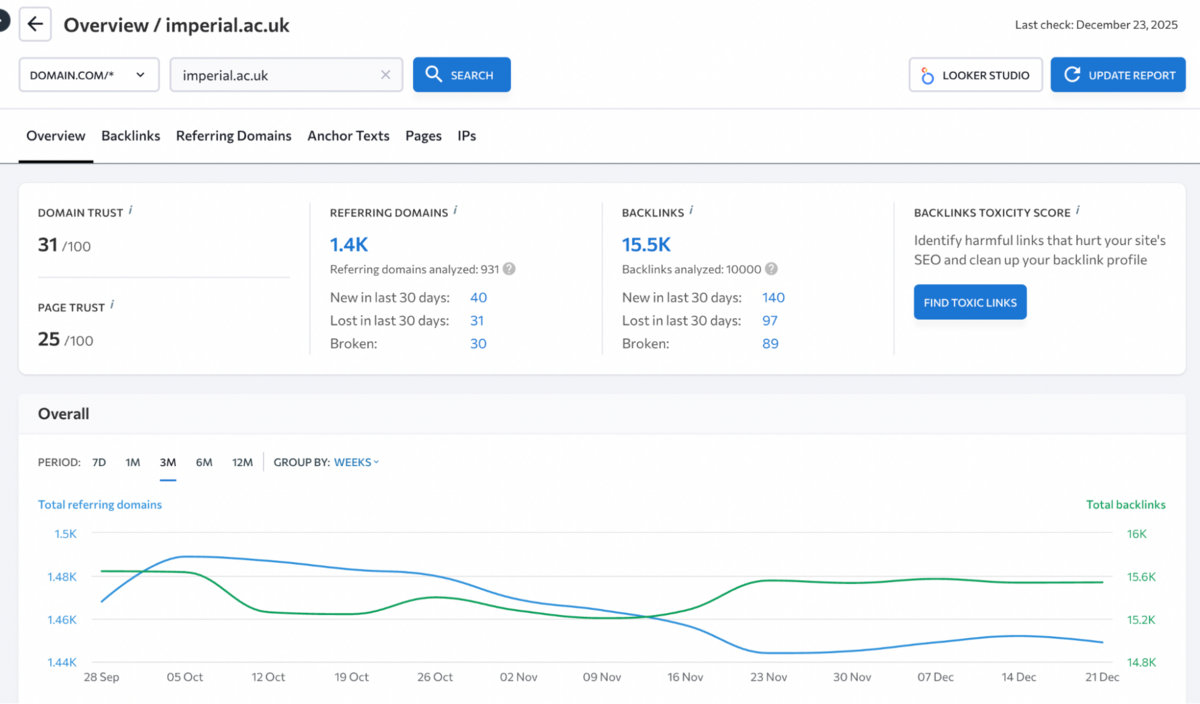
Historical graphs show referring domain and backlink trends over time, organic traffic changes, trust score evolution, anchor text distribution, and geographic distribution of backlinks. It's functional but feels decidedly basic compared to Ahrefs' Backlink Profile or Semrush's Backlink Analytics.
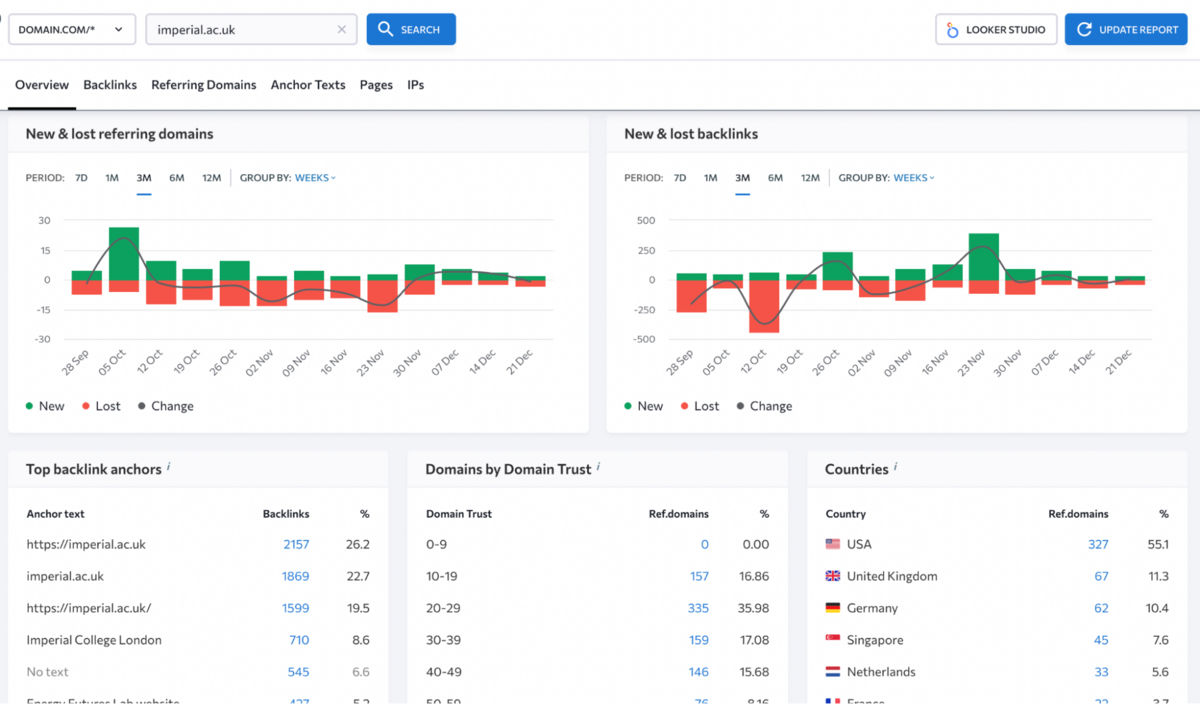
The data is there, but the presentation lacks visual sophistication and analytical depth.
Referring Domains & Backlinks
The Referring Domains and Backlinks sections let you filter by domain, metrics, and date range, with separate tabs for new and lost links.
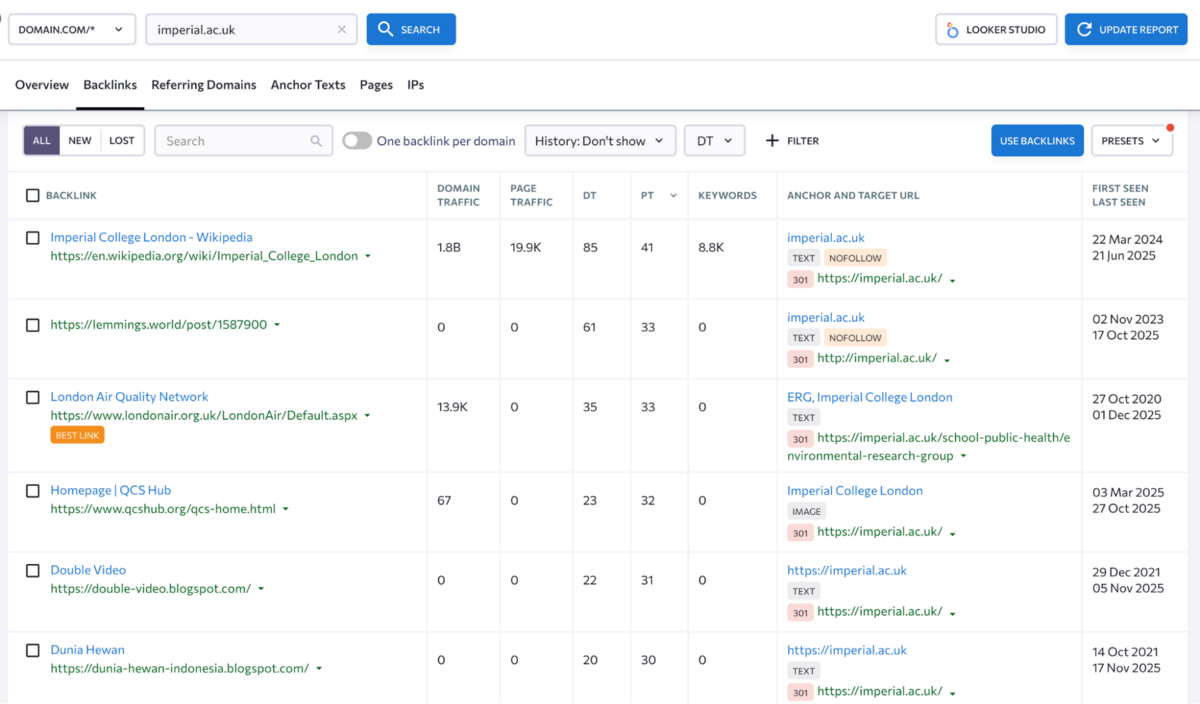
You can monitor growth and decline over time and export data to CSV or XLS. What's notably missing is any workflow integration for link building. You can identify backlink opportunities, but there's no way to add prospects to an outreach list, track contact attempts, or manage campaigns within the platform. Semrush offers dedicated link-building workflows with email integration and campaign tracking, something SE Ranking simply doesn't attempt.
Anchor Texts, Pages & IP Analysis
The Anchor Texts section shows anchor text distribution across found backlinks (this is available in every backlink tool).
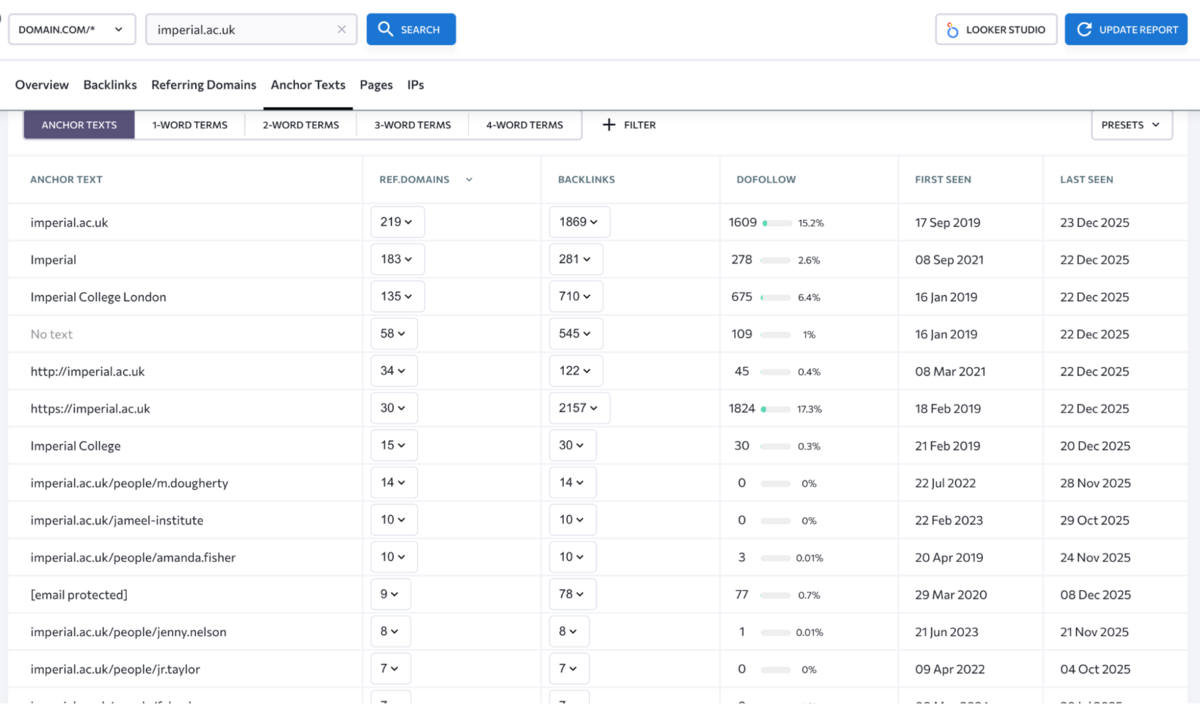
You can filter by word count and explore patterns in how sites are linking to you, which is useful for identifying over-optimisation or ensuring anchor text diversity. It's straightforward but not particularly insightful - you're looking at data tables rather than visualisations that help you understand anchor text strategy at a glance.
The Pages section reveals which URLs on your site are attracting the most backlinks, helping you understand what content naturally earns links and which pages might need promotion. The IP section provides geographic data on linking sites, showing total IP addresses, subnets, and individual IPs.
It's useful for spotting link networks or understanding whether your backlink profile is geographically diverse, though the practical value here is limited unless you're actively trying to identify suspicious link patterns.
Backlink Monitor
Beyond basic analysis, SE Ranking offers a separate Backlink Monitor tool that tracks individual backlink status over time. It tells you whether links are still live, have turned nofollow, or have been marked noindex. You can leave notes on backlinks (tracking prices paid, responsible managers, outreach details) and upload backlink lists from other platforms for consolidation.
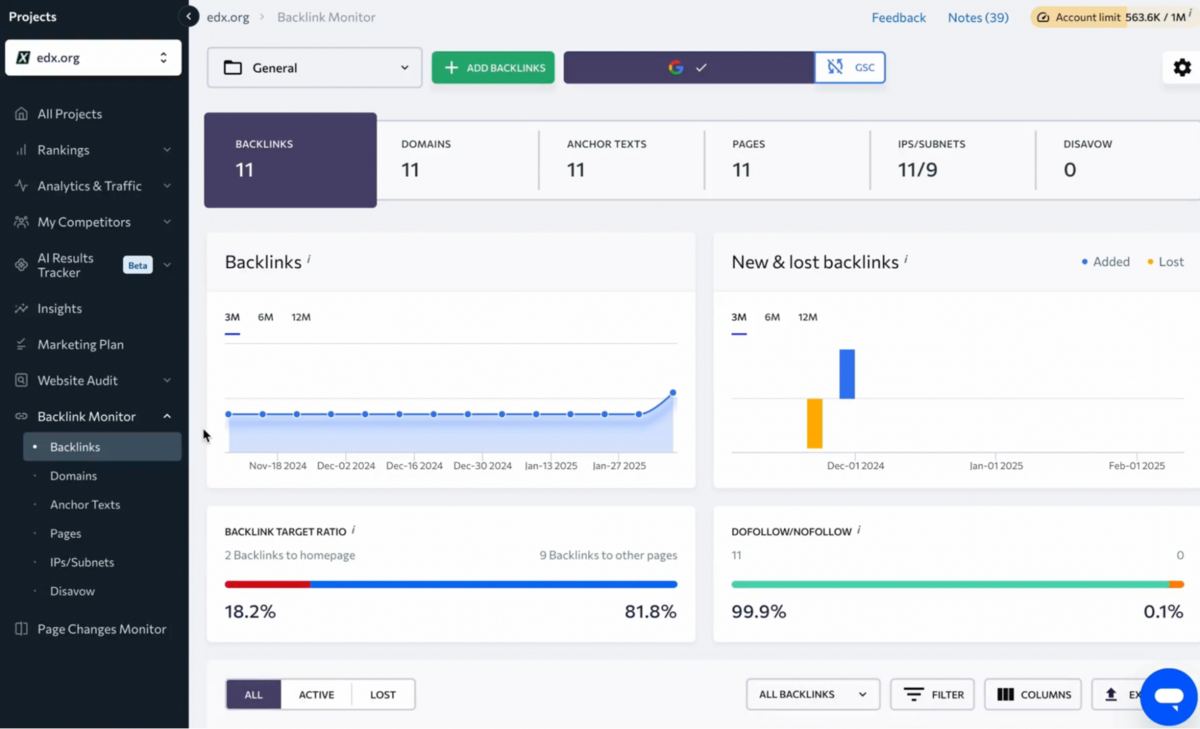
The main value here is monitoring hard-earned backlinks to ensure they don't disappear or lose their SEO value. If you've paid for a guest post or secured a difficult editorial link, knowing when it gets removed or nofollowed gives you the chance to reach out and fix the issue before it impacts rankings.
Backlink Gap Analyser
The Backlink Gap Analyser shows which sites link to your competitors (up to five) but not to you.
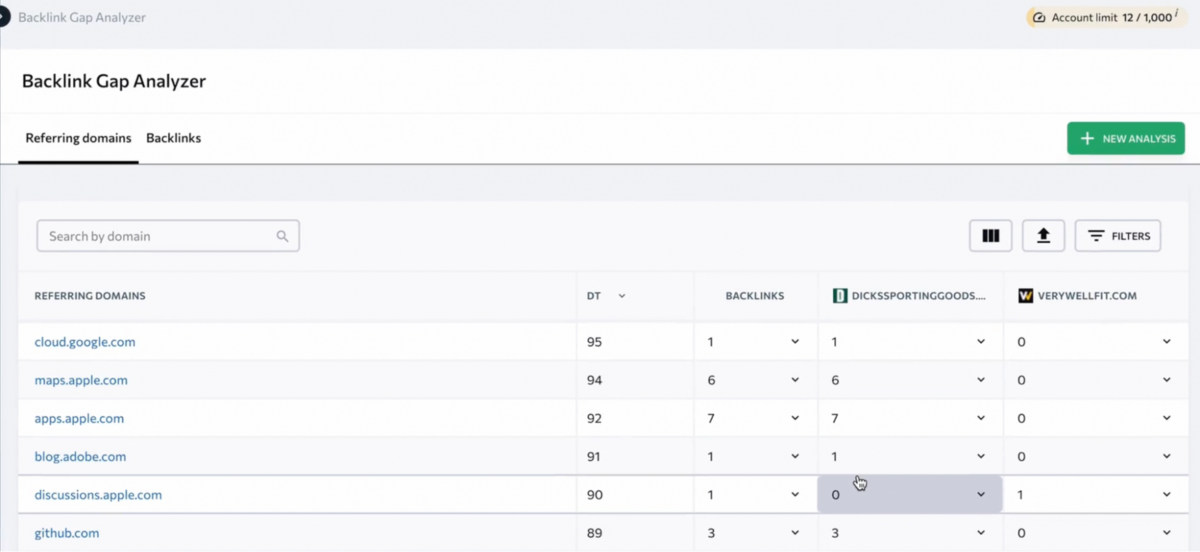
The results table displays referring domains, domain trust scores, and backlink counts for all analysed sites. You can filter to view all backlinks or isolate only those missing for your website, with an All Competitors filter that highlights backlinks multiple competitors share. It works as advertised, showing you exactly where link opportunities exist across competitor profiles. The problem is you're left doing all the heavy lifting yourself without any real workflow built into the tool.
SE Ranking's backlink tools cover the essentials but lack the depth and workflow integration that make backlink analysis truly powerful. The Backlink Checker provides accurate data on referring domains, anchor texts, and link status, but the interface feels dated, and analytical insights are limited. The bigger issue is that SE Ranking treats backlink analysis as purely informational rather than actionable. There's no built-in outreach workflow, no way to score opportunities based on relevance and difficulty, and no integration with content creation tools.
The Backlink Monitor is useful for tracking link status over time, and the Backlink Gap Analyser does what it promises, but both feel like they're checking boxes rather than innovating. For small businesses doing occasional backlink audits, SE Ranking's capabilities are adequate. For agencies running active link-building campaigns, the lack of workflow tools becomes a real limitation. Ahrefs remains the gold standard for backlink analysis with its massive index and sophisticated filtering. Semrush offers better workflow integration. SE Ranking sits somewhere in the middle, more capable than basic checkers but not competitive with top-tier platforms if backlink intelligence is central to your work.
Reporting & Data Visualisation
Once you've gathered SEO data across keyword tracking, audits, backlinks, and competitive analysis, the next challenge is communicating it. SE Ranking approaches reporting from multiple angles with varying degrees of sophistication.
Report Builder
SE Ranking's Report Builder is designed primarily for agencies and in-house professionals who need to demonstrate SEO progress to clients or stakeholders.
You can either build reports from scratch or use pre-designed templates for consistency across multiple clients. The tool lets you include data from keyword rankings, website audits, backlink analysis, competitor analysis, and historical SEO trends to show long-term strategy impact. You can add your agency's logo, customise colour schemes to match client branding, and use graphs, charts, and tables to make data more accessible.
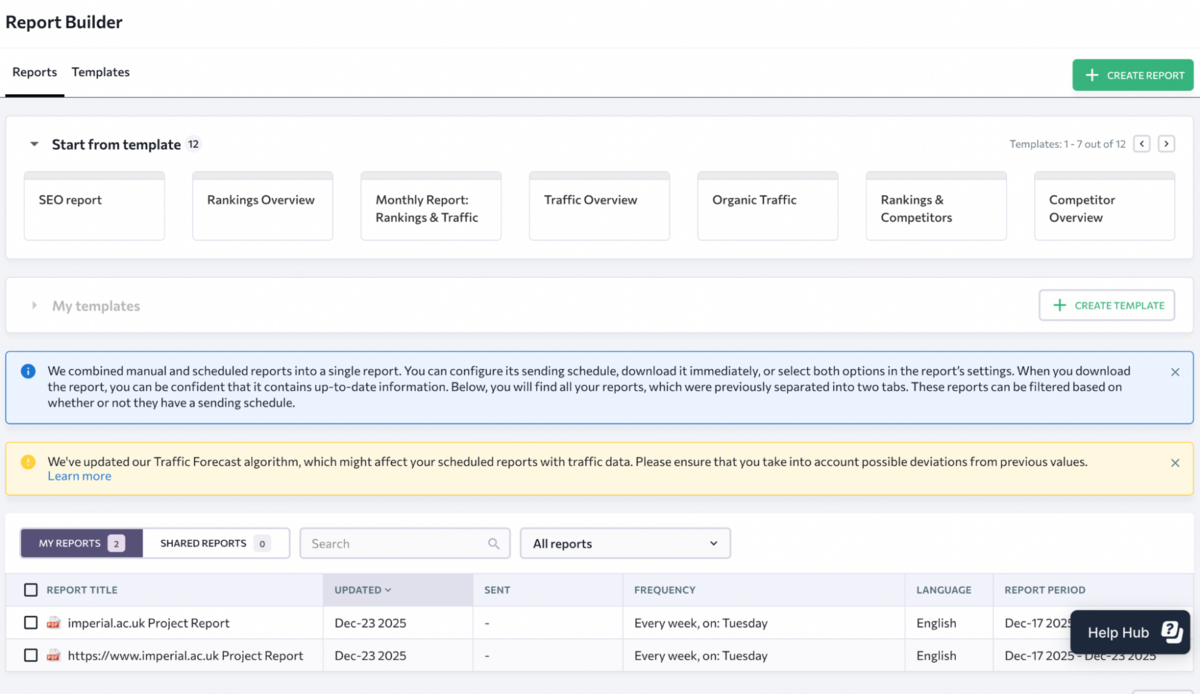
What's genuinely useful here is the text block feature, which lets you add commentary, analysis, and recommendations alongside the raw data.
This is where you explain what the numbers actually mean and what clients should do next - something that transforms a data dump into an actual strategic report. There's also an AI Summary feature that generates brief outlines of entire reports or individual sections, which saves time if you're producing dozens of reports monthly. Report delivery can be automated on weekly or monthly schedules, ensuring clients get consistent updates without manual intervention.
You can also create one-off reports for specific situations and send them directly.
With the Agency Pack add-on, you get unlimited white-labelled reports, which is valuable for agencies that need to maintain brand consistency across client deliverables.
Looker Studio Integration
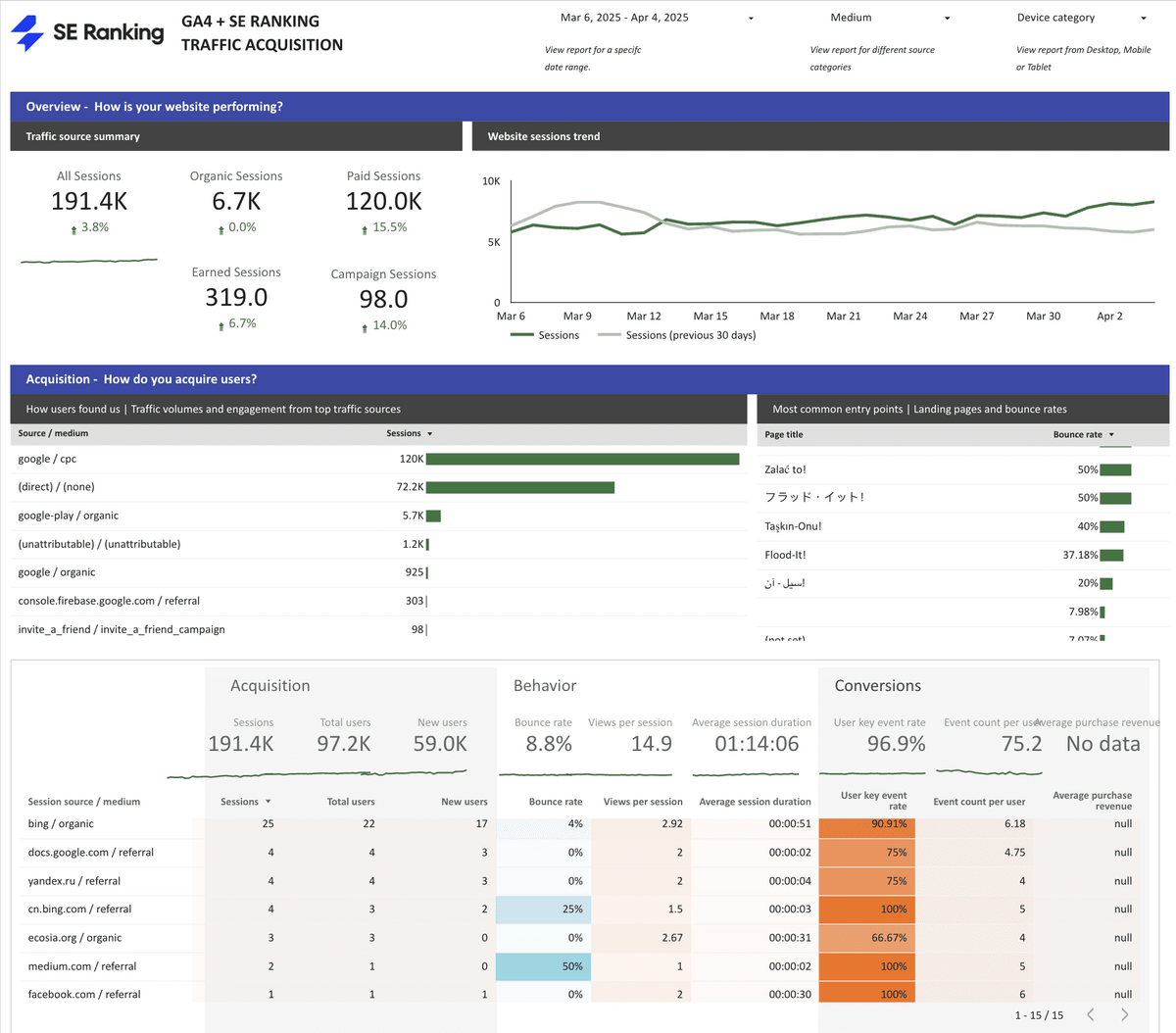
Beyond the native Report Builder, SE Ranking offers a Looker Studio Connector that pulls data directly from the platform into Google's Looker Studio (formerly Data Studio) for more advanced visualisation and custom dashboards.
This is genuinely powerful because it lets you combine SE Ranking's SEO data with Google Analytics, Google Search Console, and other data sources to create a holistic view of digital marketing performance. For instance, you can analyse traffic changes alongside keyword rankings and website audit issues to pinpoint exactly how SEO activities impact engagement and conversions.
SE Ranking provides pre-built custom dashboard templates for rankings, website audits, competitors, and backlinks, which means you don't have to start from scratch. These templates integrate GA4 data, competitor analysis, and backlink reports, making it straightforward to create comprehensive client dashboards without extensive Looker Studio expertise.
Pricing
SE Ranking's pricing structure sits comfortably below enterprise-tier platforms while offering more capability than basic rank trackers, though the actual cost can climb quickly once you factor in add-ons.
The platform offers three main tiers: Essential at $52/month (annually $624, saving $156), Pro at $95.20/month (annually $1,142.40, saving $285.60), and Business at $207.20/month (annually $2,486.40, saving $621.60). There's also a Solo plan at $65 for three months designed for freelancers and startups, offering 1 manager seat, 2 websites, and 150 keywords - a low-commitment entry point for testing the platform.
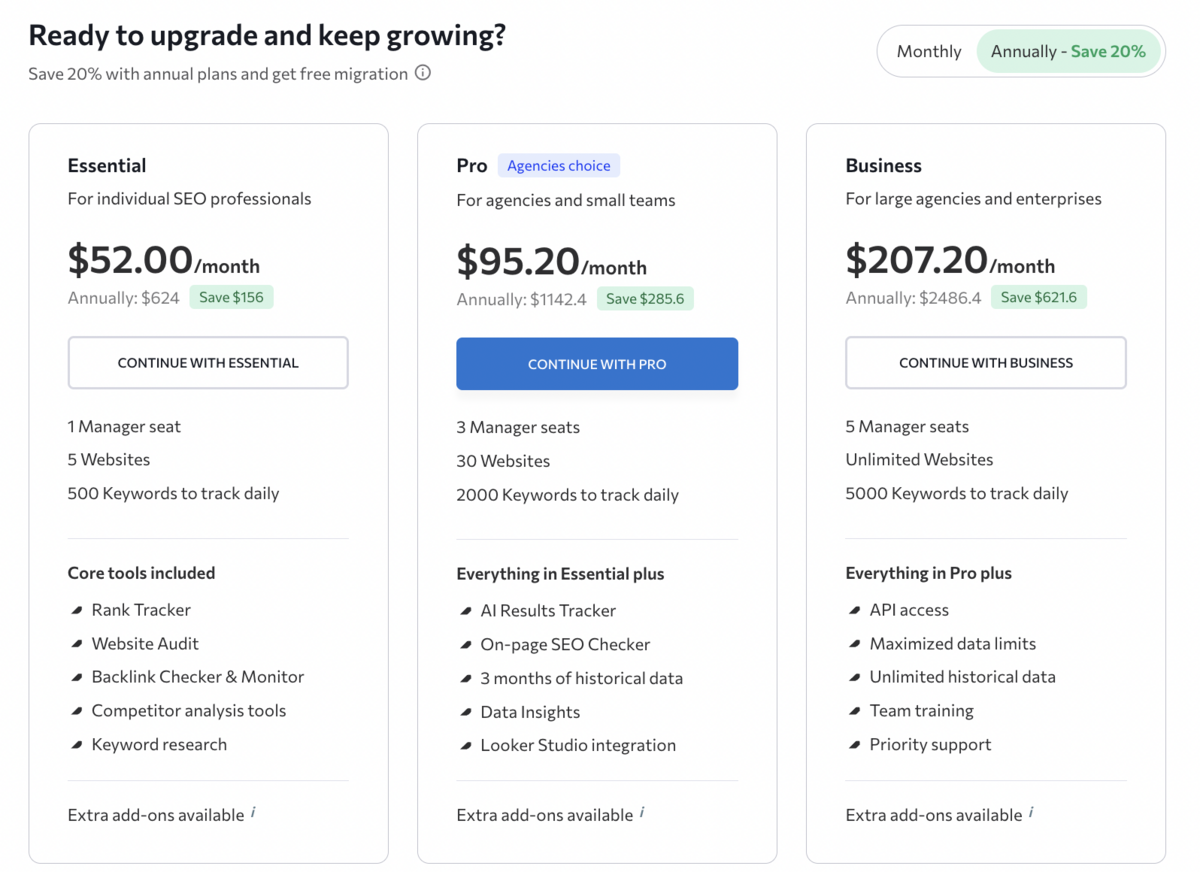
- Essential covers individual SEO professionals with 1 manager seat, 5 websites, and 500 keywords tracked daily. You get the core tools - Rank Tracker, Website Audit, Backlink Checker & Monitor, Competitor Analysis, and Keyword Research - which is adequate for solo consultants or small businesses managing a handful of properties.
- Pro is positioned as the agencies' choice with 3 manager seats, 30 websites, and 2,000 keywords tracked daily. This tier adds everything from Essential plus AI Results Tracker, On-Page SEO Checker, 3 months of historical data, Data Insights, and crucially, Looker Studio integration - which makes it the minimum viable tier for agencies doing client reporting at scale.
- Business unlocks 5 manager seats, unlimited websites, 5,000 keywords tracked daily, and everything in Pro plus API access, maximised data limits, unlimited historical data, team training, and priority support. For larger agencies or in-house teams managing complex multi-site operations, this is where SE Ranking starts to make sense, though at $207/month it's approaching Semrush and Ahrefs territory without matching their data depth.
Beyond the core plans, SE Ranking offers several add-ons that can significantly increase the total cost. Local Marketing starts at $18.40/month and includes tools for local businesses - 500 keywords for Local & Map Rank Tracker, GBP/Facebook/Apple & Bing profile management, 100+ directories worldwide, reviews management, and listings management. Content Marketing at $23.20/month provides 25,000 AI words, plagiarism checks, a 180-article limit, 1GB image storage, and a Content Idea Finder. The API Add-on runs $119.20/month for programmatic access to SE Ranking datasets, useful for developers building custom integrations but overkill for most users.
There's also an Enterprise tier with custom limits, advanced support, and dedicated account management - pricing available only through direct sales, which typically means it's expensive enough that they'd rather negotiate than publish numbers.
What's notably absent here is a truly affordable entry-level option. The Solo plan at $65 for three months works out to about $22/month, but it's a one-time trial rather than an ongoing subscription. Once that expires, you're jumping to $52/month minimum, which is reasonable compared to Ahrefs ($129/month) or Semrush ($199/month), but still a significant commitment for freelancers or small businesses just getting started with SEO.
The annual discount of 20% is standard across the industry, and SE Ranking's pricing remains competitive for what you get - particularly at the Pro tier, where Looker Studio integration and expanded limits justify the cost for agencies. That said, the per-user seat costs, add-on pricing, and lack of PPC or social media tools (which Semrush includes at comparable price points) mean SE Ranking isn't always the budget option it appears to be at first glance.
For teams serious about local SEO or AI-powered content creation, factor in an extra $40-50/month for add-ons. For those who can live within the base plan limits and don't need bells and whistles, SE Ranking delivers solid value - just make sure you're clear on what's included before committing.
The Final Verdict
SE Ranking positions itself as a comprehensive yet affordable SEO platform, and for the most part, it delivers on that promise - though with noticeable trade-offs compared to industry leaders.
What SE Ranking Does Well
SE Ranking excels at providing solid fundamentals at a reasonable price point. The rank tracking is accurate and supports granular location targeting down to the ZIP code level, making it particularly strong for local SEO campaigns. The website audit tool offers surprisingly robust configurability with over 110 technical parameters, JavaScript rendering, and customisable crawl settings that rival what Ahrefs provides. The white label capabilities and guest link sharing are more accessible than competing platforms at similar price points, which matters for agencies managing multiple clients.
The platform also deserves credit for including actionable remediation steps alongside issue identification. Whether you're running a website audit, analysing on-page optimisation, or reviewing backlink profiles, SE Ranking doesn't just tell you what's broken - it explains how to fix it. For junior team members or clients who need guidance, this instructional approach genuinely adds value.
Reviews on sites like Trustpilot consistently praise SE Ranking for being user-friendly and affordable compared to Semrush, Ahrefs, and Moz Pro. With an average G2 rating of 4.8, it clearly resonates with budget-conscious marketers who need comprehensive SEO tools without the steep learning curve or enterprise-level pricing.
Where SE Ranking Falls Short
The fundamental limitation is that SE Ranking feels modular rather than integrated.
You're bouncing between Keyword Research, Keyword Manager, Keyword Grouper, Competitive Research, SERP Competitors, On-Page SEO Checker, SERP Analyser, and various other standalone tools rather than working within a unified intelligence system. Ahrefs and Semrush unify these functions into cohesive workflows where competitive analysis, keyword research, and content optimisation flow naturally into one another.
Data depth also lags behind industry leaders in critical areas. SE Ranking's keyword database sits at 5.6 billion compared to Semrush's 26+ billion and Ahrefs' 28 billion. The backlink index is respectable but smaller than Ahrefs' 35+ trillion and Semrush's 43 trillion. For most small-to-midsize businesses, this won't matter - but for enterprise teams conducting deep competitive research or managing international campaigns across dozens of markets, the gaps become noticeable.
Competitive analysis capabilities feel reactive rather than strategic, which becomes clear once you start using the platform regularly. SE Ranking shows you which competitors rank for your keywords and which backlinks they've built, but it doesn't offer the sophisticated gap analysis, content opportunity scoring, or automatic competitor discovery that Ahrefs and Semrush provide. You're manually stitching together insights rather than letting the platform surface strategic opportunities, which slows down decision-making and makes it harder to spot patterns across multiple competitors.
Workflow integrations are largely absent, which is perhaps the most limiting factor for agencies running active campaigns. There's no outreach management for link building, no email integration for prospecting, and no way to move seamlessly from research to execution within the platform. SE Ranking functions primarily as an intelligence tool. You gather data, export it, and handle the actual work elsewhere. For teams whose day-to-day operations revolve around campaign execution rather than just analysis, this creates significant operational friction.
Who Should Use SE Ranking
SE Ranking is best suited for freelance SEOs, small-to-midsize agencies, and in-house marketing teams working with limited budgets who need comprehensive SEO capabilities without enterprise-level complexity or pricing. If you're managing 5-20 client projects, running local SEO campaigns, or need accurate rank tracking with white label reporting, SE Ranking delivers solid value without forcing you into expensive enterprise contracts.
It's particularly strong for agencies that prioritise client communication and brand customisation over cutting-edge research capabilities. The guest links, white labelling, automated reporting, and Looker Studio integration make client management straightforward, even if the underlying data depth doesn't match what Ahrefs or Semrush provide. For agencies where client satisfaction depends more on clear communication and consistent reporting than on having the absolute deepest data, SE Ranking hits the right balance.
SE Ranking is not ideal for enterprise teams managing complex international campaigns, agencies whose core business is link building (workflow integrations are too limited), or advanced SEOs who need the deepest possible competitive intelligence and backlink data. If your work revolves around sophisticated gap analysis, content opportunity scoring, or managing massive keyword portfolios across dozens of markets, you'll quickly bump into SE Ranking's limitations. The platform wasn't built for that level of complexity, and trying to force it into those workflows will create more problems than it solves.
Final Thoughts
SE Ranking occupies an interesting middle ground in the SEO tools landscape. It's not trying to beat Ahrefs at backlink analysis or Semrush at all-in-one marketing breadth. It's offering a more accessible alternative for marketers who don't need (or can't afford) everything those platforms provide.
What it offers is solid, competent SEO tooling at a price point that makes sense for small-to-midsize operations. The rank tracking is accurate, the technical audits are configurable, the keyword research covers the essentials, and the reporting capabilities support agency workflows without requiring six-figure budgets. The platform rewards users who are willing to invest time learning its modular structure and don't need bleeding-edge features or the deepest possible data. For teams that understand its limitations upfront and work within them, SE Ranking can be a genuinely valuable tool.
For budget-conscious teams prioritising rank tracking, technical audits, and client reporting over advanced competitive intelligence, SE Ranking is a smart choice. Just know what you're getting, and more importantly, what you're not.
Frequently Asked Questions (FAQs)
1. What is SE Ranking?
SE Ranking is an all-in-one SEO platform offering keyword research, site audits, rank tracking, and backlink analysis. It's designed for small-to-midsize agencies needing comprehensive SEO tools at affordable pricing, excelling particularly at local rank tracking and white-label client reporting.
2. How to use SE Ranking?
Create a project by adding your website, connecting to Google Search Console, and inputting keywords to track. Use the Keyword Research Tool to find opportunities, run site audits to identify technical issues, and generate white-labelled reports for clients through the Report Builder.
3. How much does SE Ranking cost?
SE Ranking offers three main tiers: Essential at $52/month, Pro at $95.20/month, and Business at $207.20/month (annual pricing). Add-ons like Local Marketing ($18.40/month) and Content Marketing ($23.20/month) increase costs. A three-month Solo trial costs $65.