This review is part of our SEO tools comparison report. This article has been updated for 2026 and replaces the older review of Moz Pro.
Index
- Introducing the Tool
- Setup & Interface
- Managing Campaigns in Moz Pro
- Domain Overview
- Competitive Research
- Keyword Research
- Link Research
- On-site Optimisation
- Rank Checker
- Pricing
- Conclusion
- FAQs
Introducing the Tool
Moz Pro is the flagship SaaS product from Moz, an all-in-one SEO toolkit combining keyword research, link analysis, site audits, and rank tracking.
Moz has grown from a blog & SEO consulting firm in 2004 into one of the most recognised names in the SEO software space. As of 2026, Moz Pro offers a wide, continually expanding set of SEO tools – spanning keyword research, site audits, link analysis, rank tracking, and on-page optimisation, setting the benchmark for all-in-one SEO platforms.
Setup & UI
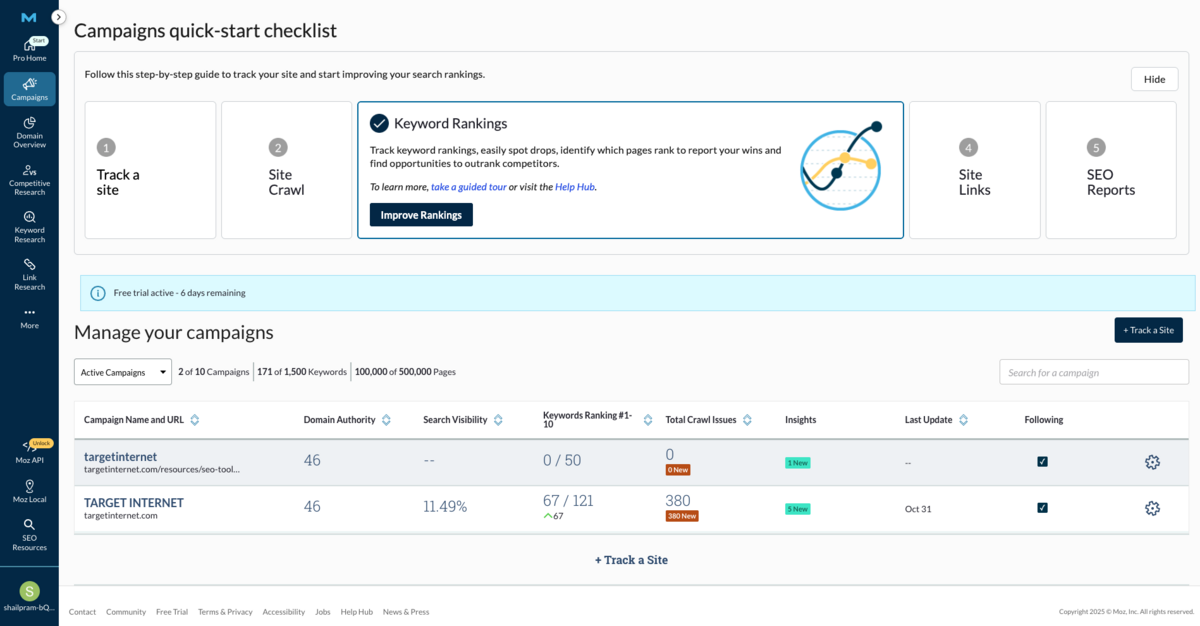
The first thing you notice about Moz Pro is its clean, campaign-centric interface.
The dashboard organises modules such as Campaigns, Domain Overview, Competitive Research, Keyword Research, Link Research, On-Page Grader, On-Demand Crawl, and Rank Checker in a left-hand menu.
A major leap forward comes with Moz's new reporting capabilities. Reports are no longer limited to on-screen views - the platform now offers a drag-and-drop report builder with white-label options and scheduled delivery so you can export branded PDF summaries covering rankings, links, and crawl data. You can customise reports with your own modules and branding, then schedule automated delivery to clients or stakeholders.
Although the interface is still not as slick as some competitors and can feel dated in places, the new reporting tools eliminate the "style over substance" criticism that we complained about in the earlier versions.
Managing Campaigns in Moz Pro
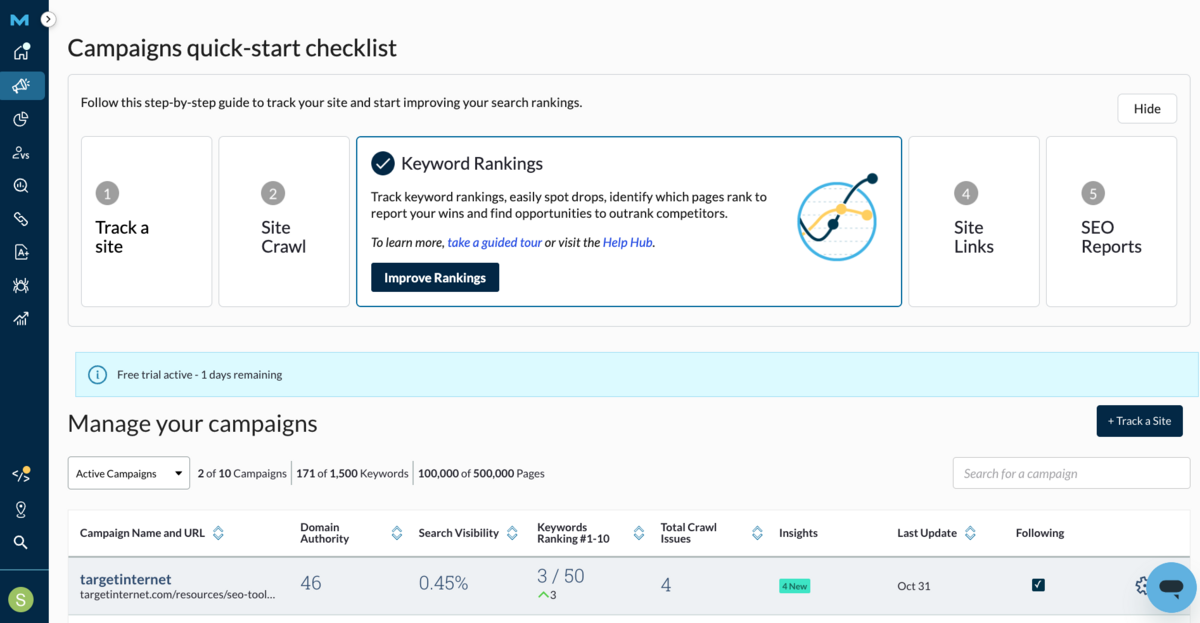
The Campaigns section in Moz Pro serves as the central workspace for managing and tracking all your SEO efforts. Each campaign is built around a single domain plus up to three competitor websites, allowing you to monitor your site's performance in context with key competitors across up to four search engines.
What we particularly appreciate here is how campaigns automatically gather critical SEO data - Keyword Rankings, Page Optimisation Insights, Crawl results, and Backlink Metrics, all in one place. Updates happen weekly without manual intervention, though you can adjust tracked keywords, swap competitors, or integrate GA4 for enhanced performance data whenever needed. We'd strongly advise connecting GA4 if you haven't already, as it adds valuable context to the ranking data.
Key Sections:
- Dashboard Overview – Acts as your command centre, surfacing domain authority, ranking trends, crawl health and link profile updates at a glance.
- Rankings – Tracks keyword performance over time with customisable reporting options.
- Page Optimisation – Identifies content issues and provides prioritised recommendations.
- Site Crawl – Runs regular audits to spot technical errors, though as we've said before, Google Search Console does a much better job of providing accurate crawl data. That being said, beginners will likely find Moz's presentation far more accessible than wading through Search Console.
- Link Metrics – This is where Moz really shines. Their link data has long set the industry standard, with domain and page authority metrics being the default measurement for link quality used by most SEO agencies. It's the main reason many people take out a Moz subscription in the first place.
- Insights – Provides actionable alerts and suggestions such as ranking shifts, crawl issues and new keyword opportunities.
- Custom Reports – As already mentioned, we're glad to see Moz has added robust reporting functionality, letting you create PDF or CSV reports with your own modules and branding.
Overall, Campaigns is a solid SEO control centre that organises all of your data into a single workspace. Some features feel like table stakes rather than differentiators, but where it truly excels is in bringing together Moz's exceptional link data with rank tracking & competitor benchmarking.
Domain Overview
Moz Pro's Domain Overview acts as a clear and concise dashboard for assessing the general SEO health of any website. It brings all the key metrics together in one place, allowing you to form a quick impression of performance before diving deeper.
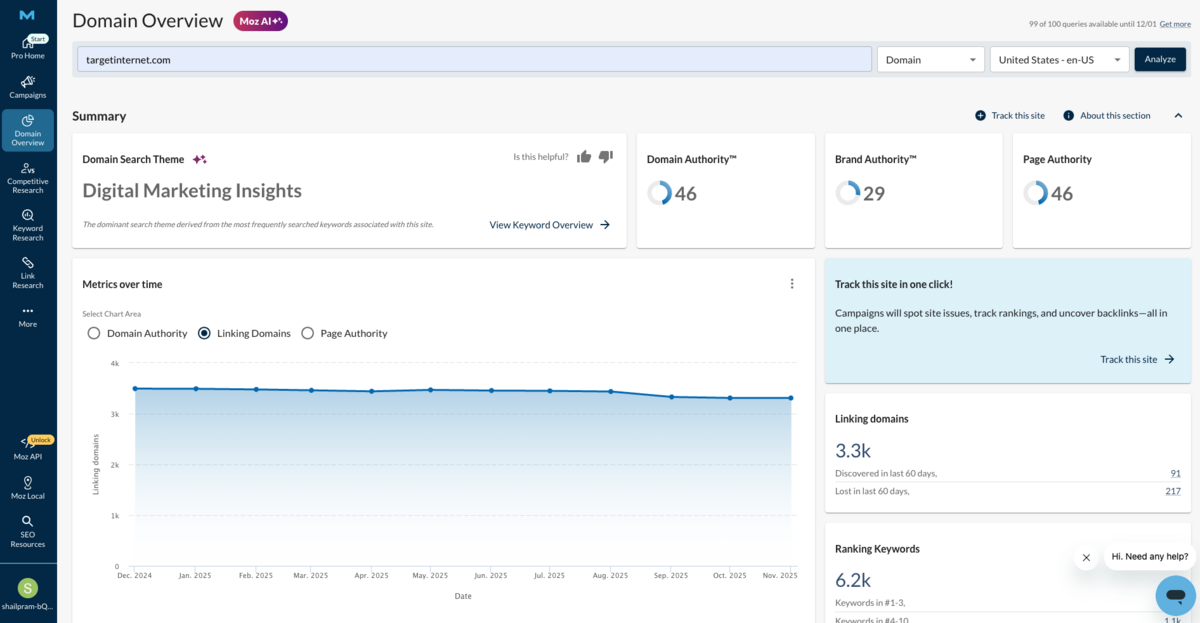
The centrepiece here is the Domain Authority graph, which tracks how your DA score has evolved over time alongside selected competitors. This provides a useful way to gauge whether your authority is improving at the rate you'd expect, and to benchmark progress against others in your market. The same principle applies to the view showing Total Linking Domains and Page Authority trends - giving you an immediate sense of whether your link profile is strengthening or stagnating.
Domain Overview also highlights your top-ranking keywords, displaying monthly search volume, difficulty scores, and the URLs currently ranking for each term. Alongside this is a ranking distribution chart which shows how many of your keywords fall into different position brackets (such as top 3, top 10, etc.). This is particularly helpful for understanding where the greatest potential gains may lie and for comparing your SERP coverage with that of competitors. If you've got 50 keywords sitting in positions 11-20, for instance, that's a clear signal of where to focus optimisation efforts.
You can also add a domain directly from this view into an existing campaign for tracking - a small but helpful feature when you're knee-deep in research mode.
Competitive Research
Moz Pro's Competitive Research tool offers a practical way to understand who your real search competitors are and how your visibility stacks up against theirs. The emphasis here is on competitors identified directly from search results rather than from brand perception alone, making the insights particularly relevant when you're shaping your SEO strategy. There are 3 sub-tools in this section, which we'll walk through below:
1. True Competitor
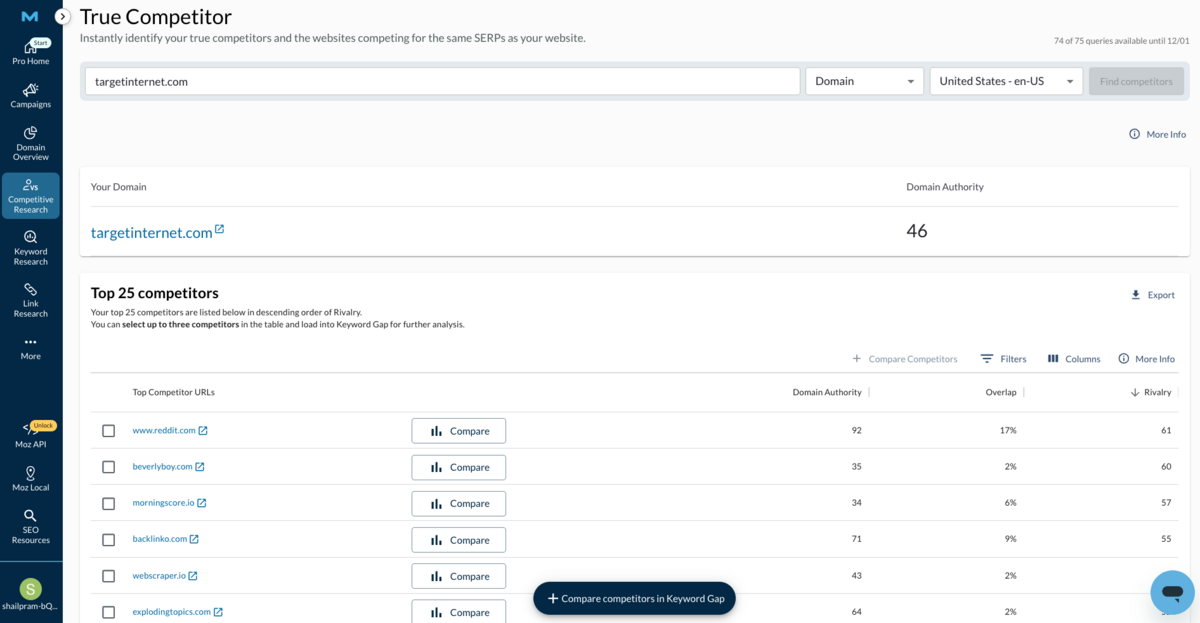
The True Competitor tool does exactly what it says: it helps you discover who you're actually competing against in the SERPs.
Rather than relying on assumptions about market competitors, the tool analyses search results where your site ranks and generates a ranked list of the top 25 competitors, complete with key metrics like Overlap and Rivalry. This makes it straightforward to focus your attention on the sites that are genuinely competing for the same keywords and audience as you. From here, you can select competitors for deeper analysis or benchmark them against your own performance.
Too often, businesses waste time analysing competitors who aren't actually competing for the same search visibility; this tool helps you cut through that noise.
2. Keyword Gap
The Keyword Gap tool lets you compare your keyword ranking profile against up to three competitors at once.
It identifies keyword overlaps (where you're both ranking) as well as gaps where competitors rank but you don't. These gaps are particularly valuable, highlighting keyword opportunities you may be missing and should consider adding to your target list. The tool uses an interactive Venn diagram visualisation to help you spot intersections and unique keywords with ease.
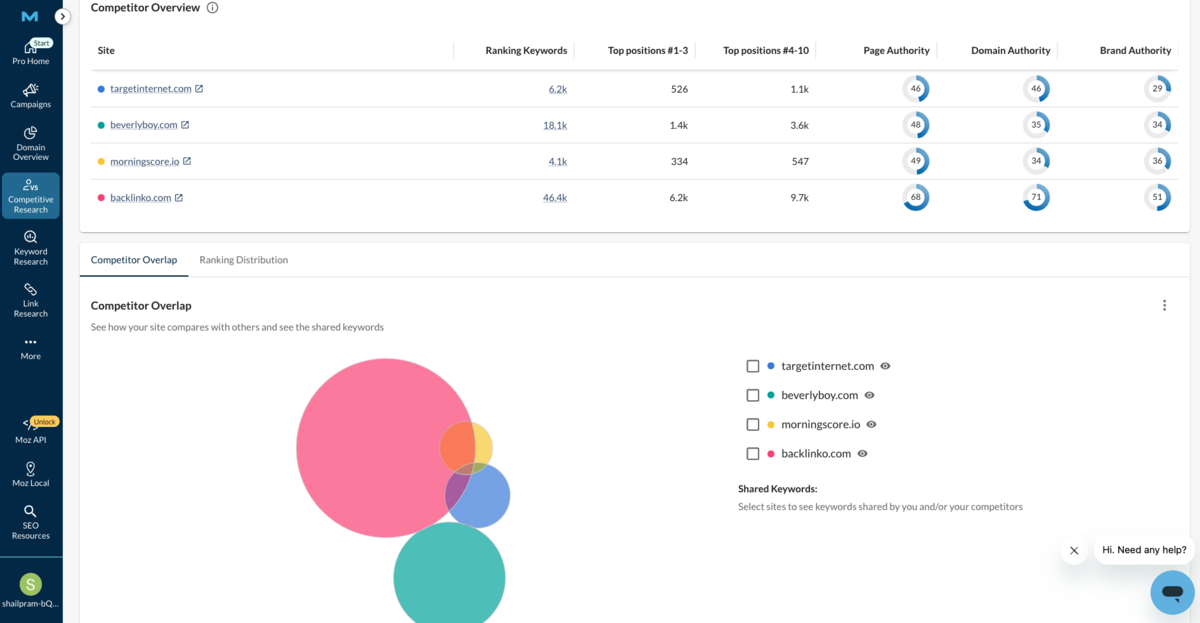
The keywords are organised into four categories - Keywords to improve, New keyword opportunities, Winning keywords, and All ranking keywords, making it easy to prioritise your focus area.
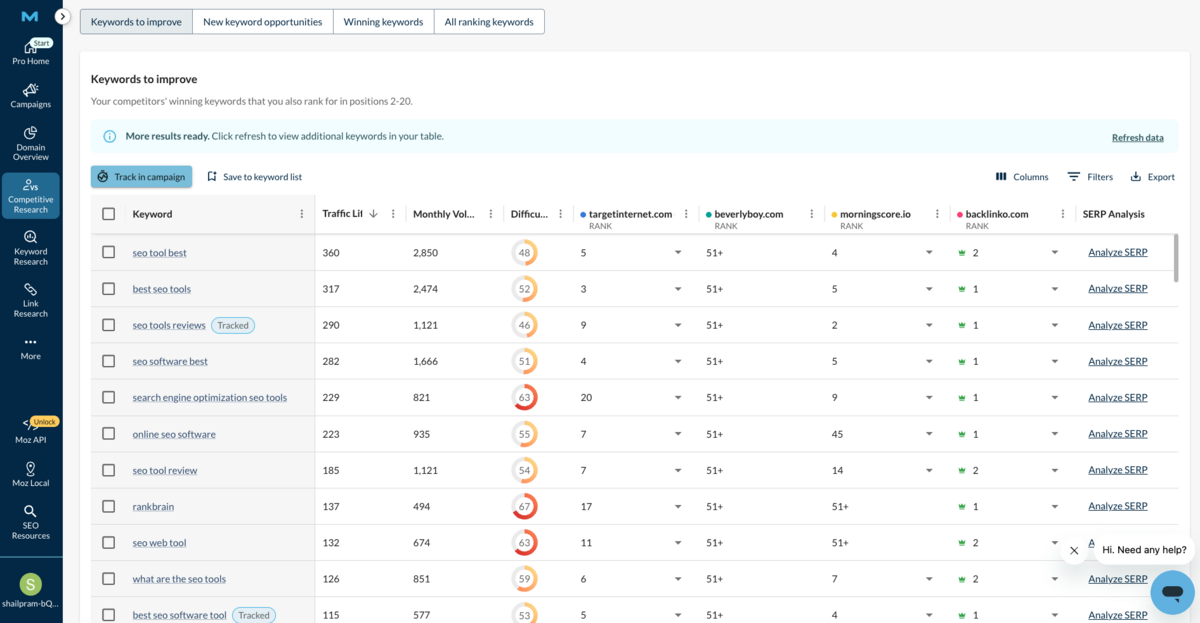
3. Top Competing Content
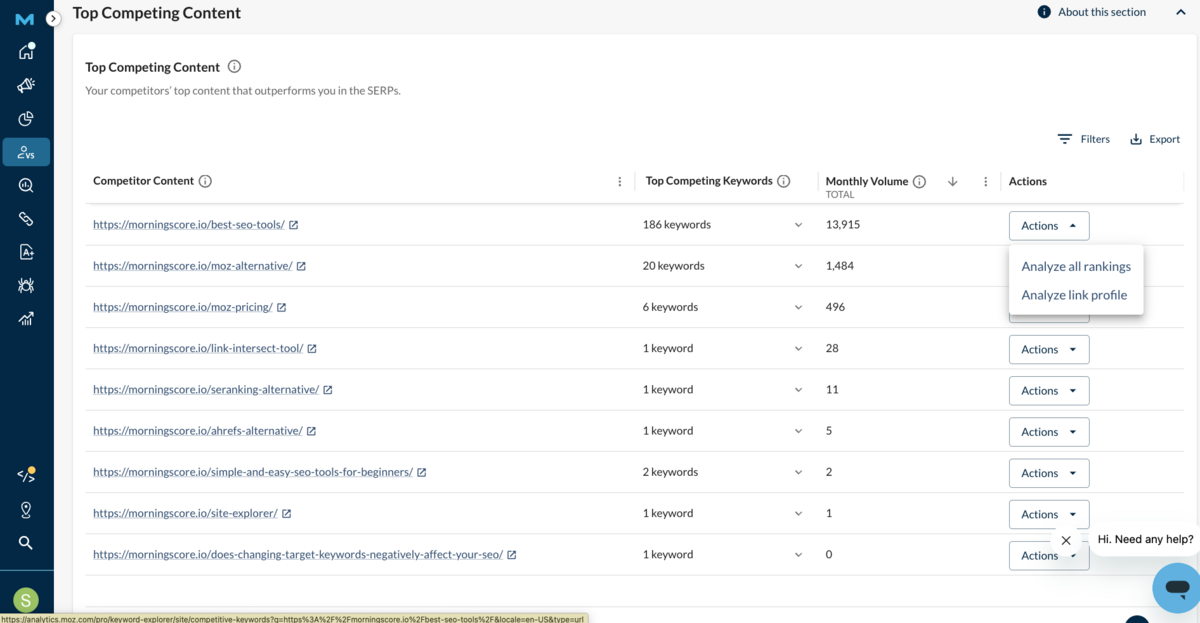
Top Competing Content provides visibility into the highest-performing pages from your competitors.
It shows you which pages are most visible in search results and which keywords they're ranking for, making it easy to spot content gaps and opportunities in your own strategy. You can compare metrics such as Ranking Keywords Count, Domain and Page Authority, and top SERP positions for up to three competitors at once. This is a handy way to see what's working for others in your space and identify areas where you might be falling behind.
Keyword Research
Moz Pro's Keyword Research suite has evolved considerably, bringing together the breadth of its database with AI-driven features to create what should be an efficient workflow. The question is whether it delivers on that promise in practice.
Overview Section
In this section, you can enter any domain, and you'll get a holistic snapshot of that site's keyword performance.
The tool reveals its current ranking keywords, showing where the site performs well and, more usefully, highlighting keywords that are within striking distance of higher rankings. You'll see key metrics like Search Volume, Difficulty, Organic CTR, and Priority Scores pulled together in one place, helping you prioritise which keywords you should include in your strategy.
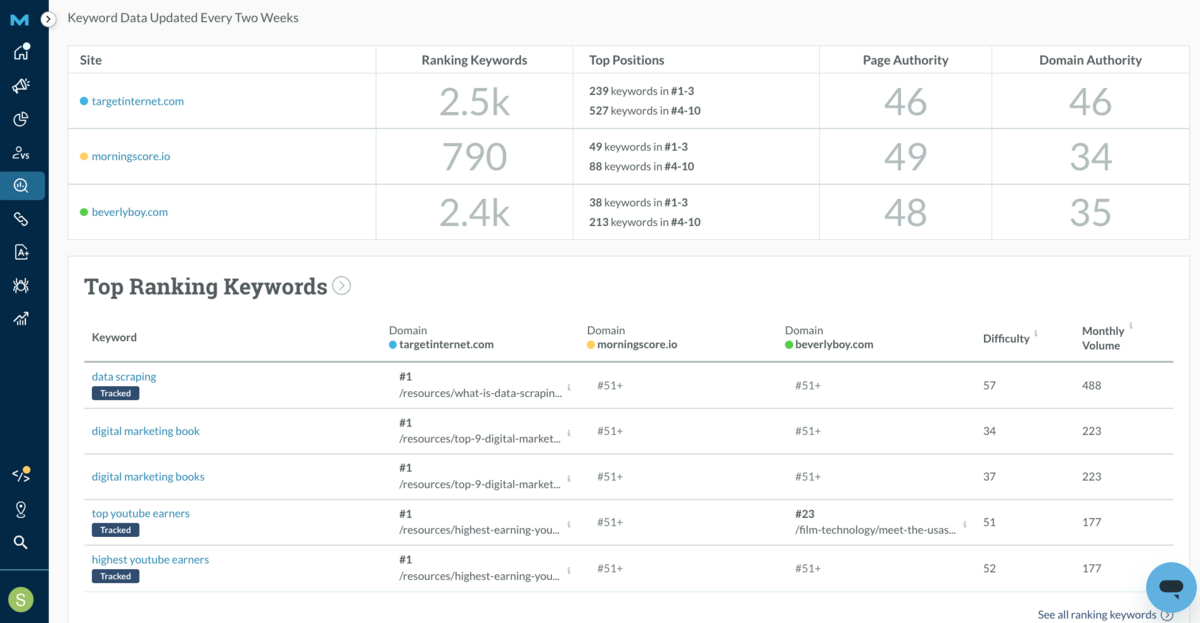
The Site Overview section gives you a quick look at the website's overall Keyword Footprint, including its Top-Performing Keywords, Ranking Distribution and Visibility Trends over time. It's particularly useful for tracking progress over several months and understanding how your site's organic presence evolves.
Meanwhile, the Ranking Keywords view provides detailed lists and insights into all the keywords a domain ranks for, complete with metrics including Rank Positions, Search Volume, Difficulty and Historical Changes.
Other Tools within Keyword Research
Beyond site-level analysis, Moz Pro offers three core keyword tools that work together to streamline your research workflow.
The Explore by Keyword tool lets you input specific keywords to get a detailed analysis, including Monthly Search Volume, Keyword Difficulty, Organic CTR, Minimum Domain Authority of competing pages, and AI-powered Search Intent. If you've used Semrush's Keyword Explorer or Google's Keyword Planner, this bit will feel familiar.
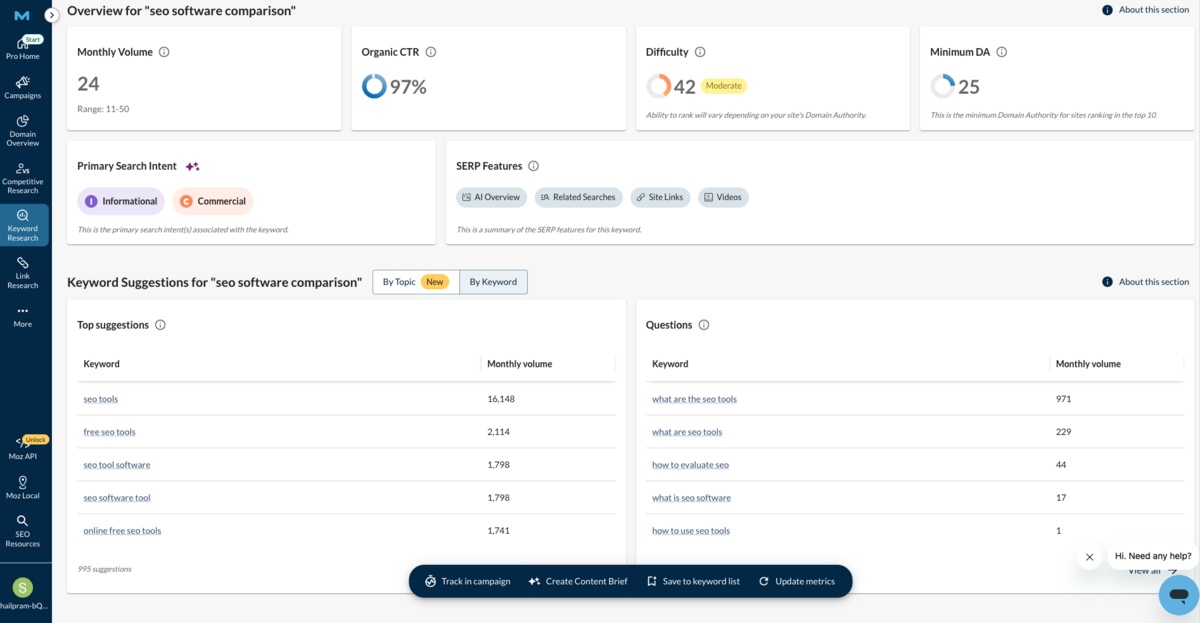
You are also able to create Keyword Lists directly from this section, or track these keywords in an existing campaign.
Keyword Suggestions is a newer addition that surfaces related keywords and questions around your seed term. Suggestions can be filtered and grouped by Lexical Similarity or Topic Relevance, helping you identify fresh content angles to build topical authority. It's a worthwhile feature that brings Moz closer to what tools like Ahrefs and Semrush have offered for some time - though we'd note it still lacks some of the depth you'll find in those competing platforms.
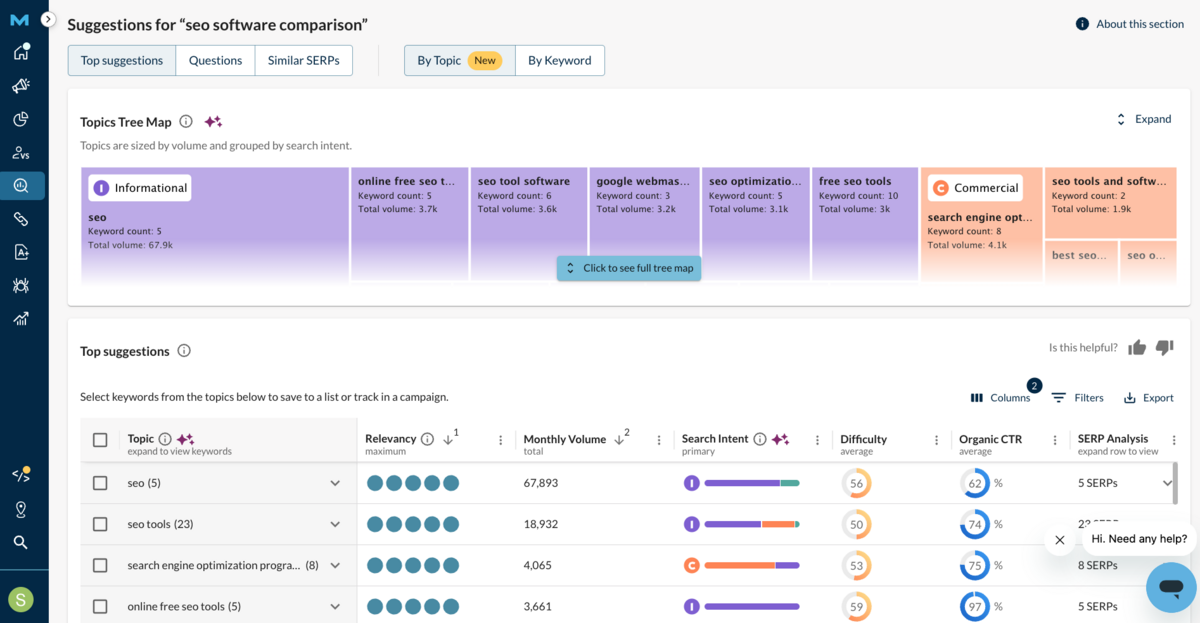
AI Content Brief (Beta)
This is Moz Pro's newest feature and uses AI to generate content briefs based on keyword data and top-ranking pages in the SERPs for your targeted topics.
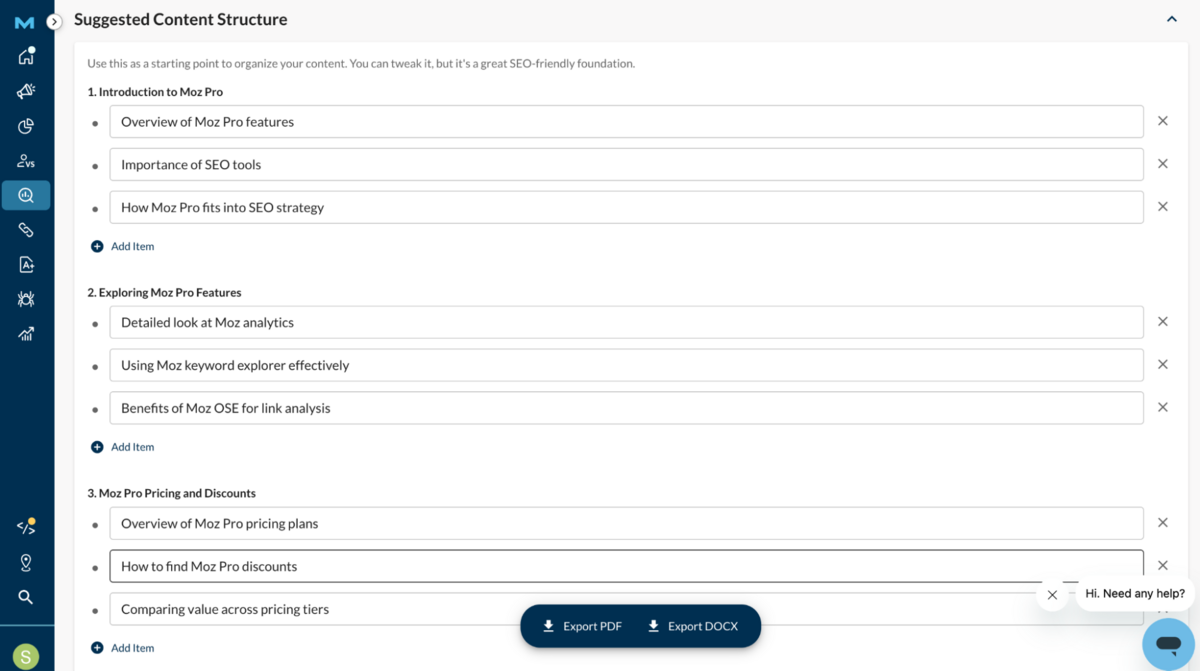
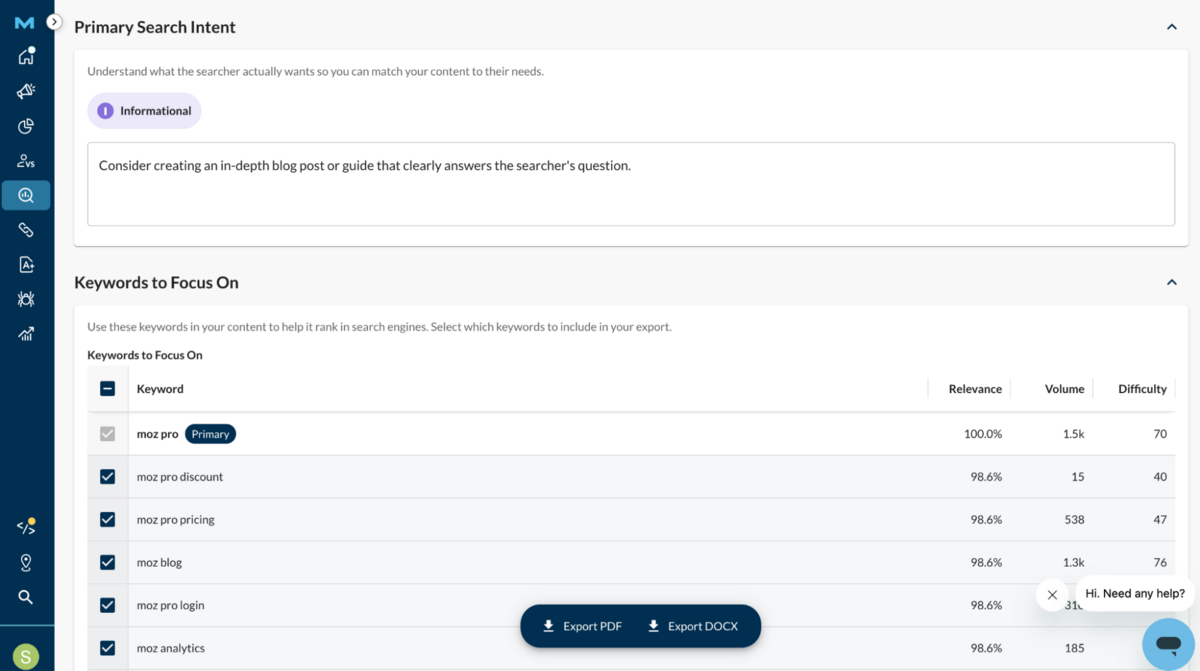
The idea is to help content creators focus on what to include to improve rankings and satisfy search intent, speeding up the content planning process.
However, as a beta feature, we'd advise testing it thoroughly before relying on it for critical content decisions. The concept is sound - automated briefs can definitely accelerate workflows - but the proof will be in how well the AI understands nuanced search intent and competitive context beyond surface-level keyword matching. We'll be watching this one with interest as it matures.
Link Research
This is where Moz Pro genuinely excels, and frankly, it's the main reason most people take out a subscription.
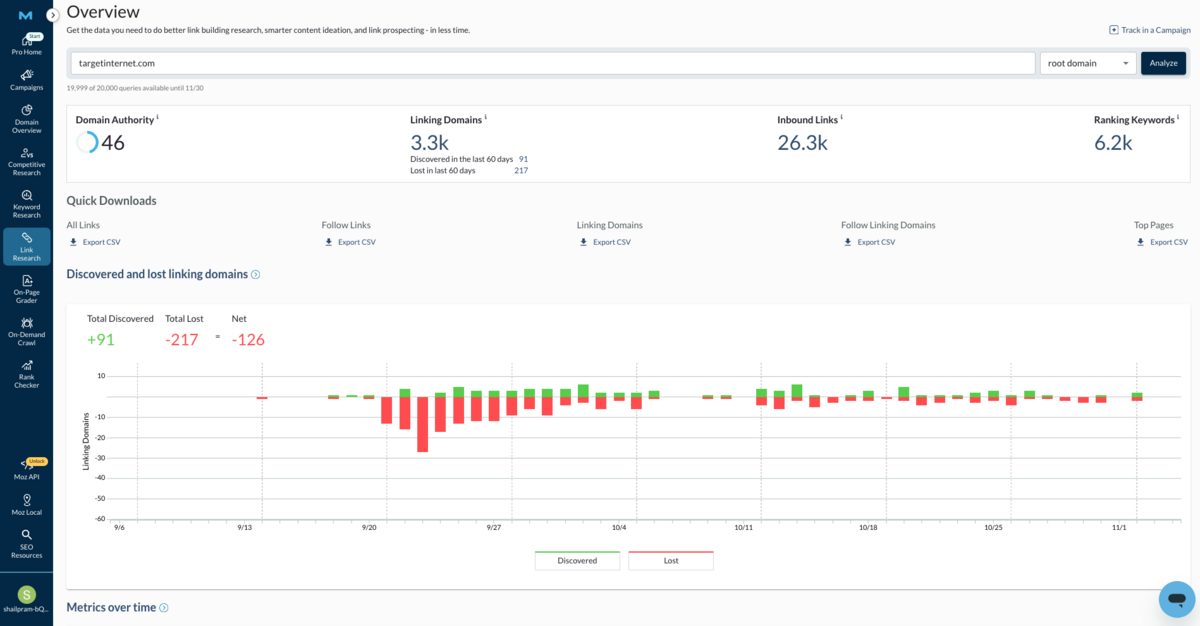
The Link Research tools have always been Moz's crown jewel, and they remain as robust as ever in this latest version. You can analyse backlink profiles at the domain, subdomain or page level, with the Overview section providing clear visualisations that make sense of what could otherwise be overwhelming data.
Inbound Links
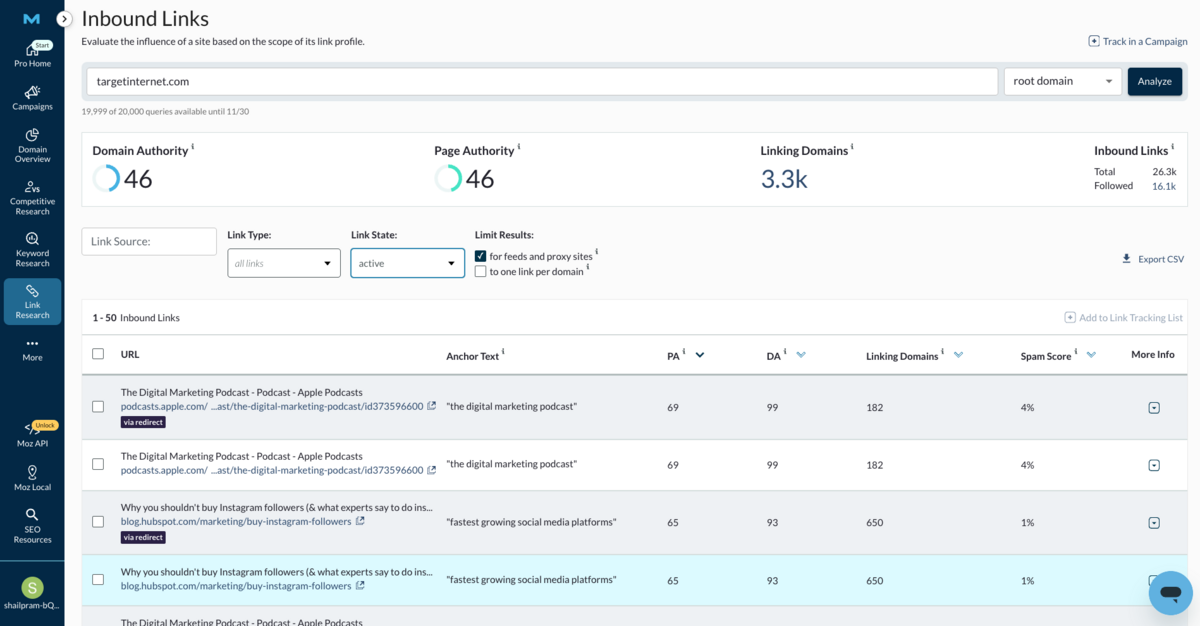
The Inbound Links section allows you to examine specific backlinks in more depth. You can filter by the source of the link, the type of link (follow, no-follow, redirect, etc.), or its current state (all links, active links, and lost links).
For example, if you're waiting for a link to appear from a site such as Wikipedia, you can check whether Moz has detected it yet. You can also view links that have been marked as lost to support your link recovery work. You can also create your own Link Tracking Lists - for example, to monitor new backlinks from an outreach campaign or to keep track of high-authority domains you want links from. These custom lists let you track & follow progress over time.
Linking Domains
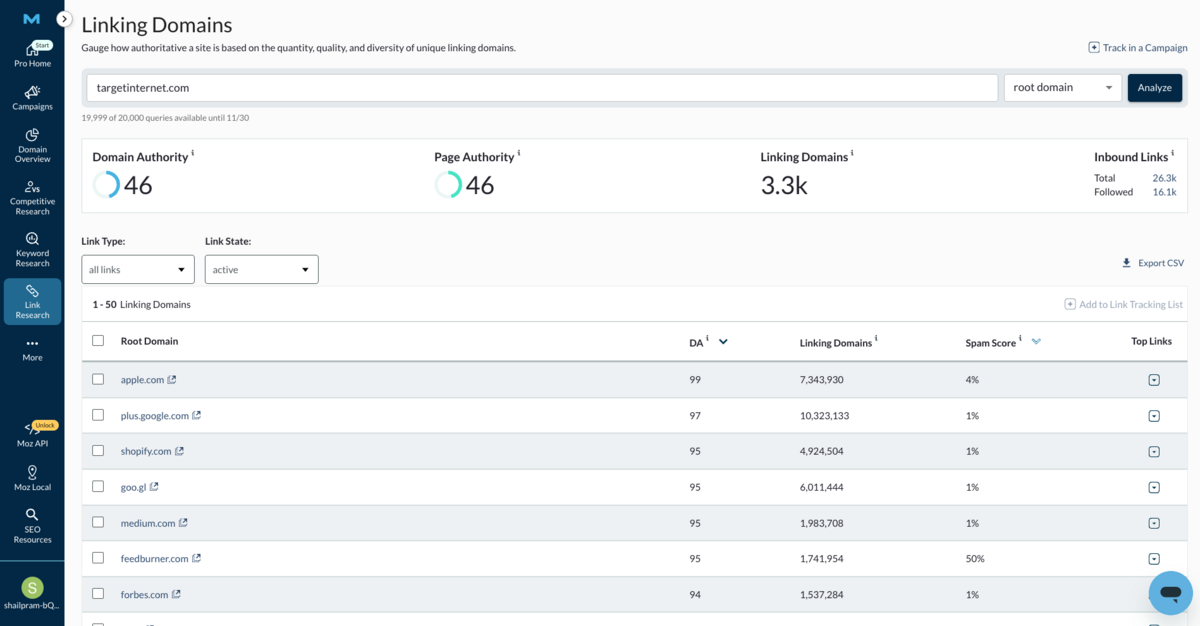
The Linking Domains view helps you assess the overall quality of sites linking to yours, displaying Domain Authority, Link Counts per Domain, and Spam Scores.
This makes it straightforward to identify strong, relevant backlinks while flagging potential risks - especially useful if link building has been outsourced. We've seen countless cases where paid backlink packages include links from dodgy gambling or adult content sites. With this view, you can immediately spot domains with high Spam Scores pointing to your site and take appropriate action.
Anchor Text
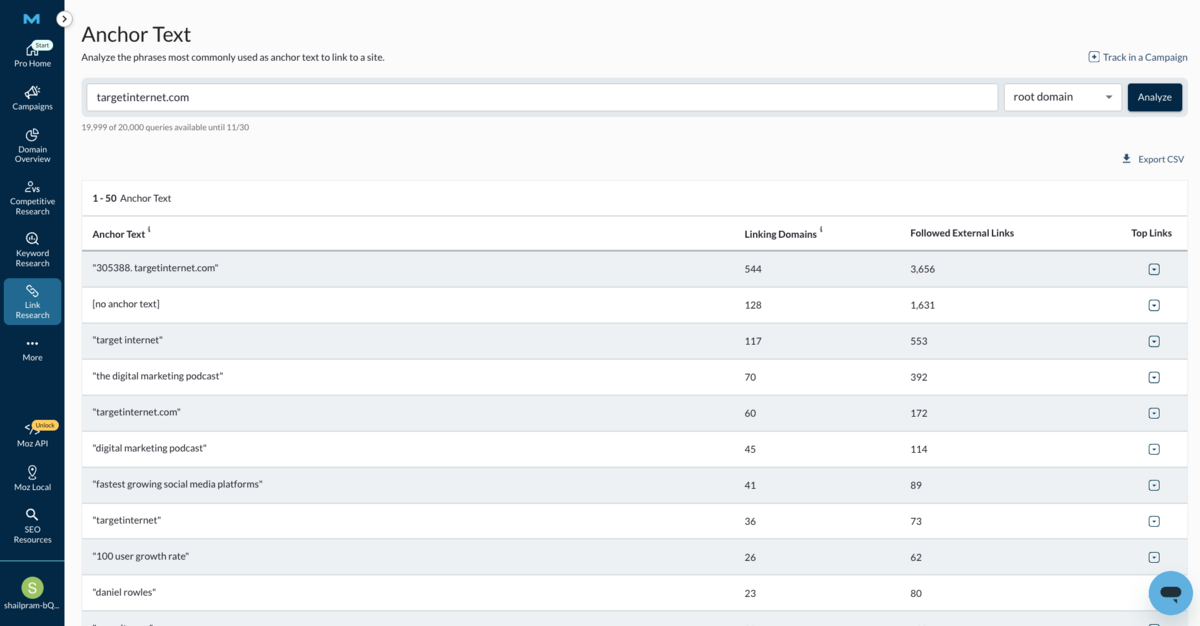
The Anchor Text section shows the exact phrasing other sites use when linking to your content, helping you identify Brand Mentions, Overly Optimised Anchors, or Missing Anchor Text that may need review.
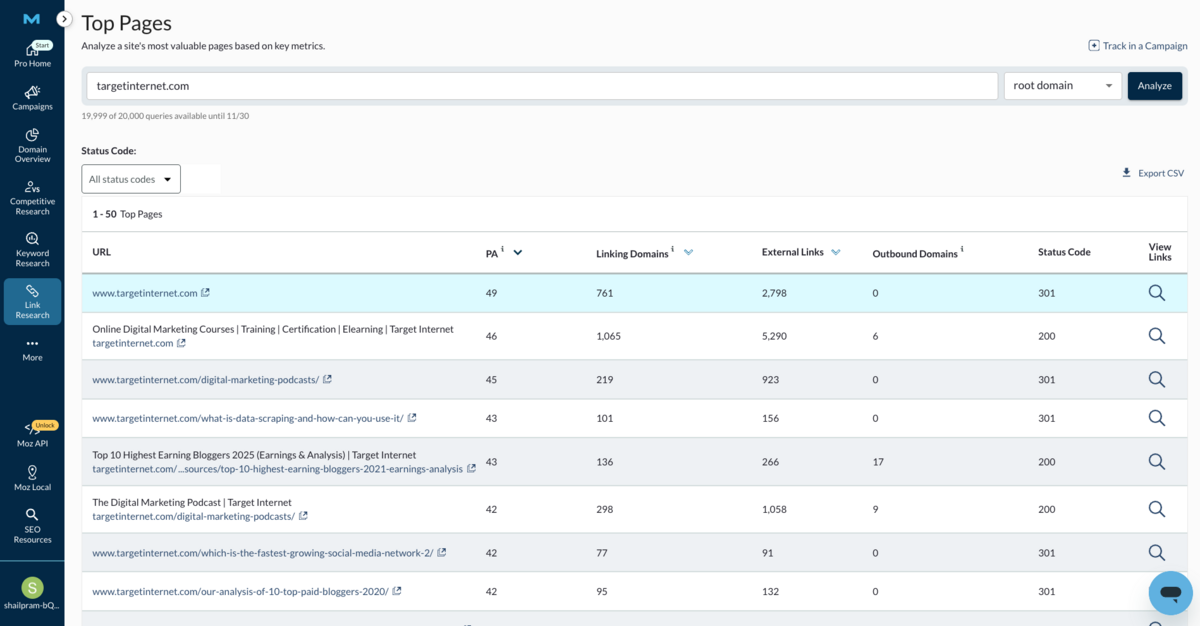
Top Pages
The Top Pages section highlights which pages on your site attract the strongest backlink profiles. You can sort by linking domains, Page Authority, or HTTP status codes to identify content worth expanding, as well as pages that may be losing value due to errors or redirects.
Discovered & Lost Links
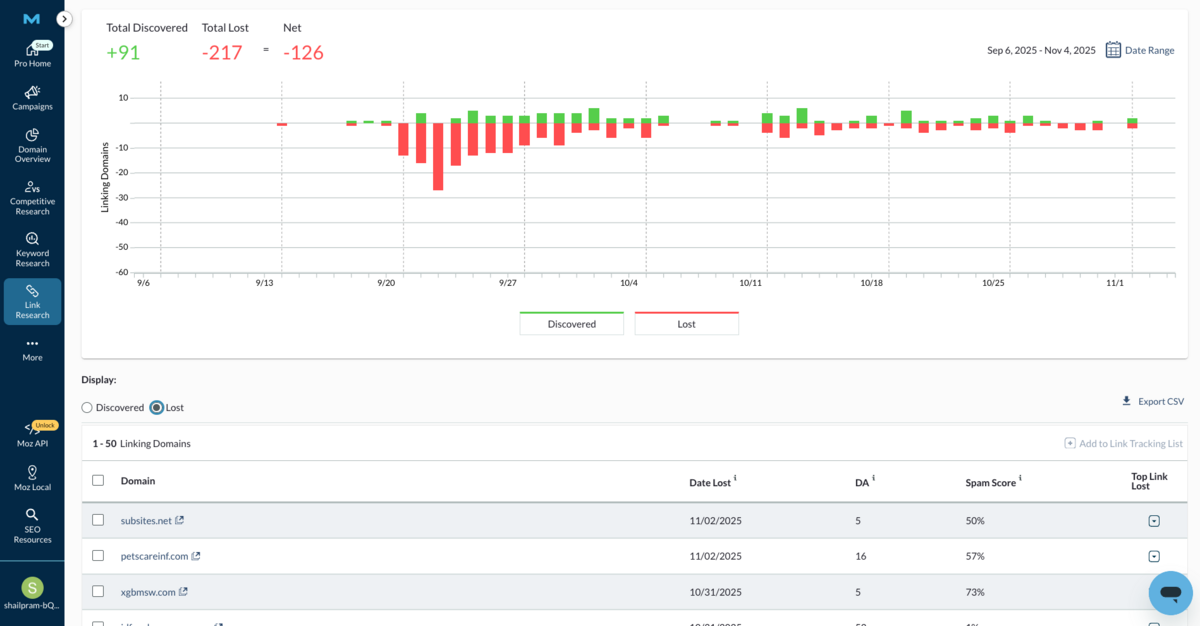
We're glad to see Moz has enhanced this feature.
The Discovered & Lost Links section gives you a clear timeline of backlinks found and lost for your website or competitors. It shows new domains or pages that have recently linked to your site, along with links that have disappeared, often due to page changes, removals or technical issues. You'll see this data in a chart sorted by date, making it easy to spot trends and take action, such as reaching out to regain valuable lost links.
You can also filter results, export your findings, and dig deeper into each domain to understand what's happening with your backlink profile.
Compare Link Profiles
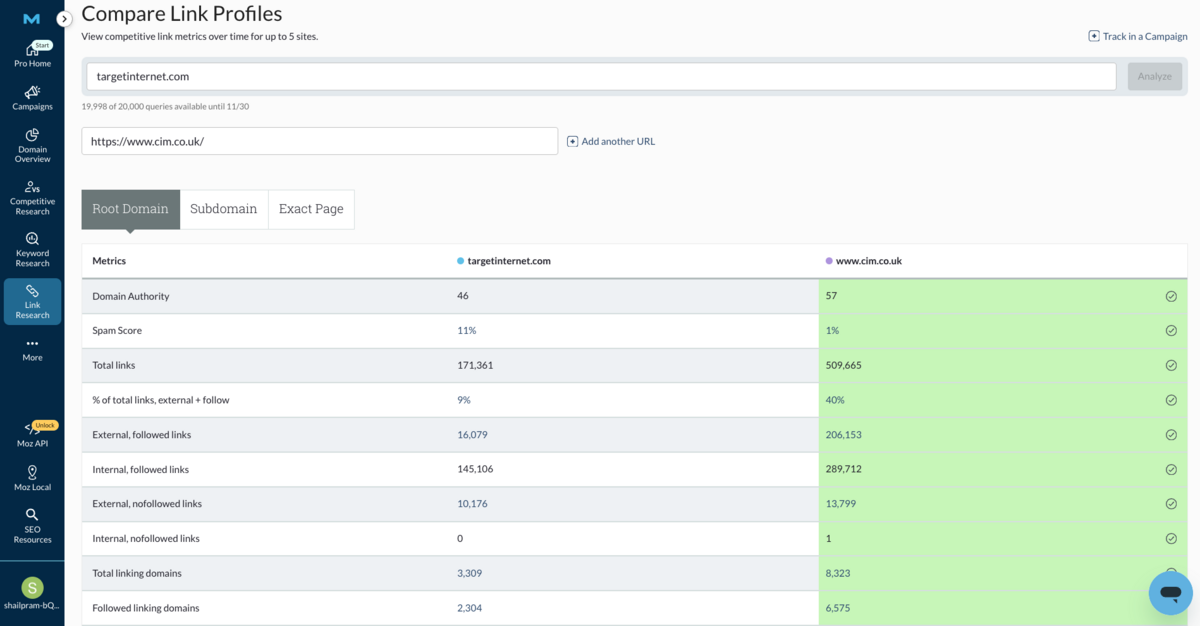
This feature allows you to compare your site's backlink profile against competitors.
This reveals domains linking to them but not to you, highlighting targeted link-building opportunities based on real linking patterns rather than guesswork.
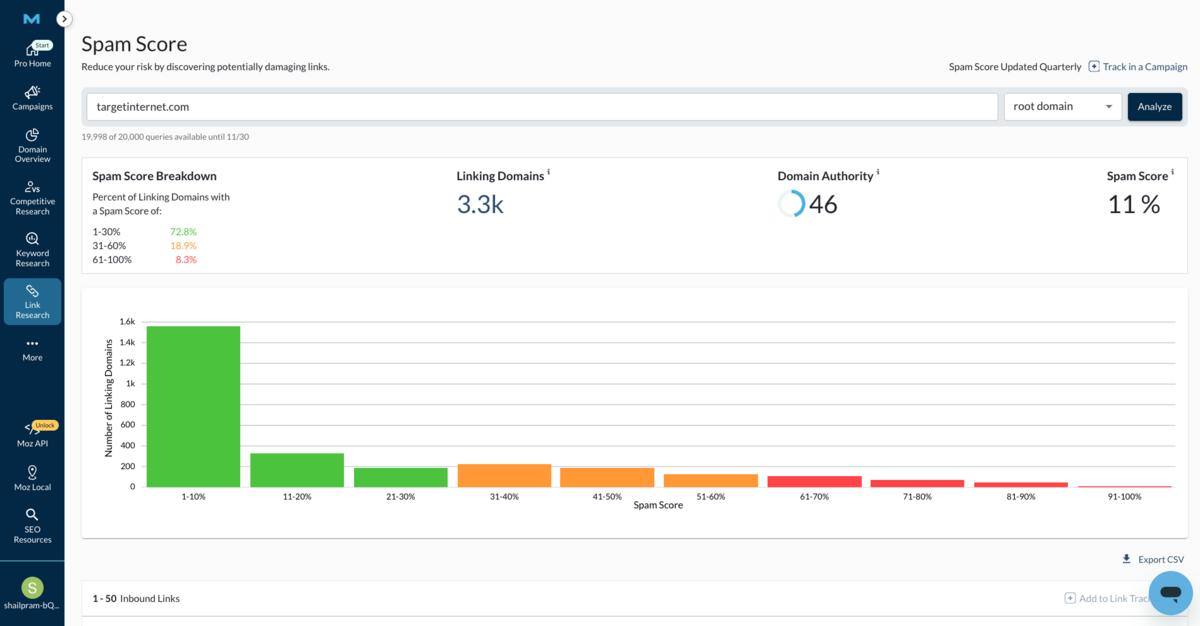
Spam Score
We already discussed Spam Score as an insight in the Discovered & Lost Links section.
However, the latest version of Moz now offers a dedicated Spam Score section to help you monitor and manage potentially harmful backlinks more easily. This section identifies domains linking to your site that exhibit patterns commonly associated with spam - such as low-quality content, unnatural link velocity, or involvement in known link networks.
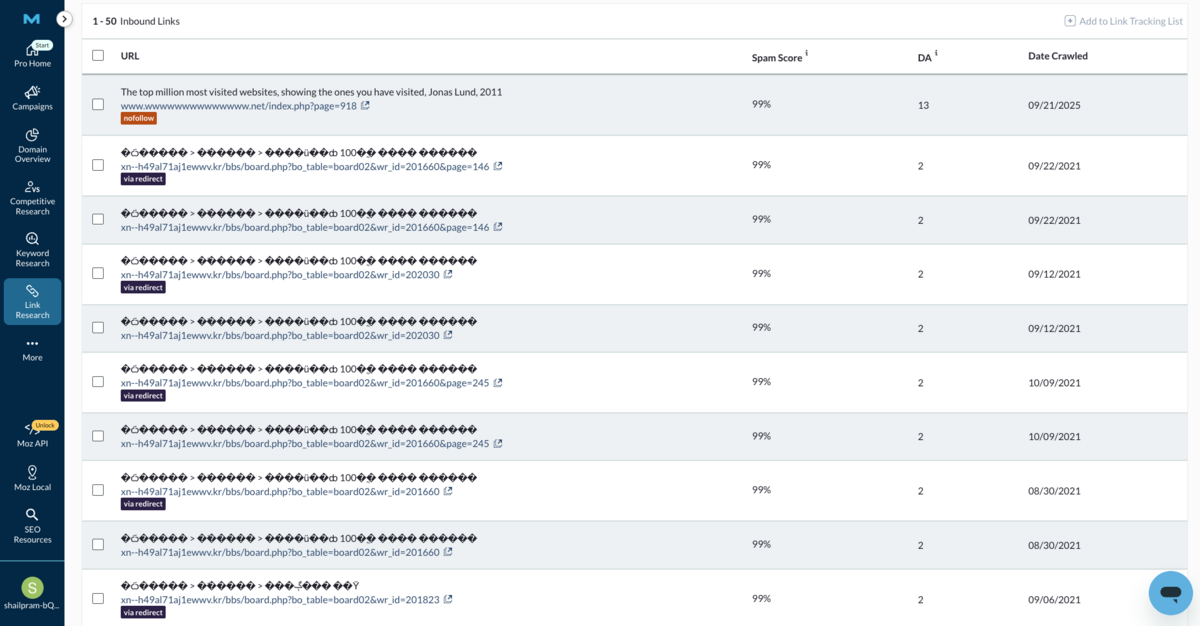
Essentially, it works as a link risk assessment tool, allowing you to regularly audit your backlink profile and spot links that could negatively affect your site's SEO health. If any high-risk domains appear, you can then take action, such as requesting removal or using Google's disavow tool to protect your site from potential penalties.
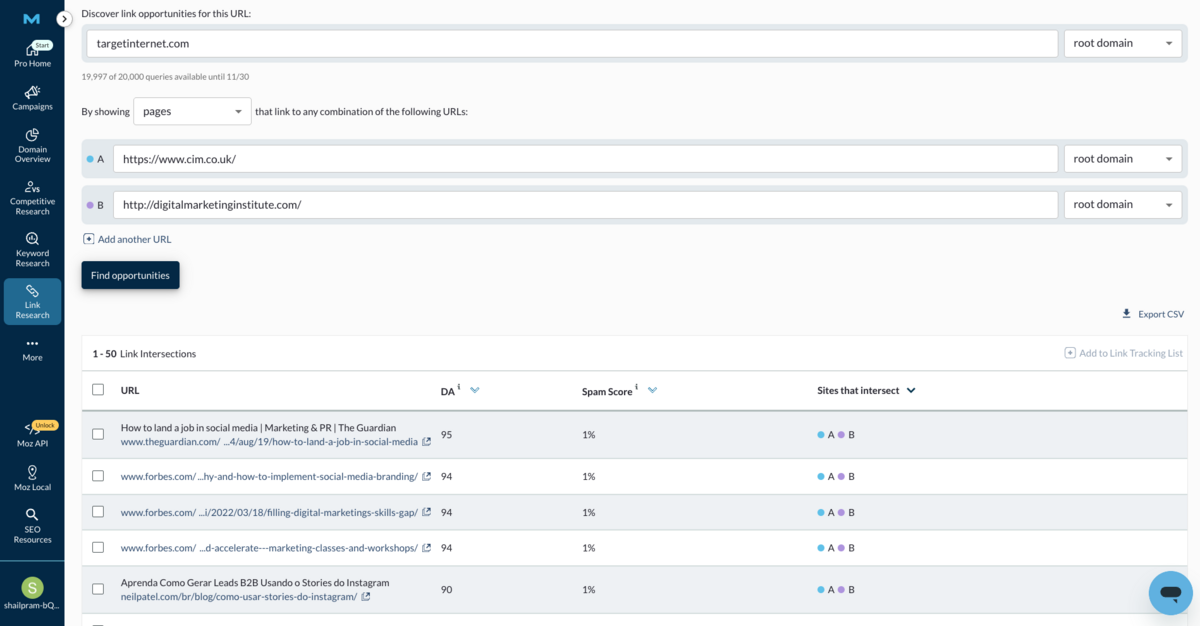
Link Intersect
Link Intersect identifies sites that link to your competitors but not to you, revealing untapped link-building opportunities. By entering competitor domains or specific URLs, the tool highlights websites already linking to similar content, making them ideal targets for your outreach efforts.
On-site Optimisation
Moz Pro has evolved its on-site optimisation suite significantly, simplifying and renaming its previous tools into On-Page Grader and Site Crawl. While both retain the foundational principles of the earlier "On-page Optimisation" and "Crawl Diagnostics" tools, their new versions bring better usability, faster results, and deeper integration with Moz's overall SEO ecosystem.
On-Page Grader
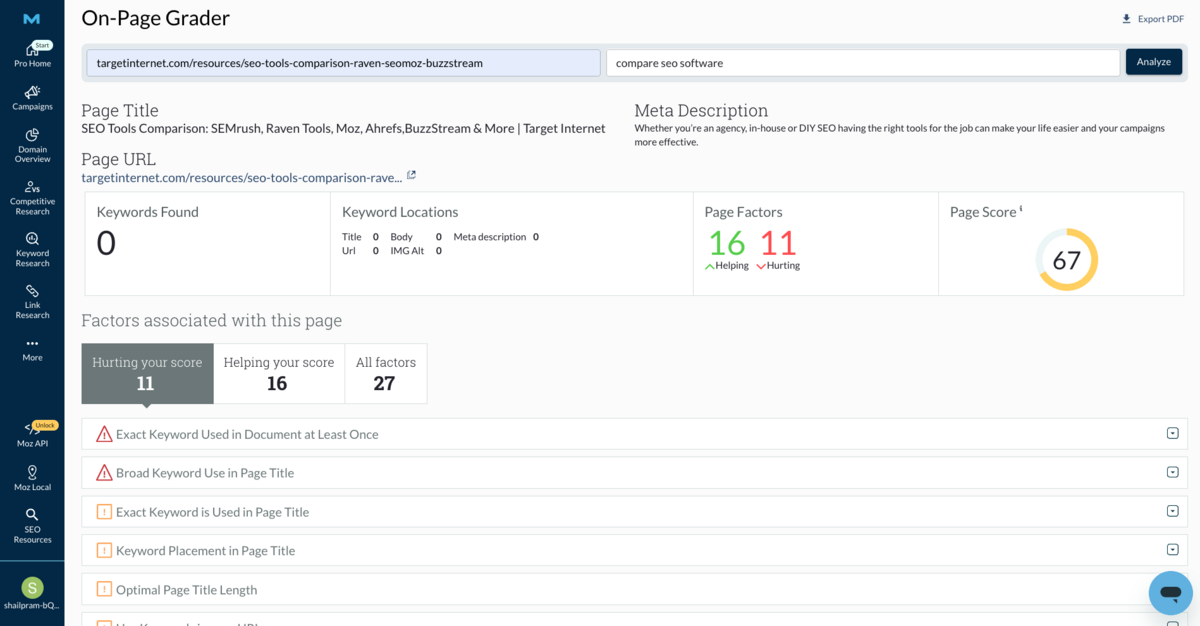
The On-Page Grader is the modernised version of Moz's old on-page optimisation module.
It provides a detailed score for any page based on how well it aligns with a chosen target keyword.
Instead of simply counting keyword frequency, it now analyses contextual signals such as Title Tag Optimisation, Heading Structure, Image Alt Text, Meta Descriptions, and Content Readability Metrics. The interface highlights issues in colour-coded categories and offers specific, actionable suggestions like improving keyword placement or refining internal links.
For marketers working on large websites or multiple client projects, the report export and tracking functionality is a time-saver here.
On-Demand Crawl
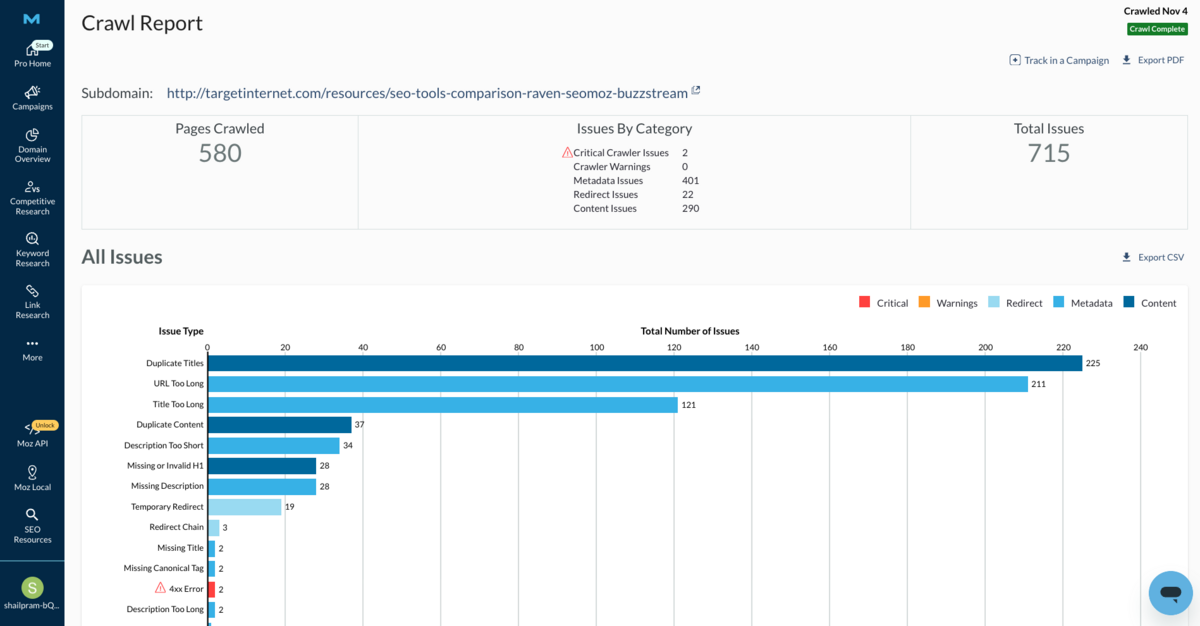
Replacing the older site-wide crawl diagnostics tool, Moz's On-Demand Crawl feature brings more flexibility and immediacy to technical site audits.
Rather than relying solely on scheduled crawl updates, the new system lets users initiate scans anytime, ideal for checking urgent site changes, migrations, or major content rollouts. It analyses common SEO and technical issues, including Broken Links, Redirect Chains, Thin Content Pages, Duplicate Titles, and Missing Metadata. The crawler categorises these findings by severity and displays them in visually intuitive graphs, making it easy to pinpoint the areas needing the most attention. A key improvement is its improved crawl speed.
The tool begins surfacing issues within minutes of launch, allowing you to respond quickly to emerging technical errors.
Rank Checker
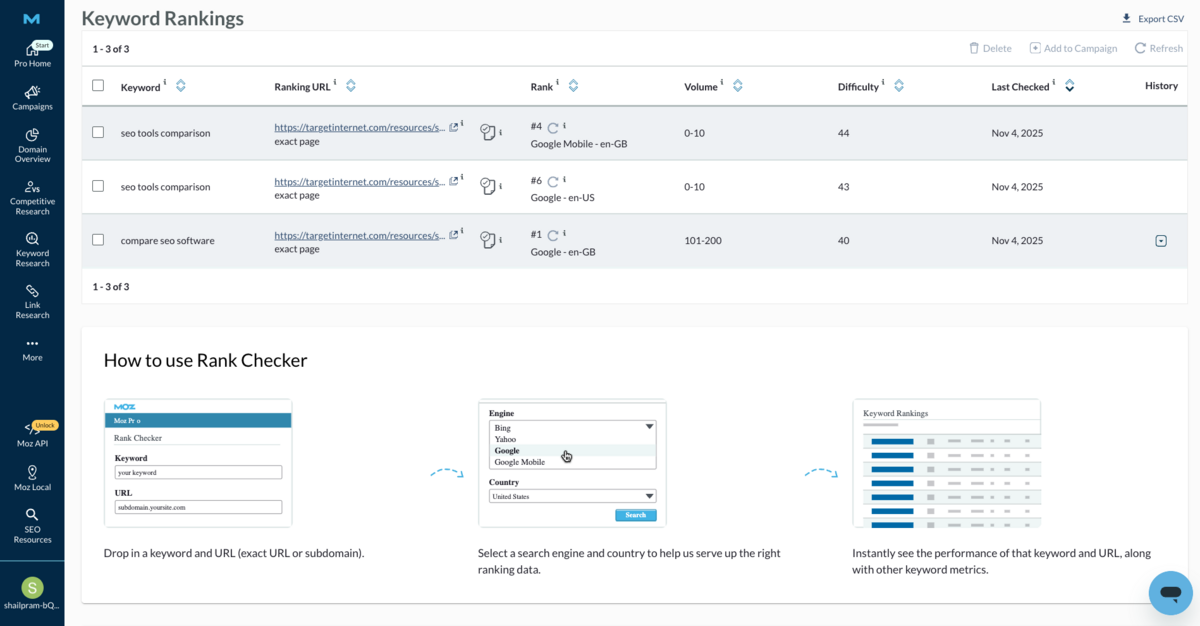
Moz Pro's Rank Checker tool provides quick, on-demand ranking checks for specific keyword-URL pairs.
You input a keyword along with a URL or subdomain, select your search engine and country, then instantly receive the ranking position within the first two pages of results (top 20 or 40 positions, including SERP features). The tool goes beyond just showing position - it also surfaces important keyword metrics such as Search Volume and Difficulty Scores. You can segment rankings by device type (desktop vs. mobile) and location, including country and language variations. For instance, you can check how a page ranks in Finland in both English and Finnish versions of the search engine - useful for international SEO work or multilingual sites.
What makes this tool particularly practical is the ability to add keywords directly into an existing campaign for ongoing tracking.
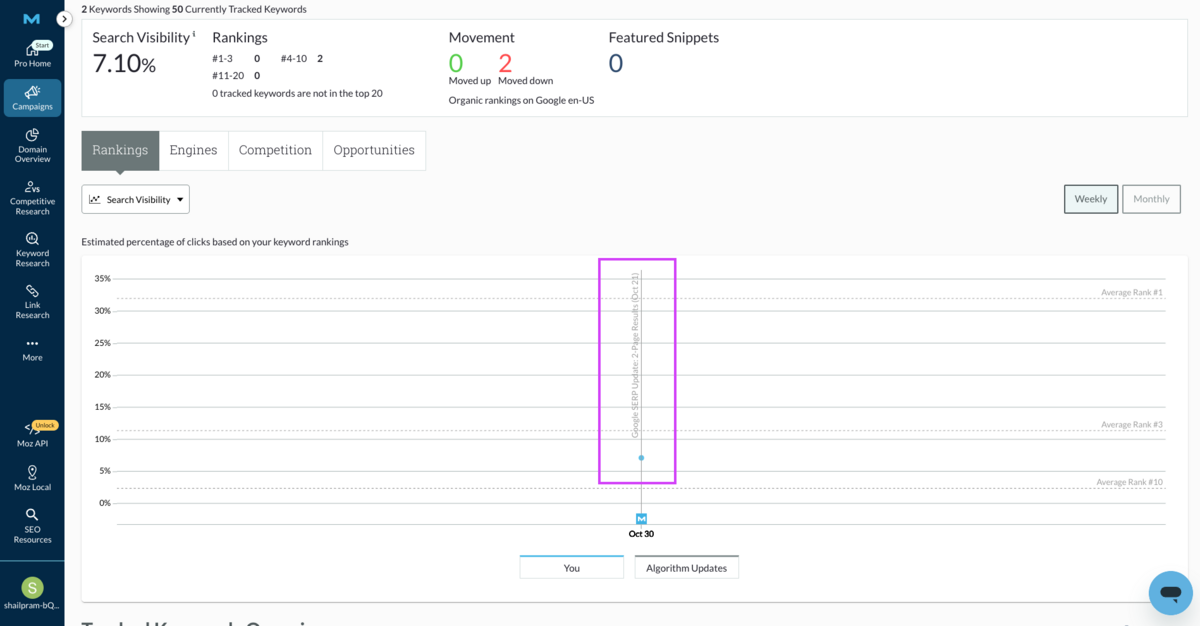
Once added, Moz Pro monitors these keywords daily and begins populating historical data on your dashboard. You can adjust date ranges to see how rankings have changed over time, and segment keywords as 'Branded' or 'Non-Branded' to understand whether visibility is driven by brand awareness or organic discovery. Over time, Moz visualises these trends in graphs that make it easier to spot improvements, identify sudden drops, and correlate ranking changes with campaign updates or algorithm shifts (which are helpfully marked on the graphs).
This context is genuinely valuable for understanding the "why" behind ranking fluctuations rather than just seeing the numbers change.
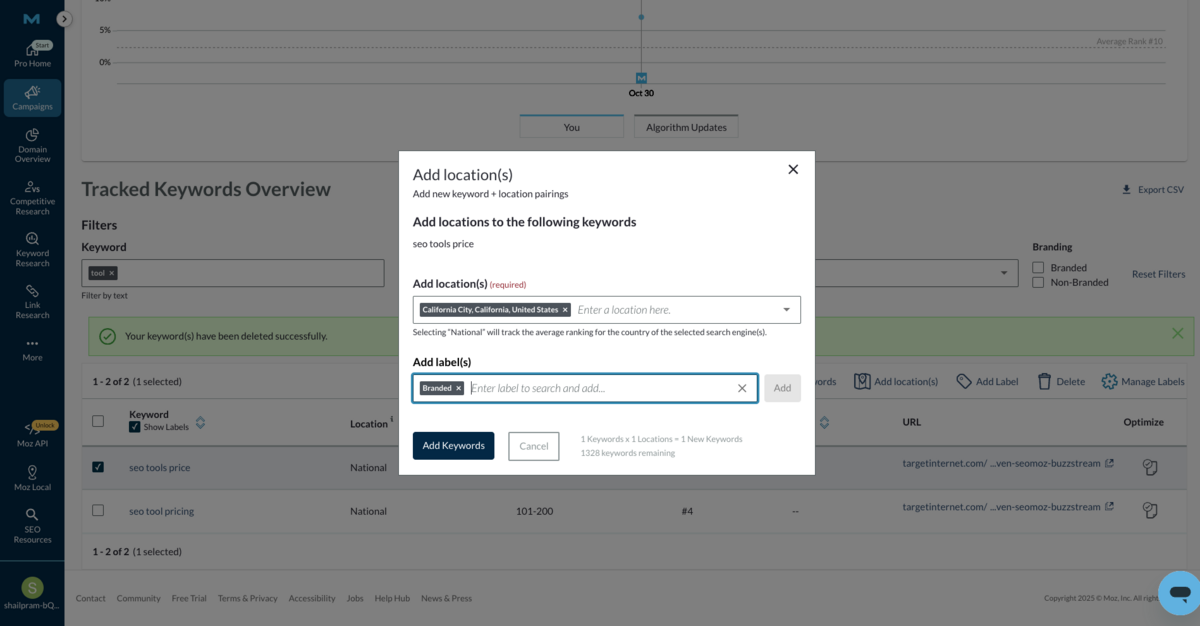
You can also track how each keyword ranks in different locations (cities, states, etc.) - perfect for small or local businesses that don't serve an entire market. It helps you see where you're performing best and where there's room to grow.
Pricing
Moz Pro's pricing structure is built around scale - not just in Keyword Volume, but in how deeply you can analyse, report, and operationalise SEO insights across teams.
Each tier increases limits on site crawls, keywords, and tracked domains while maintaining access to the same core set of research, auditing, and AI-assisted tools. For smaller teams managing a single domain, the entry-level plans provide sufficient capacity to monitor performance and maintain healthy optimisation workflows. Meanwhile, agencies and in-house teams overseeing multiple brands benefit from the higher crawl volumes, broader keyword tracking, and expanded user access at the Medium and Large tiers.
Below is the breakdown of Moz Pro's pricing tiers and what you get at each level:
| Feature / Plan | Starter | Standard | Medium (Most Popular) ⭐ | Large |
|---|---|---|---|---|
| Monthly Price | $49/mo ($39/mo yearly) | $99/mo ($79/mo yearly) | $179/mo ($144/mo yearly) | $299/mo ($239/mo yearly) |
| Users Included | 1 | 1 | 2 | 3 |
| Tracked Sites | 1 | 3 | 10 | 25 |
| Tracked Keywords/month | 50 | 300 | 1,500 | 3,000 |
| Pages Crawled / month | 20K | 400K | 2M | 5M |
| Keyword Suggestions by Topic | ✅ | ✅ | ✅ | ✅ |
| AI Overviews by Keyword | ✅ | ✅ | ✅ | ✅ |
| Brand Authority Score | ✅ | ✅ | ✅ | ✅ |
| Moz AI-Powered Tools | ✅ | ✅ | ✅ | ✅ |
| Reports & Templates | Basic | Standard Reports | Advanced Report Templates | All Medium Features + Higher Limits |
| Best For | Very small businesses, solo site owners | Small teams needing more capacity | Growing teams + full keyword research workflows | Agencies + enterprise SEO teams |
Ultimately, the right plan depends on the scale of your SEO operations and the level of reporting rigour you need.
If your team regularly audits large content libraries, manages multiple domains, or provides performance updates to stakeholders, the additional tracking capacity at the higher tiers quickly becomes essential. However, for focused teams working on one site with clear optimisation priorities, the more compact plans still offer the analytical depth and AI-powered guidance needed to improve rankings, monitor technical health, and refine content strategies over time.
Moz's core value remains consistent across all tiers, which is actionable insights backed by credible data - the difference lies simply in the volume at which you work.
Conclusion
One of our criticisms of past Moz products has been that they felt a bit "style over substance".
With the 2026 version of Moz Pro, that issue has been remedied to a significant extent through the addition of practical AI-powered features and enhanced competitive research tools to supplement Moz's long-standing data analytics prowess. Another issue we've had with previous Moz products has been a lack of innovative features, relative to competing tools. This problem has also been addressed, with additions such as AI-Content Briefs, Keyword Suggestions, and dedicated Spam Score monitoring providing a level of differentiation that Moz's toolkit once lacked.
Moz Pro is one of the most comprehensive SEO suites we've seen to date, offering an all-in-one solution with the excellent Link Research tools at its heart.
For marketers who value reliable link data, comprehensive competitor analysis, and AI-assisted features within a single platform, Moz Pro represents a solid investment - particularly if your team prioritises measurement and analysis in your SEO strategy.
Go back to the SEO tools comparison report.
Frequently Asked Questions (FAQs)
1. What is Moz?
Moz is a comprehensive SEO platform that assists marketers and businesses in improving their online search rankings through tools for keyword research, link analysis, and site audits. It's well-regarded for user-friendliness and its well-known metric, Domain Authority, which predicts website ranking strength.
2. Is Moz free?
Moz offers some limited free tools, but full access to its advanced SEO features requires a subscription to Moz Pro, which starts at approximately $49 per month.
3. What does Moz Pro do?
Moz Pro provides an all-in-one SEO toolkit including keyword tracking, site audits, backlink analysis, and optimisation suggestions. It helps users monitor site performance, uncover SEO opportunities, and improve rankings with an intuitive dashboard suited for both small businesses & large agencies.