Every piece of content you publish gets one line of text to earn its audience. The title is what people see in a social feed, what search engines match against queries, and increasingly what AI systems read when they decide which sources to quote. A strong title used to have two jobs: winning the click on social media and winning the ranking in search. It now has a third, earning citations in AI-generated answers, and the good news is that the same disciplined approach serves all three.
This guide, fully updated from our original 2015 article, explains why titles remain the highest-leverage few words you will write, how to research the phrases your audience actually uses, how to write titles that perform across social, search and AI surfaces, and how to measure the results in today's Google Analytics 4 and Search Console.
Short-term and long-term traffic: how good titles keep paying
Content shared on social media produces a spike of traffic that fades within days as your post disappears down the feed. If social were the only channel, you would be on a treadmill, forever creating content for brief bursts of attention. A well-titled piece escapes the treadmill, because the same words that made it clickable in a feed also match the searches people type for months and years afterwards. The spike gets you noticed; the search traffic compounds.
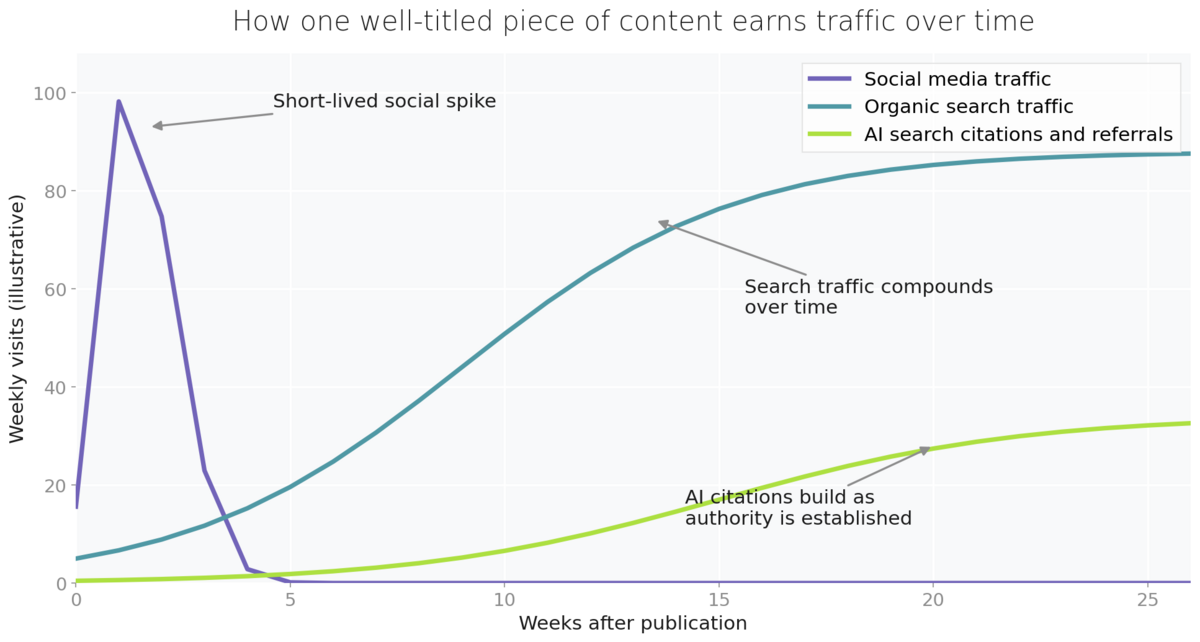
There is now a third curve on that chart. As AI Overviews, Google's AI Mode and assistants such as ChatGPT answer more questions directly, they select and cite sources whose titles and headings clearly signal what a page answers. A title that plainly states the question your content resolves makes the page easier for these systems to retrieve, which is why the most durable content published today earns traffic from three surfaces rather than two. We explain how that selection process works in our guide to optimising your content for AI Overviews and Google AI Mode.
It is worth noting what has not changed since this article first appeared in 2015. The pattern in the chart above, a social spike followed by compounding search growth, is as reliable now as it was then, and titling content around real search phrases remains the single mechanism that connects the two. What has changed is where those searches get answered, and how much more a clear title now earns you.
How to research the titles people actually search for
Effective titles start with evidence, not brainstorming. Before you title anything, find out what your audience is searching for and which exact phrases they use, because the difference between a title built on a real search phrase and one built on internal jargon is often the difference between compounding traffic and none.
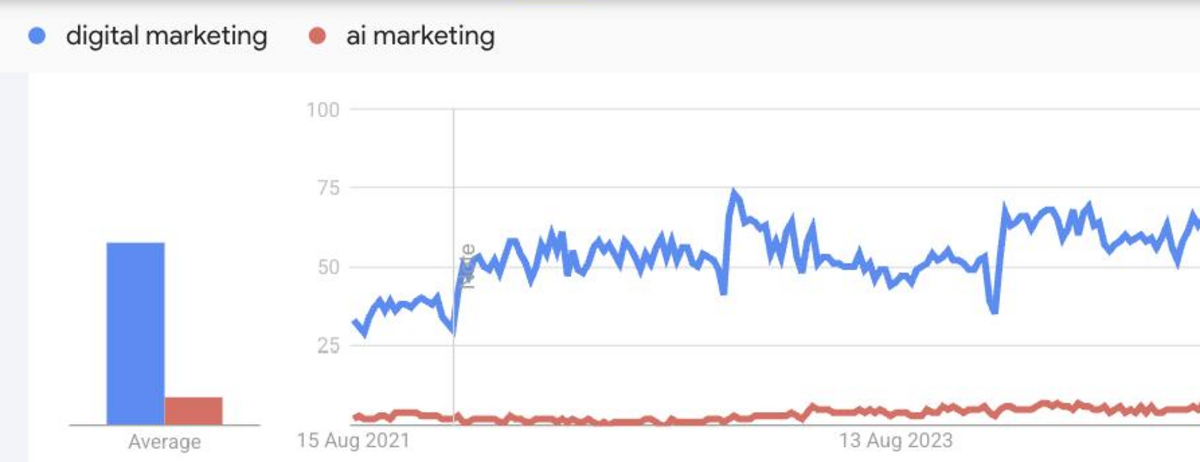
Three free tools cover most of the work. Google Trends shows the relative volume of any search term over time and lets you compare phrasings, so you can see whether interest in a topic is growing and which wording is winning. Keyword Planner, inside a Google Ads account you can hold without spending anything, adds actual monthly search volumes. And your own Google Search Console performance report lists the real queries that already bring people to your site, which is frequently where the best title ideas are hiding in plain sight.
Give special weight to what Search Console tells you. Filter the performance report to a single existing page and you will often find it appearing for queries its title never mentions, which is the clearest possible signal of demand you could capture deliberately. A page about content planning that keeps surfacing for "how to create a content calendar" is telling you exactly what its next title, or its next sibling article, should say. This kind of retrospective mining regularly outperforms fresh keyword research, because it is based on searches your site has already proven it can attract.
The results pages themselves are a research tool too. The People also ask box and the questions AI Overviews choose to answer show you the exact phrasing of demand around your topic. An AI assistant can accelerate this stage considerably.
Copy and paste prompt: "I am writing content about [topic] for [audience]. List the twenty questions this audience most commonly asks about [topic], phrased the way they would type them into a search engine. Then suggest five content titles that each match one high-demand question, keep the key phrase near the start, and would still make someone curious enough to click in a social media feed."
Writing titles that work three ways
Once you know the target phrase, the craft is holding three audiences in mind at once: a person scrolling a feed, a search engine matching queries, and an AI system deciding whether your page answers a question. A handful of principles satisfy all three. Put the key phrase early, because truncation hides the ends of titles in feeds and search results, and clarity up front wins. Prefer clear over clever, since a pun that means nothing until you have read the article will be scrolled past, never searched for and never cited. Match the phrasing of a real question or task where you can, as question-shaped titles map directly onto what people ask search engines and AI assistants. Keep titles roughly within sixty characters so they display fully, and above all make the promise the content actually keeps, because clickbait that overpromises earns a bounce, and engagement signals and AI systems alike are unforgiving of pages that fail to deliver their title's promise.
Compare "Our thoughts on the changing content landscape" with "How often should you post on LinkedIn? What the data says". The first means something only to the person who wrote it. The second contains a searched-for question, survives truncation, promises a specific pay-off for the social click, and hands an AI system a ready-made match for a question users genuinely ask. Google's own guidance on influencing title links reinforces the same principles: descriptive, concise, no keyword stuffing.
Certain title shapes earn their popularity because they encode a clear promise. How-to titles state the outcome the reader will achieve. Question titles mirror the query itself. Numbered titles such as "Seven ways to reduce email unsubscribes" promise scannable, finite effort. Comparison titles like "GA4 vs Adobe Analytics: which fits a small team?" capture decision-stage searches with strong intent. None of these shapes is inherently better; the right choice is the one that matches how your audience phrases the underlying need, which is exactly what the research stage told you. And resist the temptation to append the current year to everything: it buys a short-lived freshness signal at the cost of a title that looks stale within months, so reserve it for genuinely time-sensitive content you commit to updating.
Remember that your page title and your h2 section headings work as a system. The title wins the visit; question-led headings inside the piece win the AI citations for the follow-up questions. Writing both well is a skill you can build deliberately, and our SEO friendly content writing course, included in Target Internet membership, works through it with practical exercises.
Measuring whether your titles are working
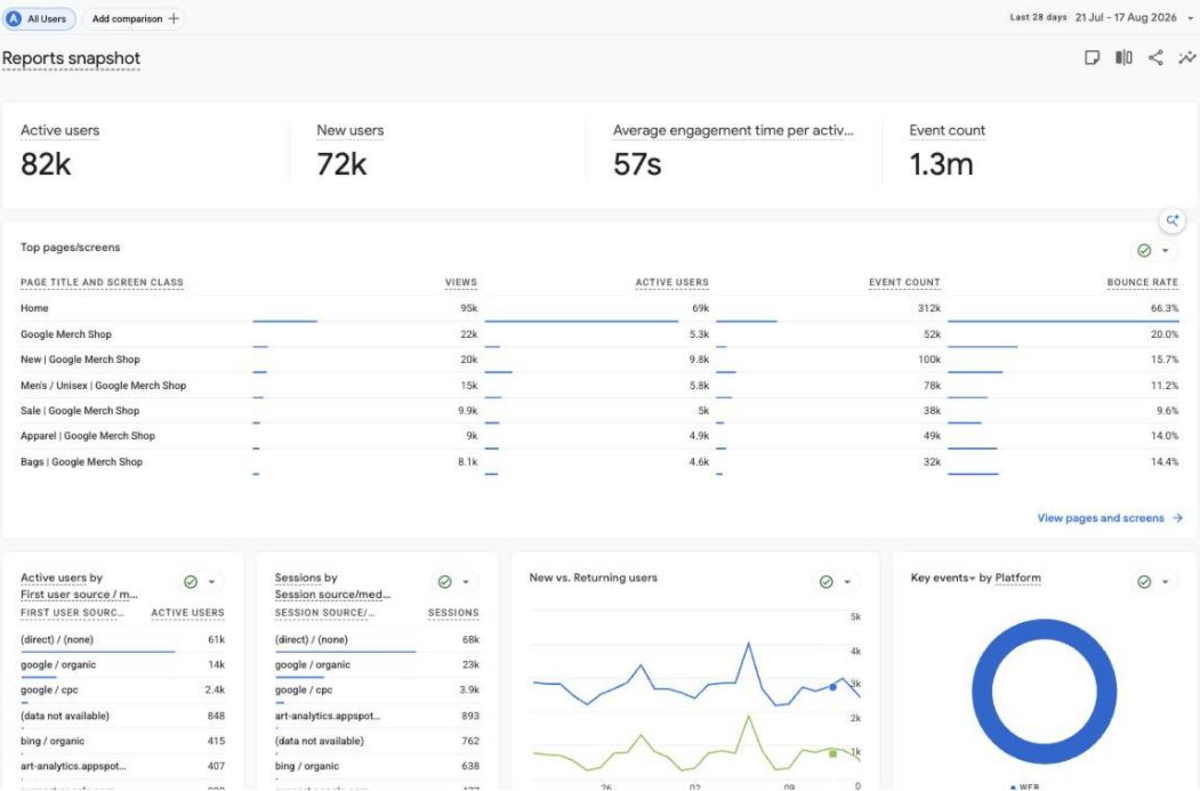
The original version of this article walked through Universal Analytics reports that no longer exist, so here is the current equivalent in Google Analytics 4. The Reports snapshot gives you an immediate view of your top pages by title, and the Pages and screens report under Engagement shows views for every page over your chosen period. To see where a specific page's traffic comes from, the modern version of the old source and medium check, open the Landing page report under Engagement, or add the session source/medium dimension, and you can watch the mix shift from social referrals in week one to organic search over the following months.
Two checks complete the picture. In Search Console, the performance report shows the queries each page appears for and its click-through rate, and a page with high impressions but a weak click-through rate is usually a page whose title is underselling it, which makes title rewrites one of the fastest SEO wins available. And since Google introduced generative AI performance reports in Search Console in 2026, you can also see whether your content is appearing inside AI Overviews and AI Mode, closing the loop on the third job your titles now do.
Measurement is also what makes retitling old content safe and worthwhile. Work through your existing library, find pages with meaningful impressions but click-through rates below their position's norm, and rewrite those titles against the principles above, keeping the URL unchanged. Change one thing at a time, note the date you changed it, and compare the four weeks either side in Search Console. A title rewrite takes minutes, carries almost no risk, and on an established page can lift traffic within weeks, which makes it the highest-return maintenance task in most content programmes.
Make titles a habit, not an afterthought
The discipline is simple to describe: research the phrase before you write, put it early in a title that makes a promise the content keeps, and check back in Google Analytics 4 and Search Console to see which titles are compounding. Do this for every blog post, video and podcast episode you publish and the effect stacks, because each well-titled piece keeps earning search visits and AI citations long after its social moment has passed.
If you want to build this skill properly across your team, Target Internet membership includes interactive courses on SEO friendly content writing, content marketing and AI, skills benchmarking to find your gaps, over 400 episodes of the Digital Marketing Podcast, and monthly live masterclasses, including our SEO and AEO Masterclasses covering exactly how search is changing. It is the fastest way to turn good titling from one person's habit into your whole team's standard practice.
Bibliography
1. Google Search Central. Influencing your title links in search results. https://developers.google.com/search/docs/appearance/title-link
2. Google Analytics Help. User acquisition report. https://support.google.com/analytics/answer/12922540
3. Google Search Central Blog. Introducing Search generative AI performance reports in Search Console. https://developers.google.com/search/blog/2026/06/gen-ai-performance-reports
4. Google Trends. https://trends.google.com/trends/
5. Target Internet. How to optimise your content for AI Overviews and Google AI Mode. https://targetinternet.com/resources/how-to-optimise-your-content-for-ai-overviews-and-google-ai-mode