This review is part of our SEO tools comparison report. This article has been updated for 2026 and replaces the older review of WebCEO.
Index
- Introducing the Tool
- Setup & Interface
- Rank Tracking
- Keyword Research
- Site Audit
- Site Infrastructure Toolkit
- Landing Page SEO
- Competitor Content Insights
- Backlink Profile
- Traffic Analysis & Integrations
- Social Analytics & Google Business Profile
- Competitor Metrics
- Reporting & White-Label
- Pricing
- The Final Verdict
- Frequently Asked Questions (FAQs)
Introducing the Tool
WebCEO has been around since 2000. It's one of the 'original SEO platforms'.
After more than two decades of iteration, it has evolved into a 24-tool suite covering the entire SEO workflow: rank tracking, keyword research, site audits, backlink analysis, content intelligence, and competitive analysis. It's built mainly for agencies and professional SEO teams, not for beginners. Compare it against the Big 3 (Semrush, Ahrefs, and Moz Pro), and you'll find it does some things better, some things differently, and some things less comprehensively.
Setup & Interface
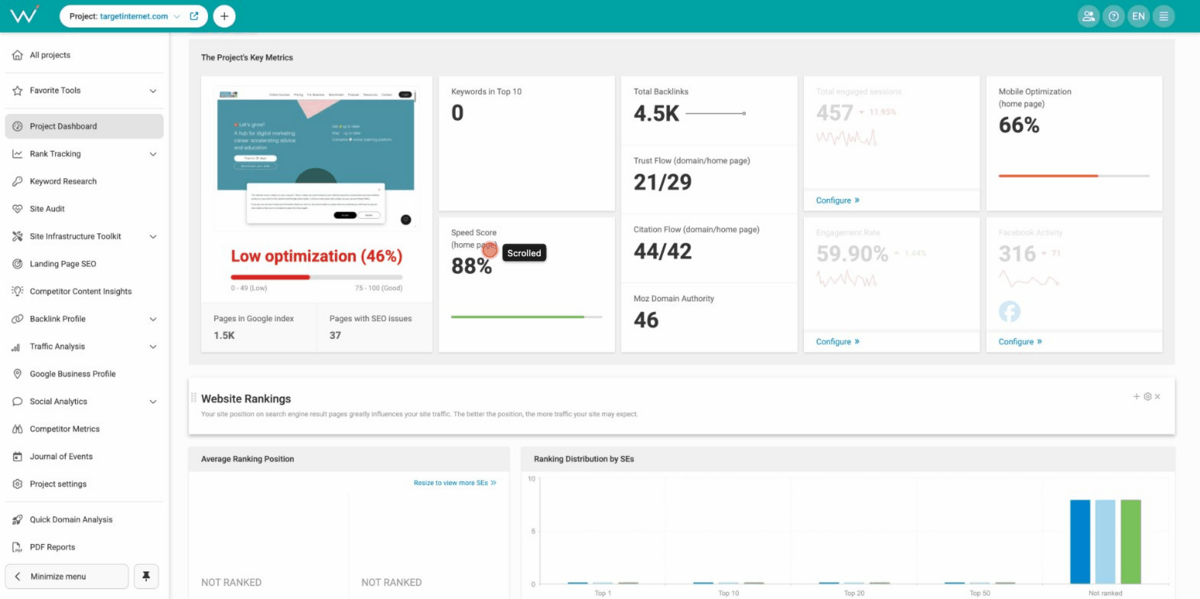
When you log in first, you'll see a widget-based dashboard that is completely customisable.
It gives you many options to play with: Keywords in Top 10 positions, Moz Domain Authority, Trust Flow, Citation Flow, total backlinks, Speed Scores, Site Optimisation Percentages, Google Indexation Status, Social Engagement Metrics, Facebook activity, and a lot more. It's helpful if you know what you're looking for, and also useful if you want to build certain views so you can present your preferred metrics to your stakeholders. When you're running multiple accounts, you can customise each dashboard to exactly what you need.
That said, the interface is dense. It's not cluttered, but it is a bit hard to understand. We wouldn't say that the UI is bad, but it's not very friendly either. The navigation involves nested menus, and while the structure is logical, if you're using WebCEO for the first time, you should definitely expect an orientation period here.
Rank Tracking
Rank tracking is one of the main functionalities of any SEO software.
My Site Rankings
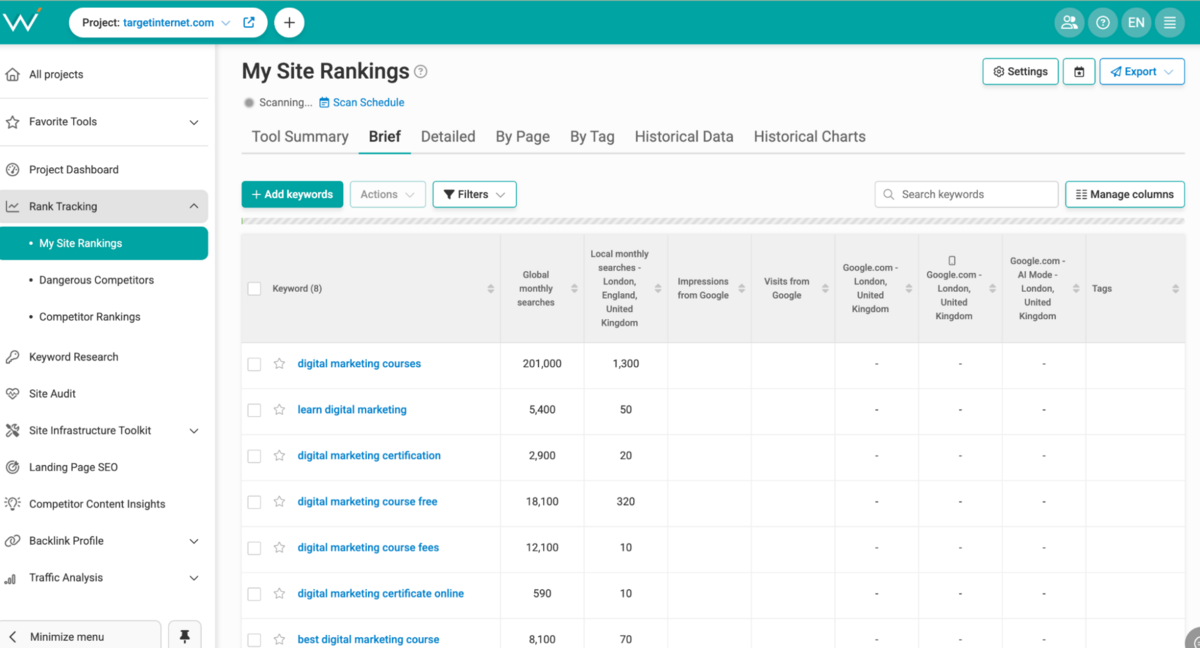
My Site Rankings is where you live if you're running keyword monitoring.
You can track performance across your target keywords, and WebCEO gives you multiple perspectives: Tool Summary for quick stats, Brief for a clean overview, Detailed for the full picture, By Page showing what's ranking where, By Tag for keyword groupings, and Historical Data for trends over time. For each keyword, you're seeing: current position, improvement or decline, global monthly searches, local monthly searches, impressions from Google Search Console, visits from Google, CPC estimates, and bid competition levels.
That's considerably more context than just tracking "position 5."
You understand the actual business impact, and can also use this information to inform your organic vs. paid keywords strategy. There is also a distinction between Desktop, Mobile, and AI Mode tracking, which is quite useful.
For GEO, WebCEO shows you which of your keywords appear in Google's AI Overviews and, crucially, whether your site is being cited as a source. Most competing tools (excluding the big 3) are still building basic support for this.
Where this section falls short is in scale. Ahrefs and Semrush allow you to track large keyword sets without high costs. WebCEO charges $4 per 1,000 rank queries beyond your plan's limits, which becomes a meaningful cost consideration for agencies tracking 5,000 or more keywords across multiple clients.
Dangerous Competitors & Competitor Rankings
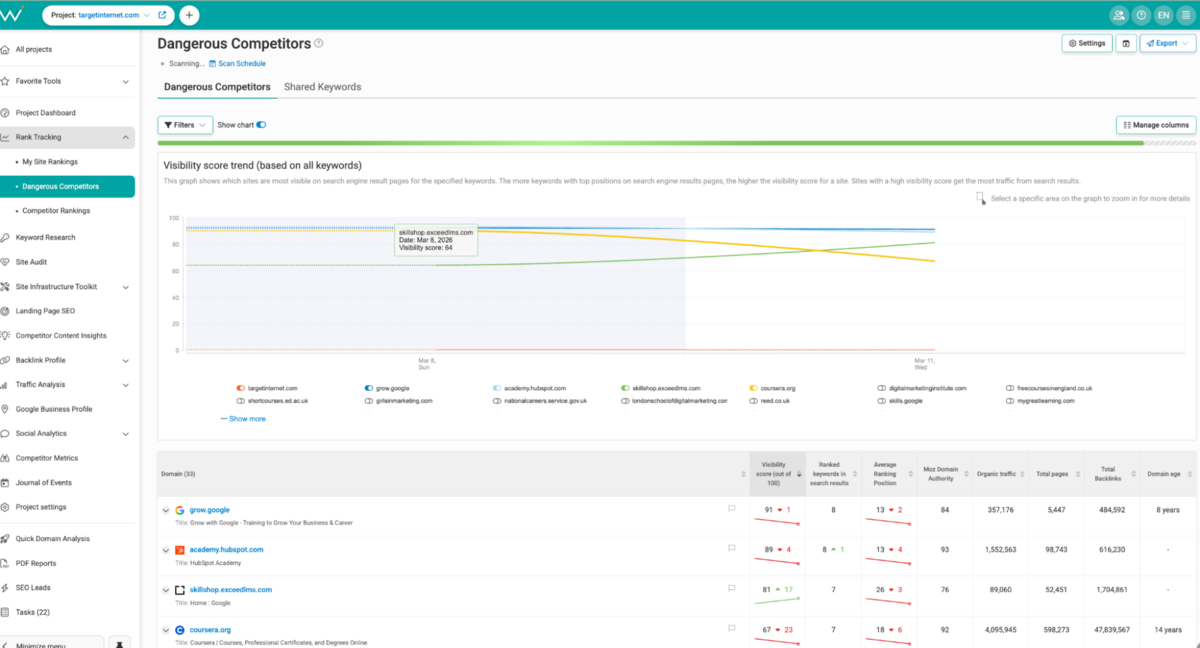
This section deserves a special shoutout. Out of all the keyword tools that we have reviewed, the 'Dangerous Competitors' section in WebCEO has shown us the most relevant competitors to our brand.
Neither Semrush nor Ahrefs has shown us competitors that are so relevant to the nature of our business. 70% of all competitors that are shown on all other SEO tools are simply inaccurate, because they pick up the wrong context. WebCEO is the first tool in our process of reviewing SEO tools that has shown highly relevant competitors that sell the same things as we do, which are digital marketing courses & certifications.
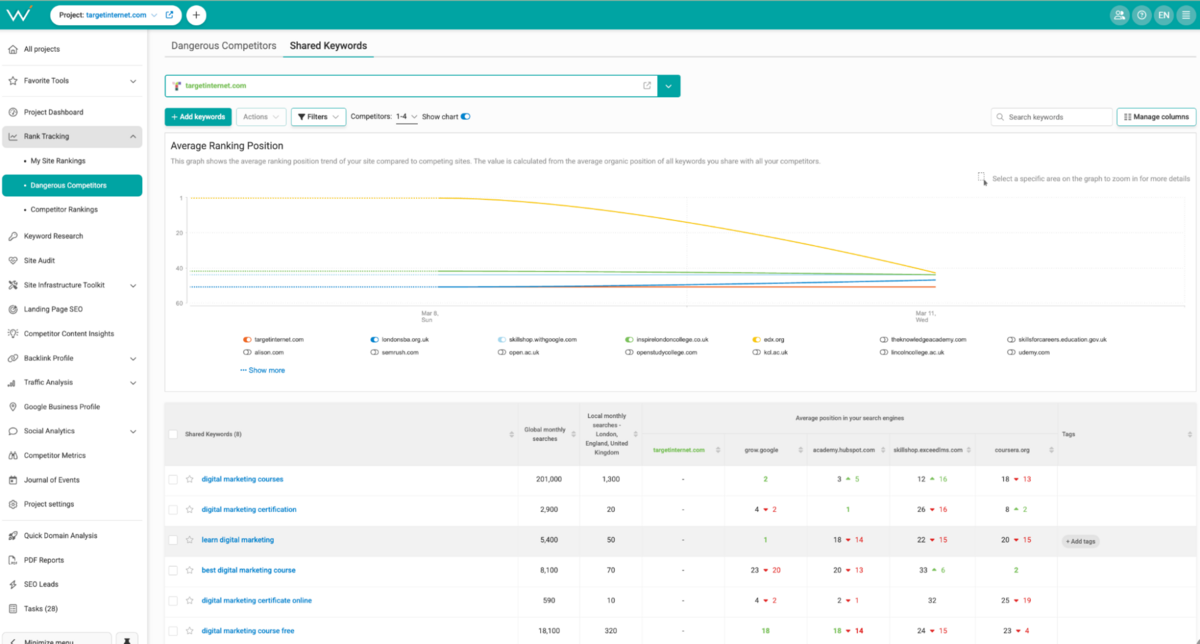
The entire section is well built.
A competitor suddenly jumps from position 8 to position 3 for your target keywords? WebCEO flags them as "dangerous" and surfaces them at the top of your radar.
It shows you how your target competitors are performing across your keyword set and, inversely, how you're stacking up against them.
Keyword Research
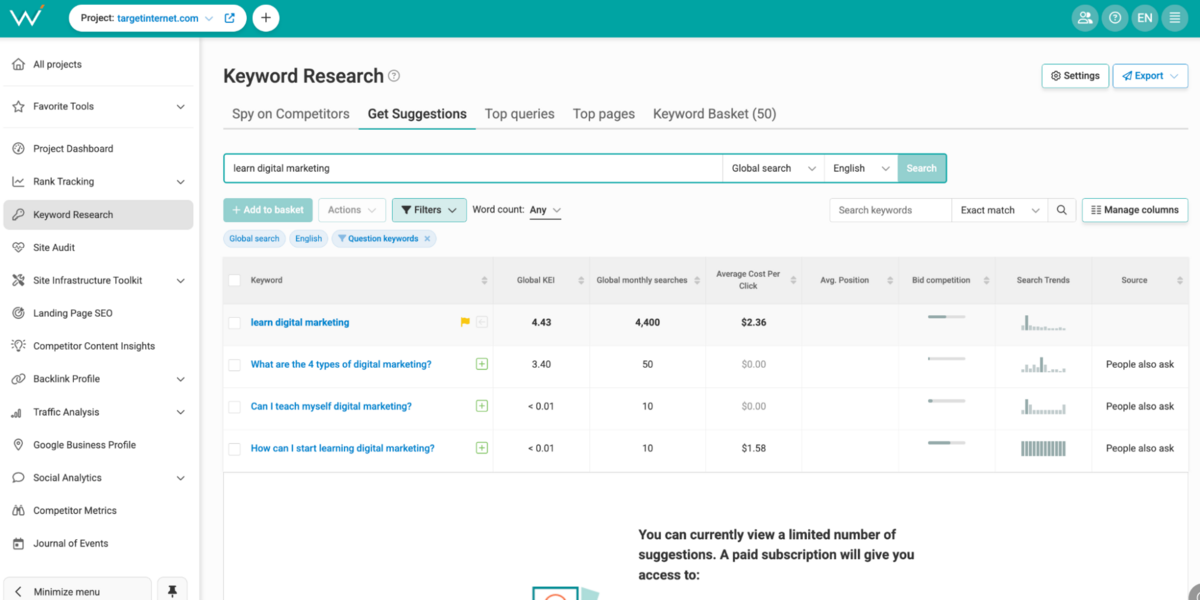
Keyword research is where the gap between WebCEO and the top-tier tools becomes most apparent. The platform pulls data from Google Autocomplete, Related Searches, People Also Ask, and Google Ads Keyword Planner.
It's just the way that this tool is built that makes it a little hard to make the keyword research useful. For example, there is no option to directly create keyword lists from here. You can assign tags, and then make a list yourself by filtering for the tag later on, but it's just an extra layer in your workflow that can usually be avoided on other tools.
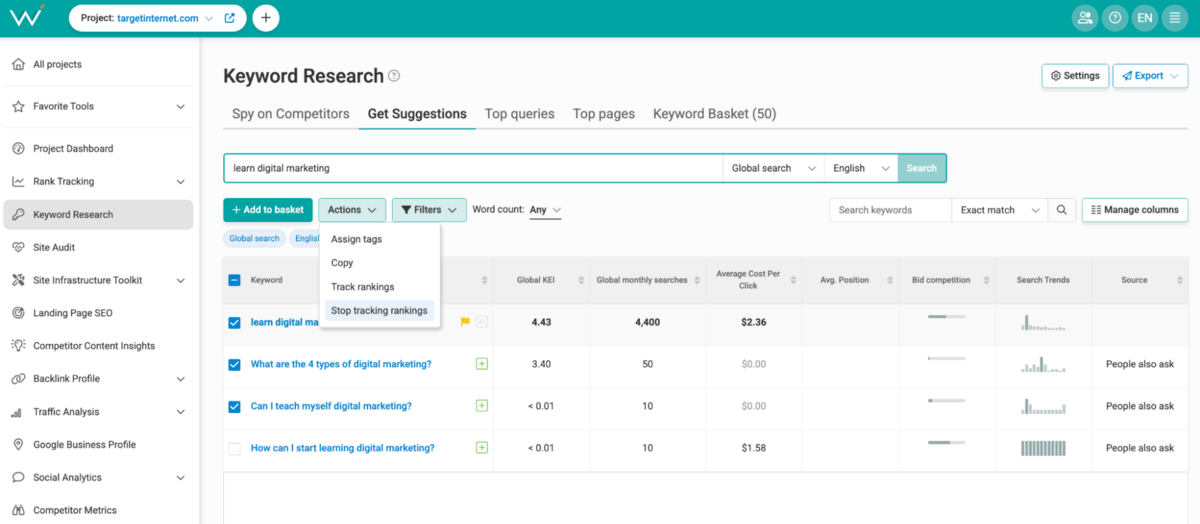
For mapping entire keyword universes or discovering long-tail variations in niche markets as well, it's just easier to use Semrush or Ahrefs here. They really have gamified their versions of keyword planners that make it easy for you to do things quickly.
Spy on Competitors
This feature does exactly what the name suggests.
Point WebCEO at a competitor's domain, and it identifies the keywords they're targeting. From there, you can analyse which of those keywords you're already ranking for, which you're completely missing, and which might be quick wins.
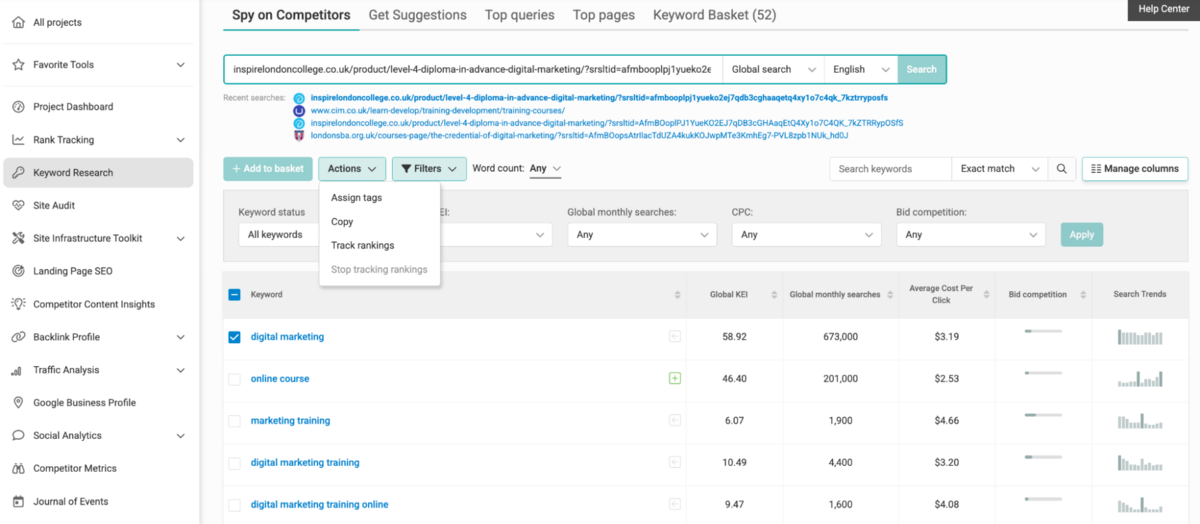
It is a simple tool - very easy to use.
However, it would be really helpful here to have other insights on here, like what pages are ranking, where is the opportunity for your site to win, how deep is the keyword coverage for specific pages, and so on. Semrush, Ahrefs, and Moz Pro are miles ahead of WebCEO when it comes to this, so there's no real comparison here.
Site Audit
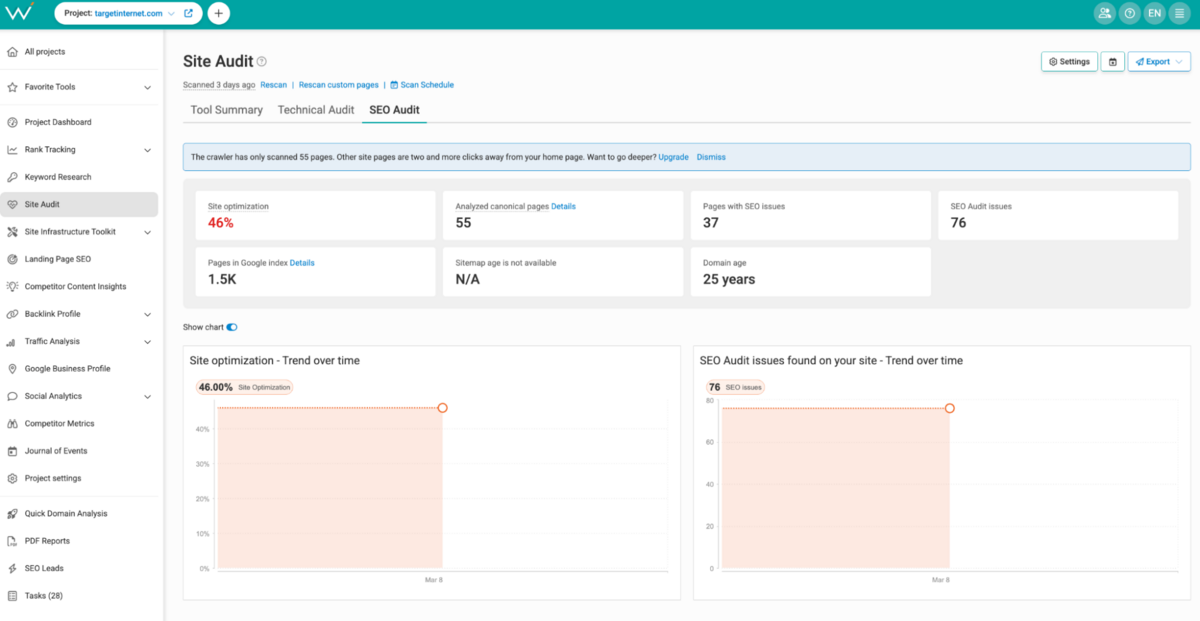
Site audits are where WebCEO shows considerable maturity. It is table stakes in 2026, but it's impressive that WebCEO's Site Audit is so well built.
Technical Audit
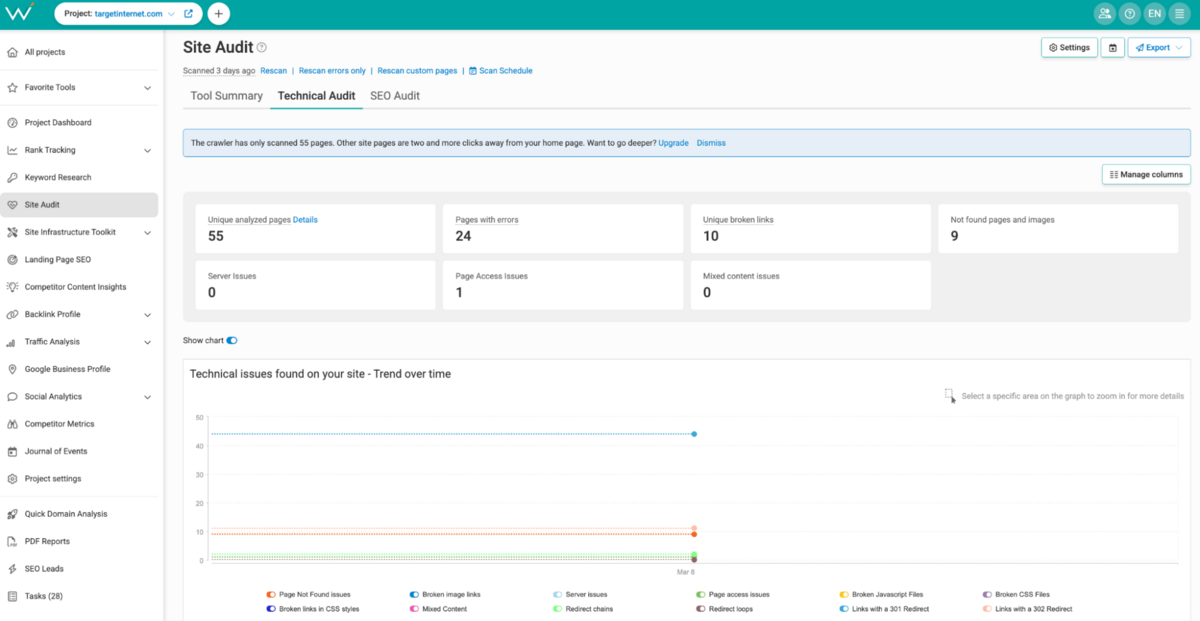
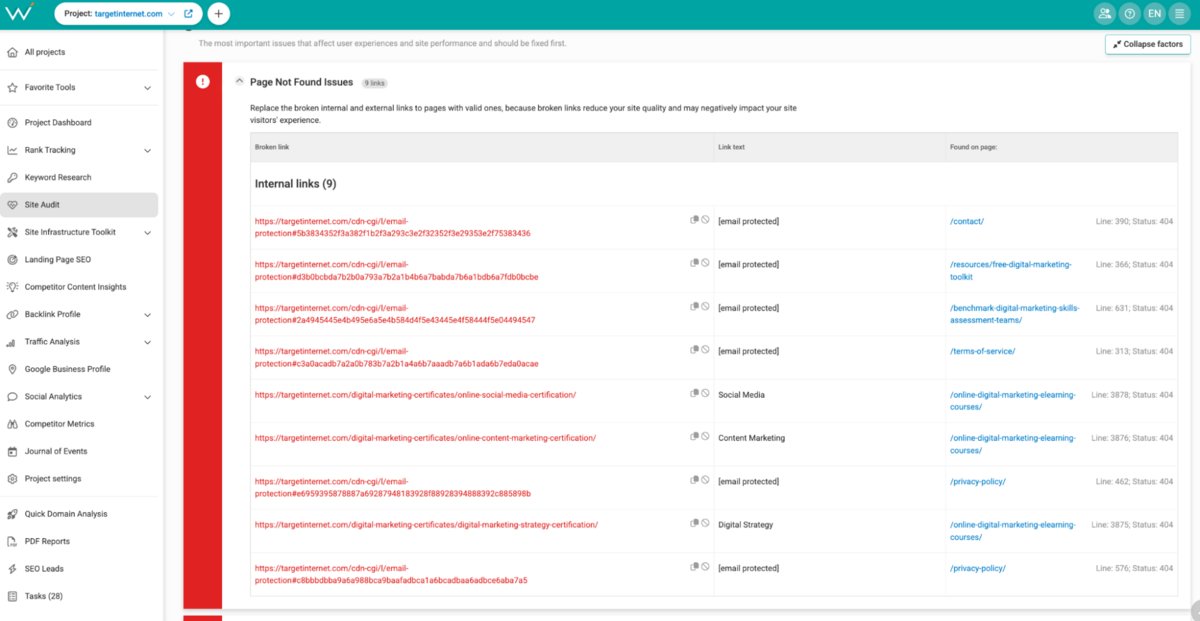
The Technical Audit identifies pages with errors, broken links, not found pages (404s), server issues, and page access issues. You're getting a crawl-based analysis of your site's technical health, which is foundational work and typically the first place to start when inheriting a new site or troubleshooting ranking drops.
What stands out is the specificity. Rather than getting a vague "this page has issues," you're getting specific problems like "this page returns a 302 redirect," "this internal link is broken," or "this page takes 4.2 seconds to load."
SEO Audit
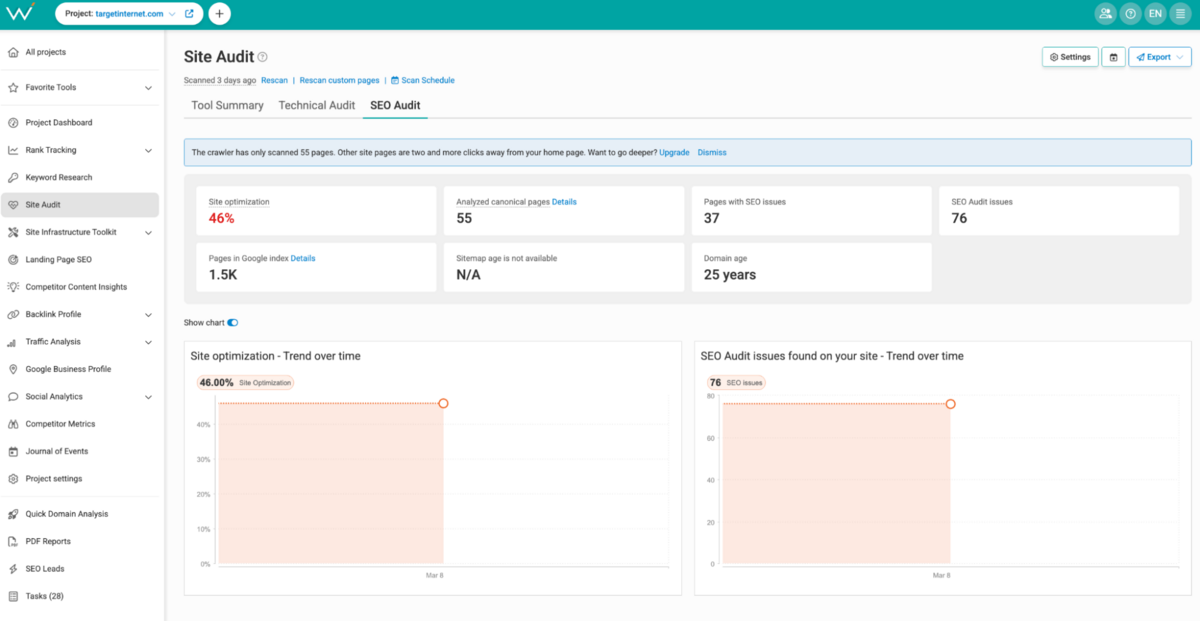
The SEO Audit measures your site optimisation percentage (a score out of 100).
The "Consider Fixing" section breaks down specific, high-impact SEO issues like: "Add Title tag to 23 pages," "Shorten Title tags on 15 pages," "Rewrite duplicate content on 8 pages," and "Add meta description to 47 pages." It's not just flagging problems. It's quantifying them and showing you the effort required to fix them.
Again, this section is simple to use.
There are, however, no workflow integrations here or connections to other sections of the tool internally. You will need to manually export all of this into a .csv file and then tick things off the list yourself.
Site Infrastructure Toolkit
This is where WebCEO's "24 integrated tools" claim becomes tangible. The Site Infrastructure Toolkit bundles several separate analyses that other tools spread across different sections.
Internal Links
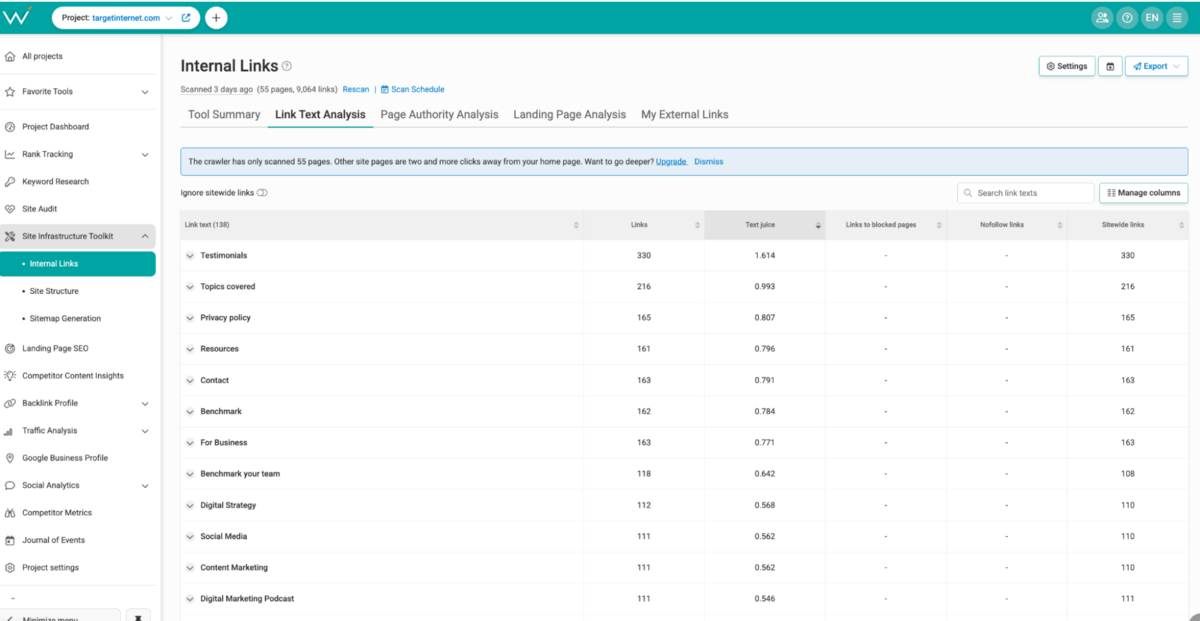
The internal link analysis includes a metric called "Text Juice."
In their own words: "This metric considers both the number and authority of pages using a specific link text. Search engines may decide on a site's theme based on juicy link texts."
This is basically PageRank flow measurement across your internal links. You can see which pages are accumulating the most link authority and which links are most valuable for distributing authority throughout your site. It's a simplified but effective way to understand your site's internal authority structure.
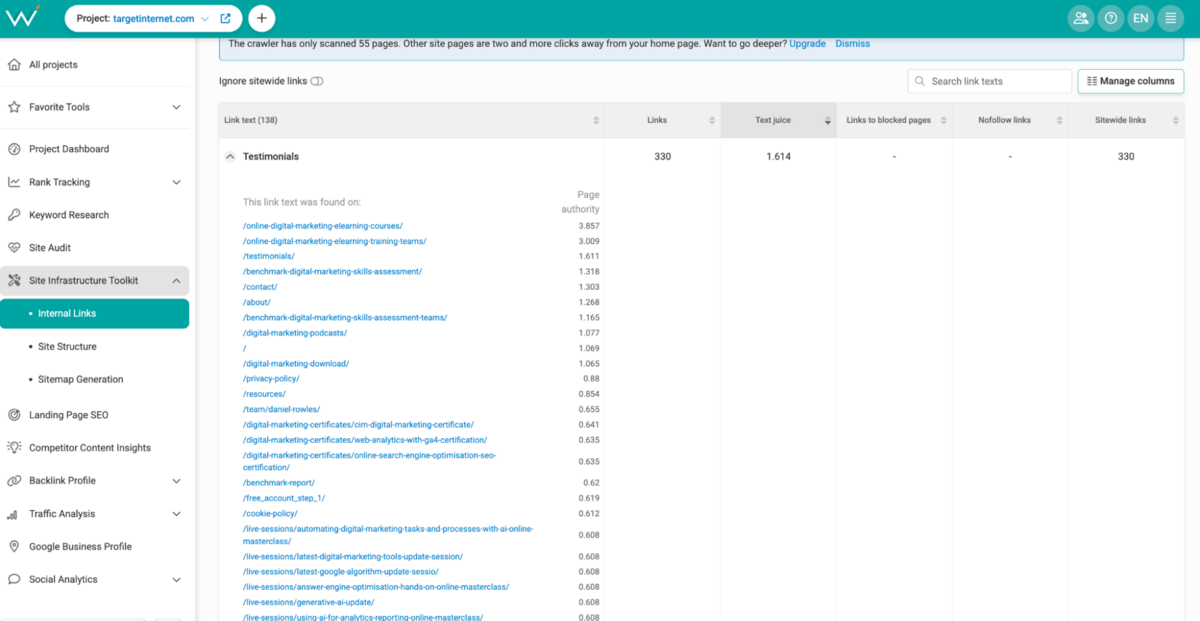
Rather than showing you every single internal link on your site (which would be overwhelming with thousands of data points), it intelligently surfaces the ones that matter: high-value internal links that are actively driving authority distribution through your site architecture.
Site Structure & Sitemap Generation
WebCEO can now generate your XML sitemap based on crawl data and visualise your site structure, so you understand hierarchy and topology. This is useful if you're inheriting a site and need to understand its structure quickly or if you're redesigning site architecture.
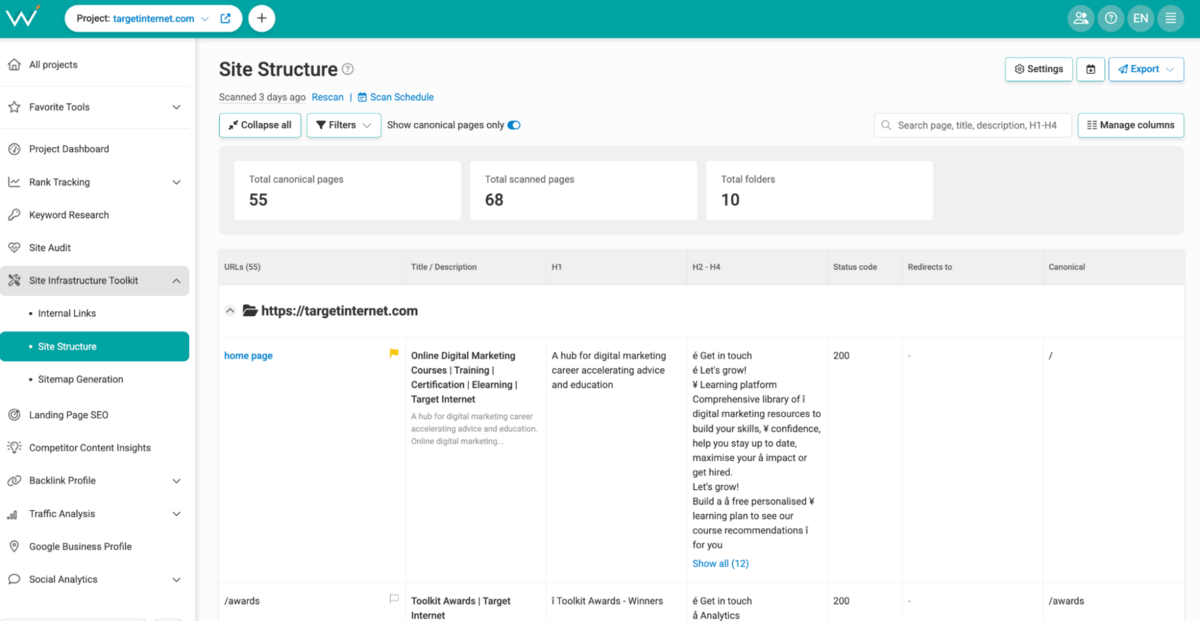
You can compare your actual site structure against your submitted sitemap to Google. If you've told Google you have 500 pages, but you actually have 680, WebCEO will flag that discrepancy. That disconnect matters considerably for crawl budget allocation and proper indexing of your content.
Landing Page SEO
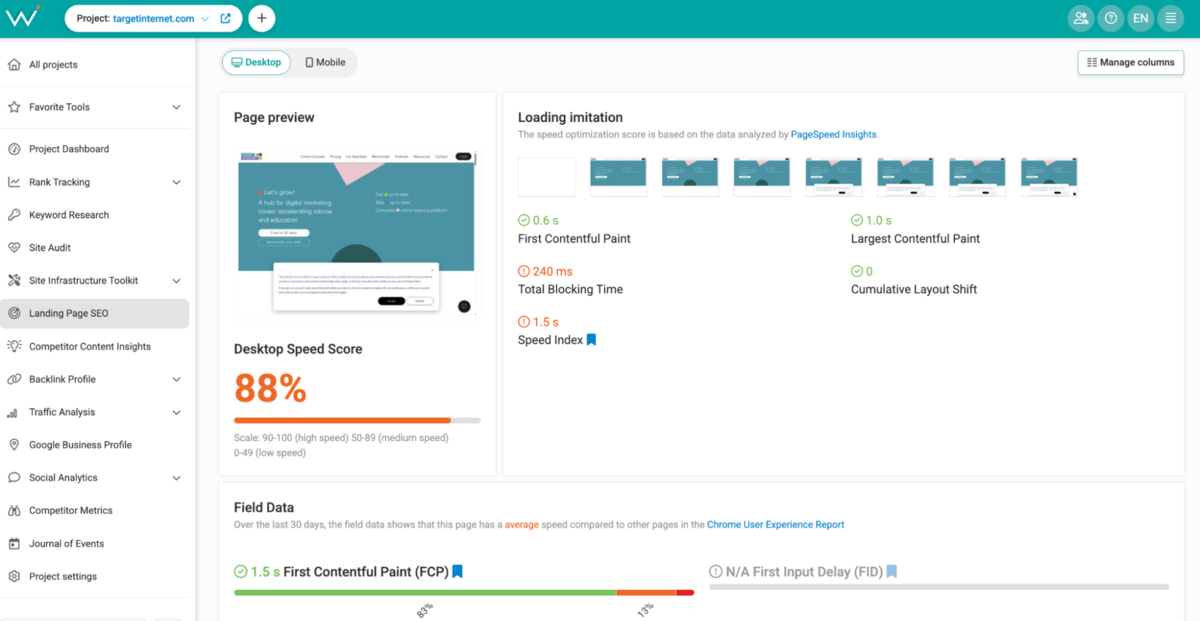
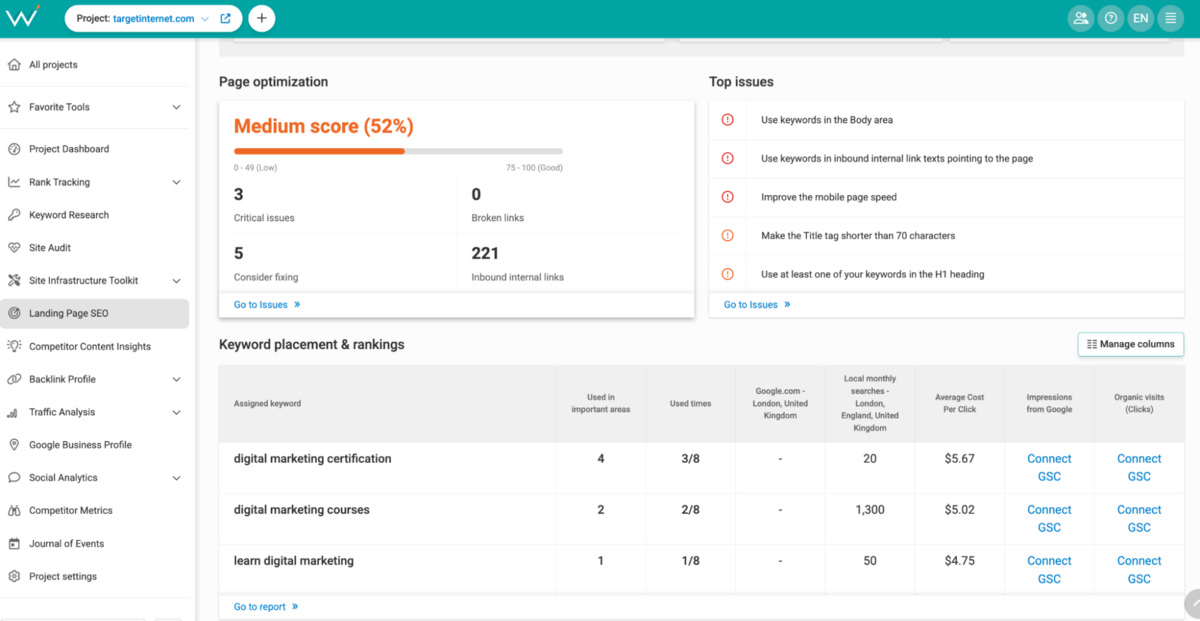
Here, you can see optimisation scores alongside actual impressions, clicks, average position, backlink counts, and page speed scores for Desktop and Mobile.
The integration with Google Search Console is also helpful here. You're seeing not just "this page is optimised" but "this page gets 340 impressions and 12 clicks monthly, and here's what's preventing it from ranking higher." That real traffic context changes how you prioritise optimisation work.
Competitor Content Insights
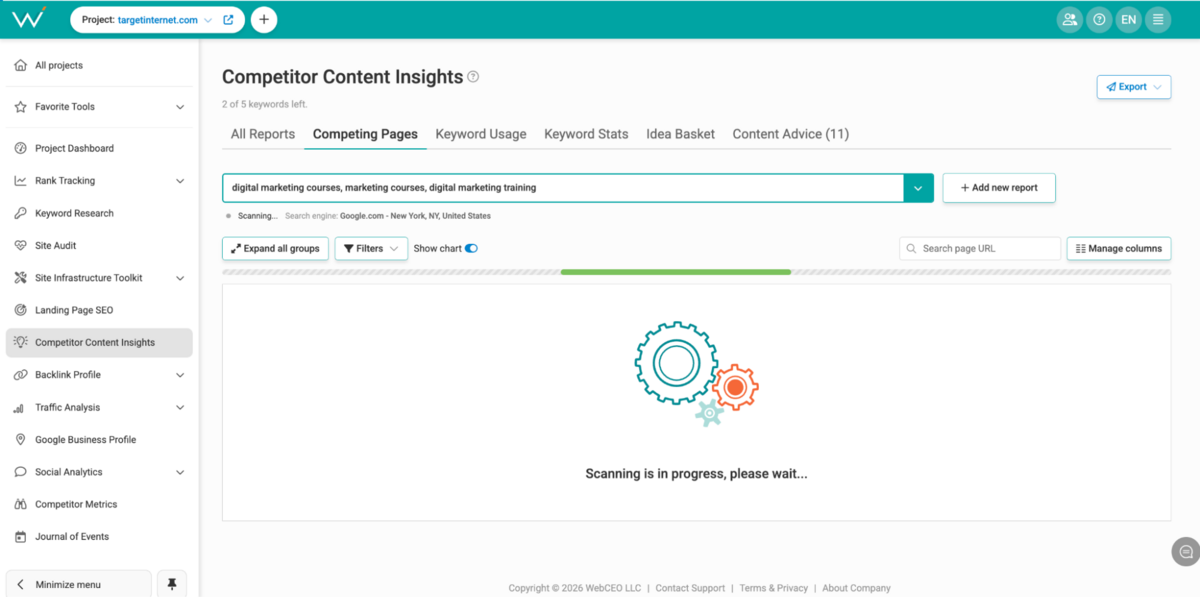
Since this is a review, we'll be honest. This section is broken in WebCEO. We tried using it multiple times for the purposes of this review, but it never seemed to work. Even after waiting for a few days, the Competitor Content Insights returned the same error: i.e. it just says "Scanning in progress, please wait…"
Backlink Profile
WebCEO uses Majestic data to do its backlink analysis.
My Backlinks
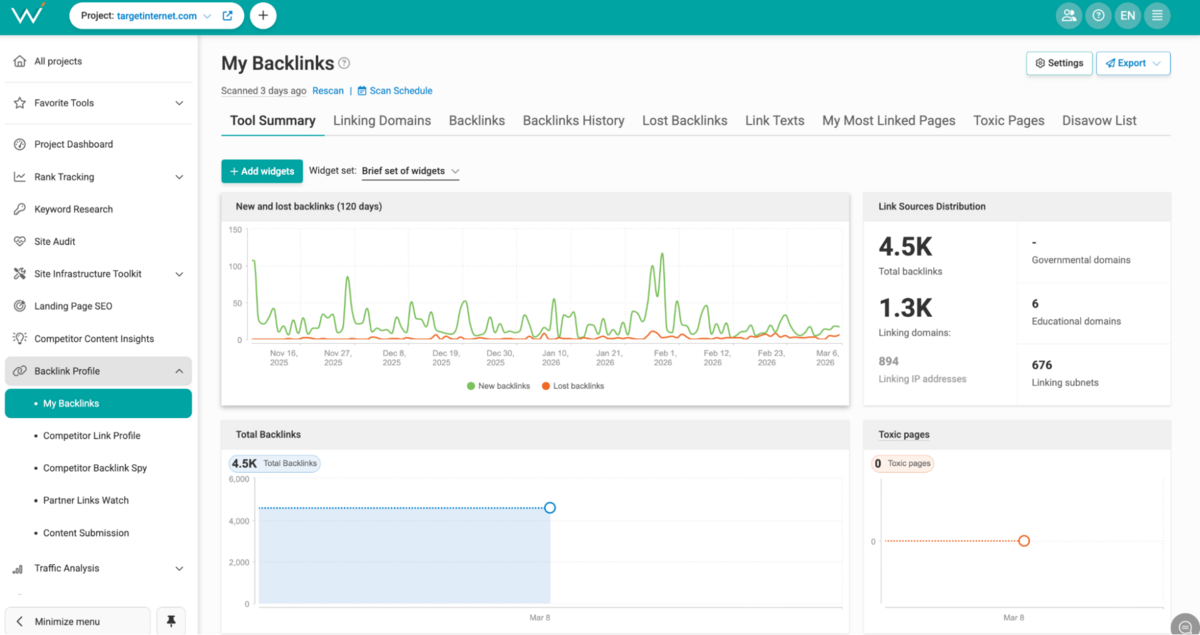
Your backlink analysis shows linking domains, total backlinks, backlink history, and lost backlinks.
You're getting Trust Flow and Citation Flow metrics (Majestic's authority metrics), Juicy Links identification, nofollow percentage, toxic percentage, and estimated domain organic traffic. It's a comprehensive overview of your entire link profile in one view. Rather than treating all backlinks equally and forcing you to manually sort through thousands of links, WebCEO surfaces the links that matter most for your rankings.
Tracking lost backlinks is standard functionality at this point. You need to know when valuable links disappear so you can investigate and potentially reclaim them. WebCEO's presentation is clear and actionable, showing you both the lost link and the date it was last detected.
The biggest flag here is that there is no workflow integration, where you can manage outreach/link-building efforts.
Competitor Backlink Spy & Partner Links Watch
The Competitor Backlink Spy feature lets you see where your competitors are getting links and, crucially, where they're getting links that you're not. This is useful for prospecting new link opportunities and identifying publication or website relationships you haven't yet leveraged. You can see the pattern of where your competitors' links are clustering and reverse-engineer their link strategy.
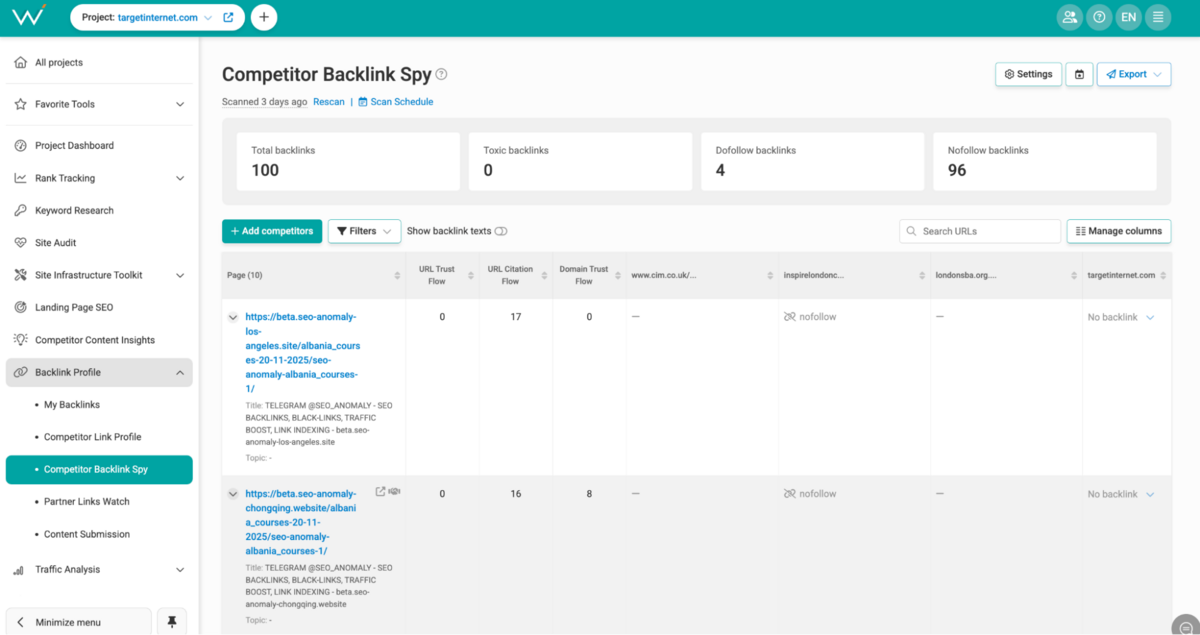
The Partner Links Watch feature here is clever.
You set up monitoring for a list of specific websites (partners, publications, directories, resource sites) and track which competitors are getting links from them in real time. This is excellent for identifying opportunities like "our competitor just got coverage in a major publication, where can we pitch our content?"
WebCEO has built-in disavow list functionality. You can mark toxic links and submit them to Google for disavowal without leaving the platform. This is something that you'll find in every major tool these days.
Traffic Analysis & Integrations
WebCEO integrates with Google Analytics (GA4), Google Ads (GA4), and Google Search Console, and allows you to analyse competitor traffic estimates.
That's the expected integration list for any serious SEO platform, and WebCEO checks every box. For most agencies, having these three data sources available in one place is highly convenient. The simplicity of integration makes this easy. You can authorise through Google, and data starts flowing immediately. There's no complicated API setup required, no token management, no ongoing authentication issues.
WebCEO isn't doing anything particularly innovative with this data integration.
You're seeing your traffic data in a dashboard, which is useful for consolidation, but Ahrefs' traffic estimates and Semrush's GA integration offer more sophisticated cross-pollination of data. WebCEO is functional but not differentiated in this area.
Practically speaking, if you want to understand: "Why do these keywords drive traffic but don't rank well?" or "These pages get traffic from Google, but are they ranking for our target keywords?", WebCEO will help you understand that better. But you're probably already seeing this in Google Analytics. There is definitely convenience here, just not any new intelligence.
Social Analytics & Google Business Profile
WebCEO has 4 sub-sections in the Social Analytics section - Facebook Insights, LinkedIn Insights, Social Engagement Metrics, and Web Buzz Monitoring.
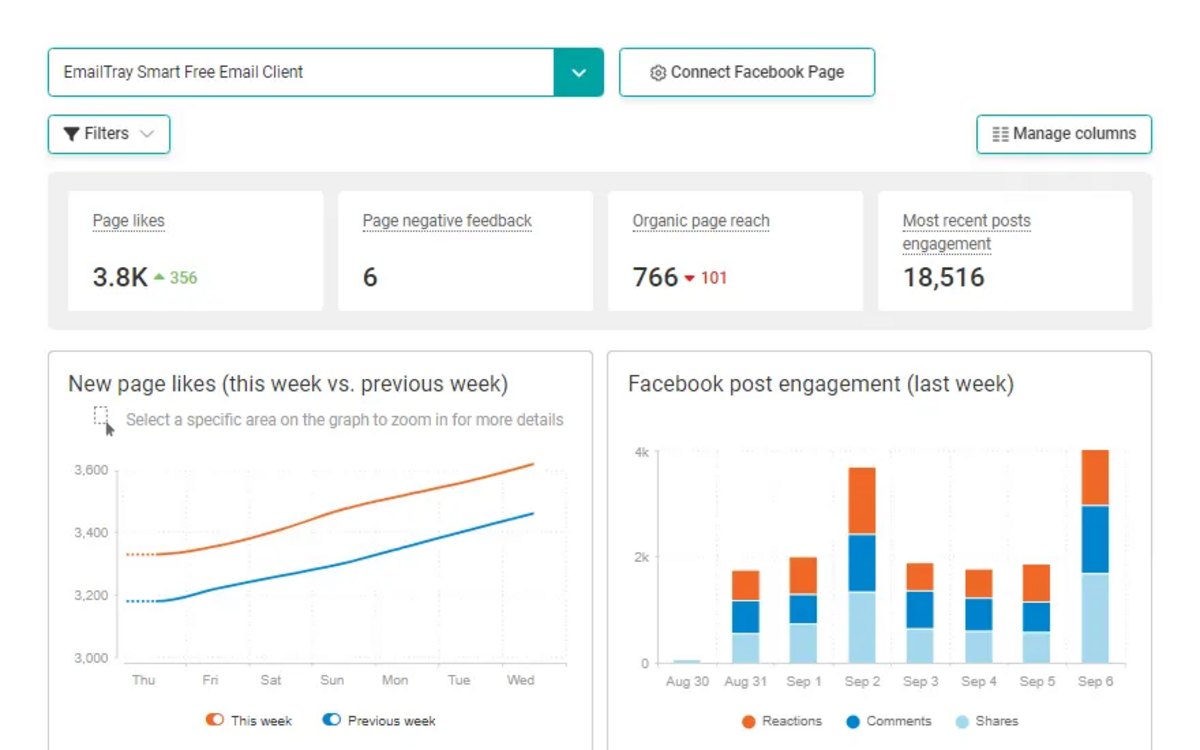
Honestly, this does not add a lot of value.
Yes, it is helpful to see all of this in one view. But if you're serious about social, then you're better off with SproutSocial or Hootsuite. You can't go very deep or look for insights on WebCEO. It's easier to do community management, manage scheduling, and track performance from a dedicated Social tool vs. doing it here.
Competitor Metrics
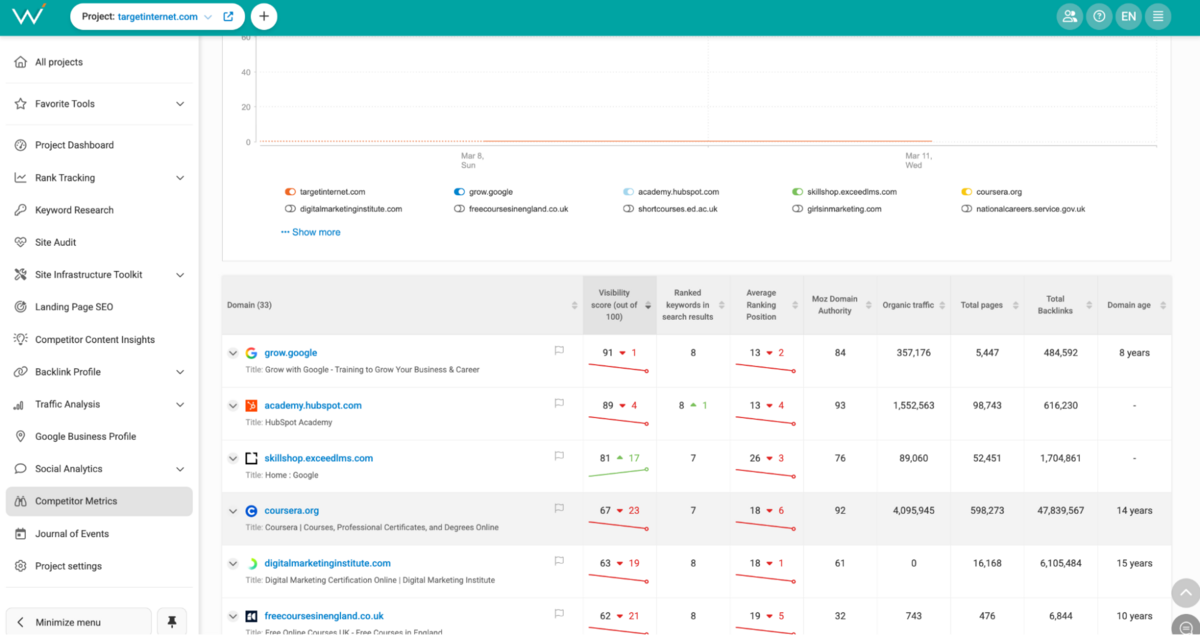
This section bundles several competitor analysis features: dangerous competitors identification (a sub-section of the same tool that was mentioned earlier), shared keywords tracking, traffic comparison, link profile comparison, social citations analysis, and rankings overview across competitors.
The "Dangerous Competitors" section really stands out. Rather than analysing only the competitors you've identified, WebCEO identifies sites that are moving aggressively in your keyword space, so you can plan your keyword strategy accordingly.
Reporting & White-Label
The white-label reporting functionality in WebCEO is made specifically for agencies.
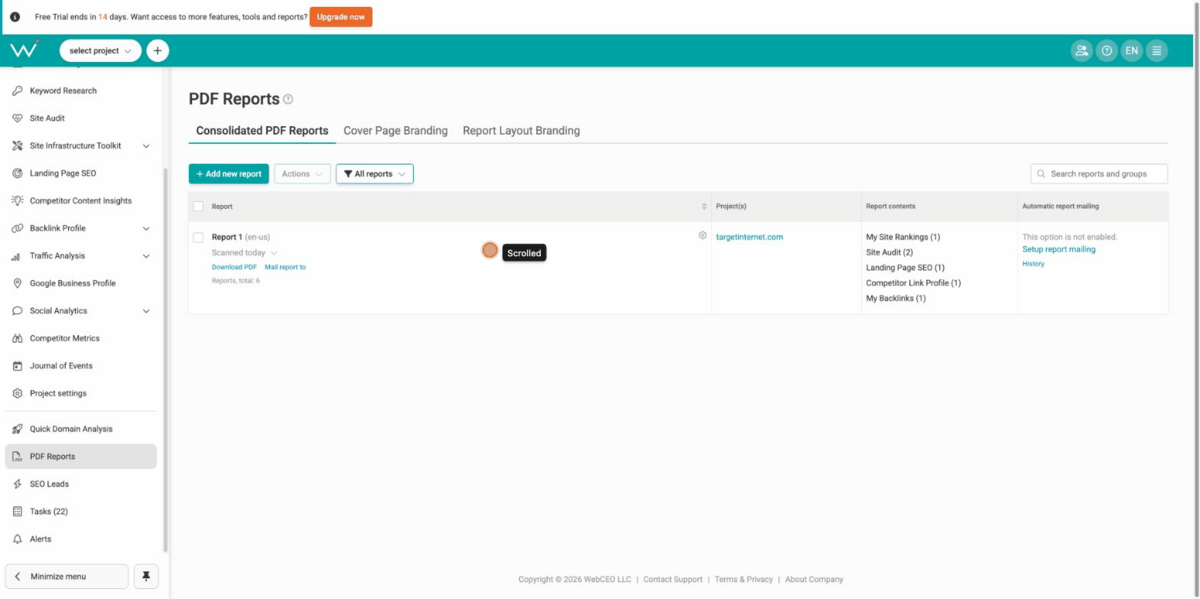
You can build consolidated reports covering all tracked metrics, customise cover pages and layouts with your branding, and set up automated report delivery on your preferred schedule. Everything is self-service through the UI without needing a developer. However, the report interface feels somewhat dated compared to more modern reporting platforms.
These reports are functional & comprehensive, but they don't look very modern. It's more like the 2012 version of Facebook vs. how Facebook looks now.
Pricing
WebCEO's pricing structure is straightforward and considerably transparent. There are no dark patterns, no surprise charges, and no features mysteriously locked behind higher tiers:
- Solo: $36/month (quarterly) or $32/month (annual) - 1 project, 1 user, 100 keywords
- Startup: $119/month (annual: $99/month) - 5 projects, 5 teammates, 750 keywords
- Agency Unlimited: $99/month (annual: $83/month) + scanning fees - unlimited projects, unlimited teammates, unlimited keywords
- Corporate: $299/month (annual: $251/month) - 30 projects, 10 teammates, 2,400 keywords
The Solo, Startup, and Corporate plans are flat-rate.
What you see is what you pay. Agency Unlimited is where costs can move, and it's worth understanding how before committing. The base price is $83/month on annual billing, but that's just the starting point. Every rank query you run costs extra, and that number adds up faster than you'd expect.
Let's talk about how 'queries' work.
Tracking one keyword across Google US desktop, Google US mobile, and Google UK counts as three separate queries. Run that across 20 clients, 200 keywords each, and suddenly you're burning through tens of thousands of queries before the month is out. WebCEO has a budget calculator on their pricing page. We highly recommend using this before you subscribe to the agency plan.
For smaller agencies managing 5 to 10 clients on moderate keyword sets, the plan still works out well. You get unlimited projects and teammates at a low base price, and your query volume stays manageable. The problem is when you scale. Ahrefs and Semrush's higher tiers cover high query volumes at a flat monthly rate. If you're adding clients quickly, you may find the predictability of a flat-rate competitor plan actually works out cheaper once the overages stack up.
The Final Verdict
WebCEO has been around for over two decades. That age is both its biggest strength and its most obvious weakness.
The site audit is specific and actionable. The Dangerous Competitors section is strong and one of the best we've tested in this category. The white-label reporting is solid for agencies that need automated delivery without building custom infrastructure. The AI Mode rank tracking is ahead of where most tools are right now.
Then there's the other side.
The interface has a real learning curve. Keyword research is underpowered compared to Ahrefs and Semrush. The report design hasn't kept pace with how the category has evolved. None of these are dealbreakers on their own, but taken together, they paint a picture of a tool that hasn't been fully modernised.
The tool is built for a specific type of user: an agency or professional SEO team that values simplicity over best-in-class individual features & functionality/workflow management. If you're looking for a tool that can do the bare bones of SEO work, then WebCEO is a good choice, especially if you prefer simplicity.
If you're a beginner or if keyword research and content strategy are your primary needs, then WebCEO isn't the right starting point.
You also need to pay close attention to pricing. Agency Unlimited is the plan most agencies will gravitate toward, and it can be very cost-effective at a small scale. But the per-query model means costs can move quickly as you add clients and keywords.
Okay, but how does it stack up against the big 3?
The honest comparison against the Big 3 is pretty straightforward.
Ahrefs is better for backlinks and keyword research. Semrush is better for content strategy and has a more modern interface. Moz Pro is more beginner-friendly. WebCEO beats all three on one specific thing: identifying dangerous competitors before you've noticed them yourself. Everything else is either comparable at best or behind.
That's the honest position. WebCEO is an old tool. It works, it's reliable, but it's not the best.
It won't win a design award, and it won't make keyword research feel effortless. What it does is give a professional SEO team a single platform that covers the basic workflow, produces solid white-label reports, and flags competitive threats before you notice them yourself.
If that's enough for what you need, it's a reasonable choice. If you need more, Ahrefs, Semrush, or Moz Pro are better choices.
Click here to get back to the 2026 SEO tools comparison report.
Frequently Asked Questions (FAQs)
1. What is WebCEO?
WebCEO is an SEO platform built for agencies and professional SEO teams. It covers rank tracking, keyword research, site audits, backlink analysis, and competitive intelligence across one dashboard. It's been around since the early 2000s and is best known for its white-label reporting and Dangerous Competitors tracking feature.
2. How much does WebCEO cost?
Plans start at $36/month for Solo. Startup is $99/month on annual billing, Corporate is $251/month, and Agency Unlimited is $83/month. Agency Unlimited has usage-based fees on top: $4 per 1,000 rank queries and $0.80 per 1,000 backlinks found.
3. How do you connect Search Console to WebCEO?
Go to your project settings, select the Integrations tab, and click Connect under Google Search Console. You'll be prompted to authorise through your Google account. Once authorised, data starts flowing automatically. No API setup required.
4. How do you switch users on WebCEO?
From the main dashboard, go to Account Settings and select Team Management. From there, you can add, remove, or switch between users.
5. Is WebCEO legit?
Yes. WebCEO has been operating since 2000 and is used by agencies worldwide. It's a legitimate SEO platform that consists of 24 sub-tools.