This review is part of our SEO tools comparison report. This article has been updated for 2026 and replaces the older review of Authoritas.
Index
- Introducing the Tool
- Setup and Interface
- AI Search Platform
- Market Analysis and Visibility
- Keyword Research and Rank Tracking
- Technical SEO and Search Console
- Content Tools
- Link Data
- Pricing
- The Verdict
- FAQs
Introducing the Tool
Authoritas has been quietly building SEO software for over a decade, originally under the name Analytics SEO (which was founded in 2009).
In 2018, the company acquired the Linkdex platform, folding its enterprise-grade data and functionality into what would become the Authoritas we see today. It is not a name that comes up in most casual SEO conversations, and that is partly the point. Authoritas has always positioned itself as a tool for serious practitioners rather than a mass-market product.
What makes Authoritas worth a closer look in 2026 is its pivot towards AI search.
The platform now bills itself as a "Complete AI Search + SEO Visibility Platform for Brands," and it is one of the first tools we have reviewed that offers advanced tracking for LLMs like ChatGPT, Perplexity, Claude, and Gemini, alongside traditional SEO.
The platform is built around two core offerings: the SEO Platform, which handles the traditional rank tracking, keyword research, technical audits and backlink analysis (the same stuff you would expect in any SEO platform), and the newer AI Search Platform, which monitors how brands appear in AI-generated responses. The AI bit does take some time to understand, but an hour of sitting down and reading through their knowledge base is enough to get the hang of it.
Setup and Interface
Setting up Authoritas is straightforward enough.
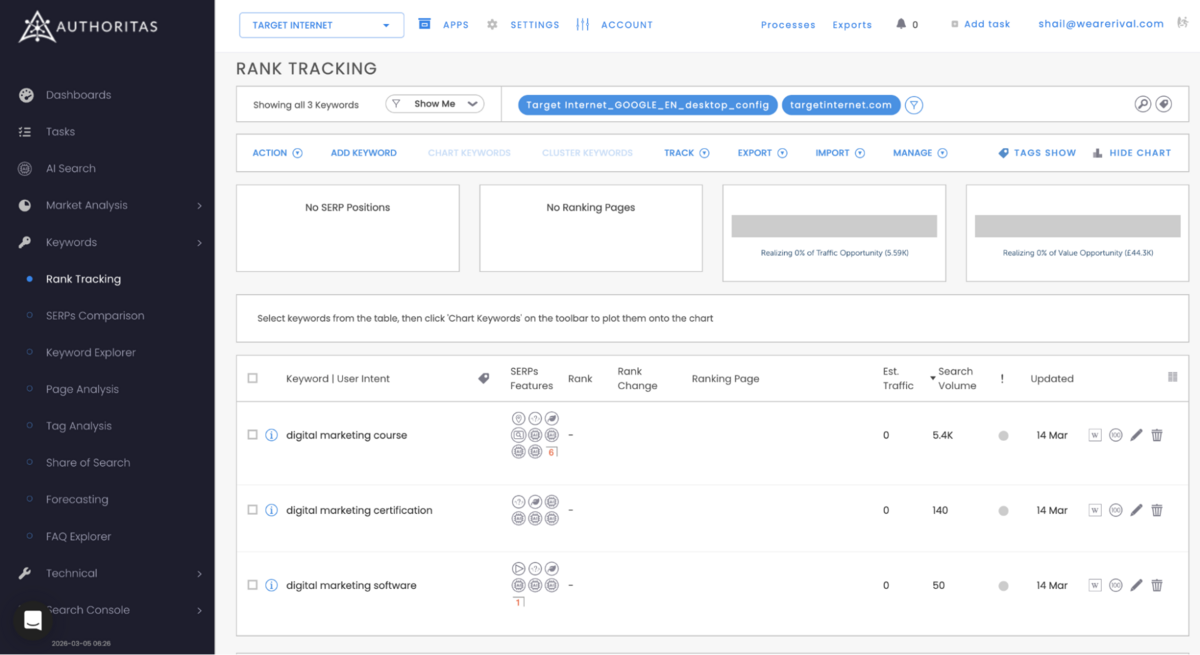
You create a project, add your domain, and the platform starts pulling in data. In our case, we used targetinternet.com as our test project. The onboarding includes a 13-step guided tour, which walks you through the core sections. It is helpful for first-time users, though if you're an experienced SEO practitioner, you will probably skip it after the first couple of screens.
AI Search Platform
We've reviewed 10+ SEO Tools in 2026. Honestly, this is the most sophisticated AI search tracking tool we've seen so far.
Nothing else comes close - not Semrush, not Ahrefs, not Moz Pro, and not any of the standalone AI monitoring tools that have popped up in the last year. Authoritas has built something genuinely ahead of the market, and it deserves a detailed breakdown.
What is "AI Search", and why should you care about it?
Say your brand sells digital marketing courses and certifications. Someone opens ChatGPT and types "What's the best digital marketing course?", or if someone else asks Perplexity, "Which digital marketing certifications are actually worth the money?" Your brand either shows up in those answers, or it doesn't.
You can't see this in Google Analytics. Traditional traffic/SEO metrics don't cover it. However, millions of people are already making purchasing decisions based on what AI models tell them. Authoritas tracks how your brand appears across all the main AI search engines (ChatGPT, Perplexity, Claude, Gemini, and Google AI Overviews). It goes beyond whether you get mentioned.
You see exactly what gets said, which sources get cited, whether the tone is positive or negative, and how your visibility compares to your competition.
The Composer
The Composer is the first part of the workflow in understanding where your brand stands in "AI Search".
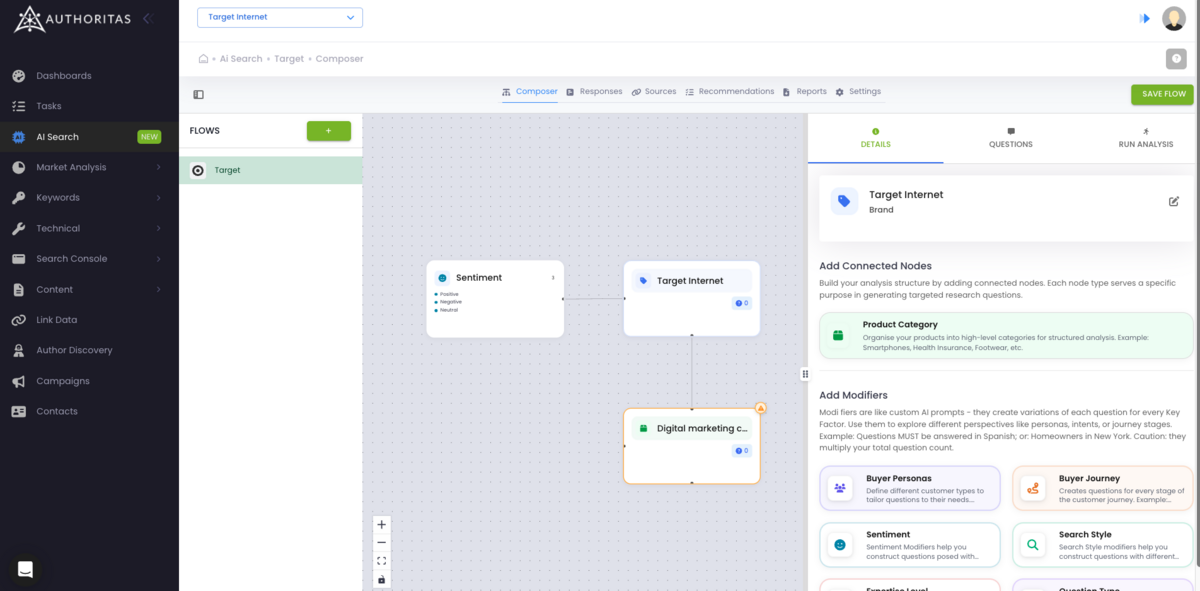
It's a visual canvas where you can build a structured hierarchy of your brand, its related product categories, and the factors that matter to your customers.
By doing this, you build a mind map that Authoritas then uses to build hundreds of targeted questions to send to AI models to see what kind of related queries people are searching for. This is helpful because these 'question variations' cover multiple different kinds of questions that someone could potentially search for while in the research/consideration/conversion phase.
After you've added your brand, you add Product Categories (like "Digital Marketing Training" or "Digital Marketing Courses"). Here, you need to cover all the categories where you're selling a product or service. You can also add subcategories under each category if you need more granularity.
Then, you add key Factors to each category or subcategory. Key Factors are the criteria your customers care about: price, quality, comfort, sustainability, whatever matters in your space.
In our testing, we added Target Internet as the main node and then defined 3 categories: Certifications, Courses, and Training.
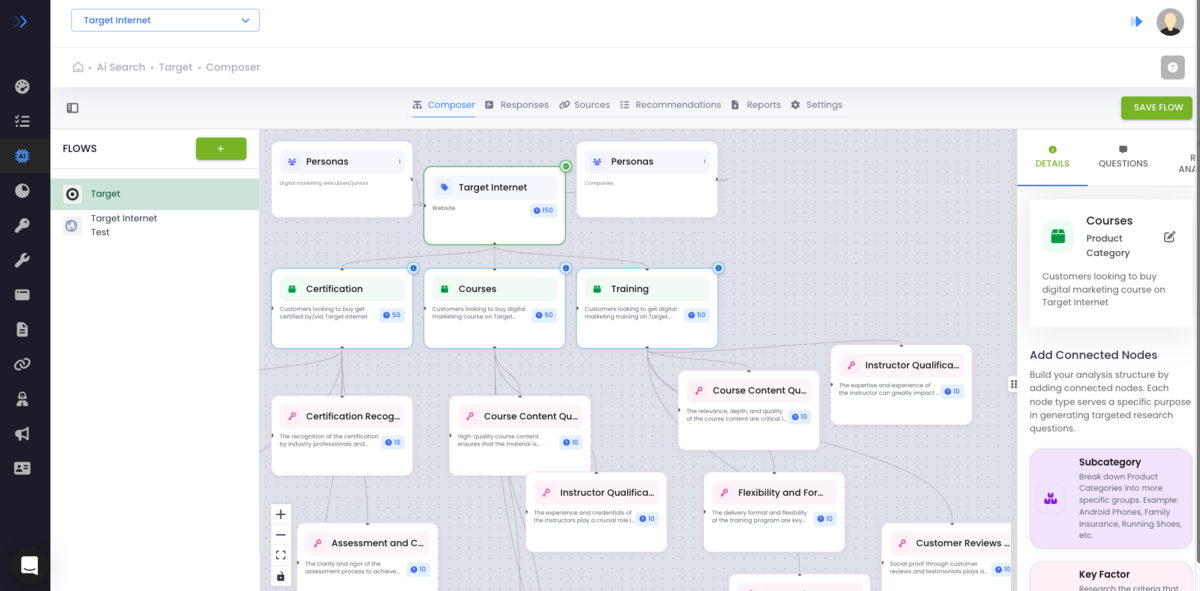
All we had to do was write the names of these categories and a brief 1-liner of what each category is, like "People looking to purchase a certification related to digital marketing skills".
After this, AI does the heavy lifting to come up with the Key Factors.
For "Certification" as a category, the Authoritas AI came up with "Cost & Payments", "Customer Reviews", and "Course Content", all the factors that one would take into account before actually paying for a course with certification.
Authoritas then generates 10 unique questions for each Key Factor.
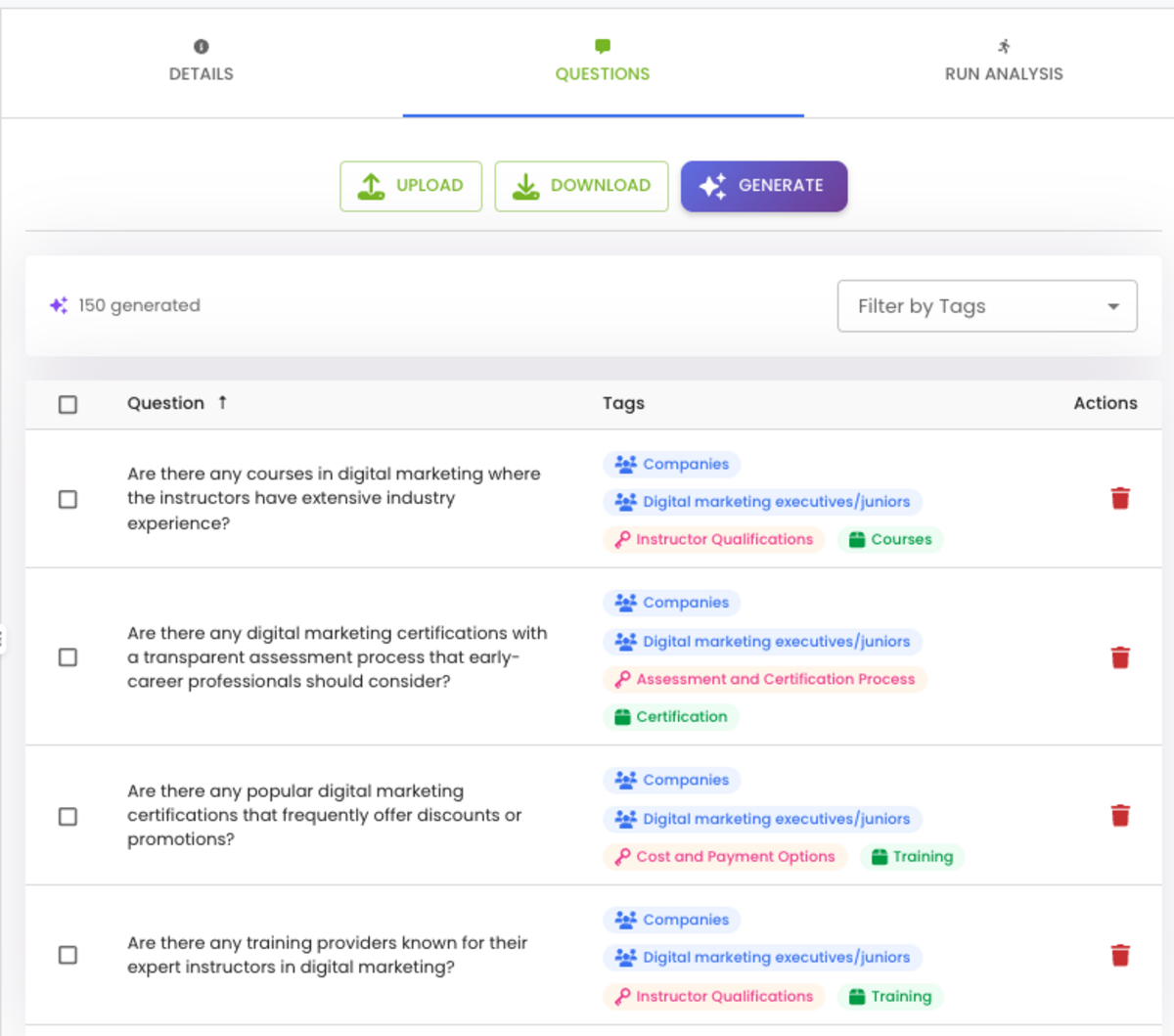
So if you have 7 Key Factors across your categories, you're starting with 70 questions. That's already more comprehensive than anything you'd get from manually querying ChatGPT yourself.
Outside of this, if you already have a list of specific questions you want to test, you can upload them directly via CSV - without needing to build key factors, etc.
Running the Analysis
Once your questions are ready, you move to the Run Analysis tab.
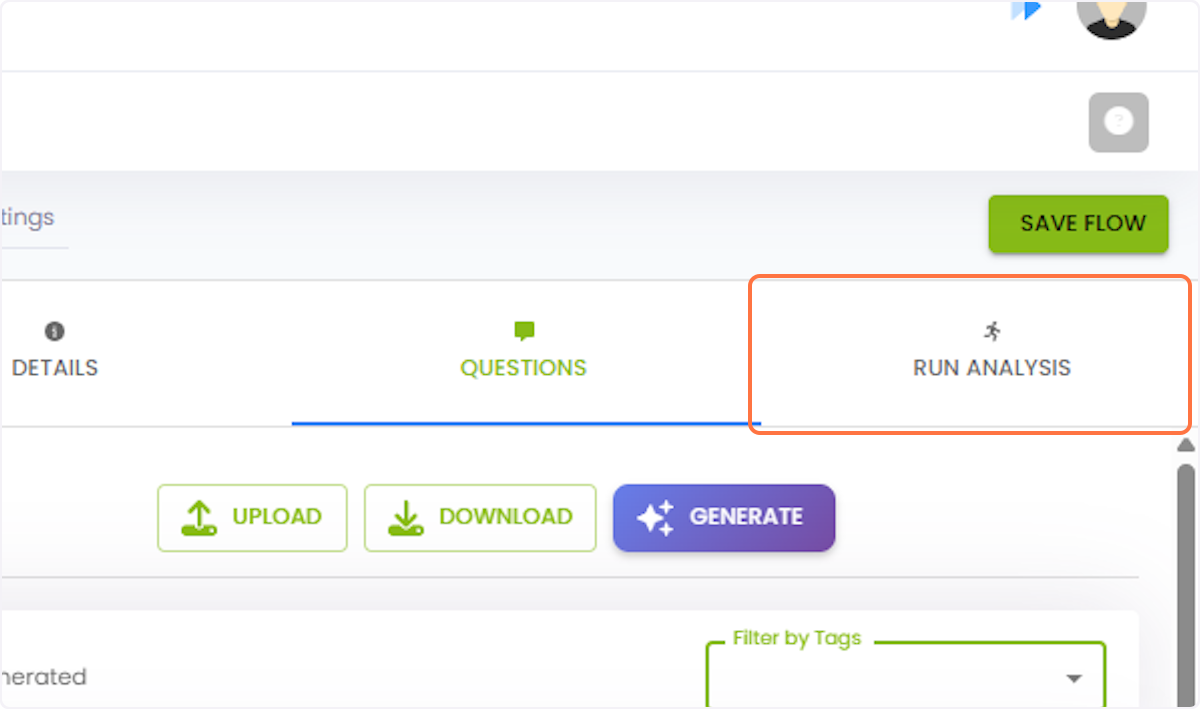
Here, you pick which AI models to query.
The model selection includes ChatGPT, Claude, Perplexity, Gemini, Google AI Overviews, and others. Some models are "search-enabled," meaning they can access the web and show which sources they reference. Others respond only from training data. This distinction matters because the Sources tab (more on that below) only populates when you use search-enabled models.
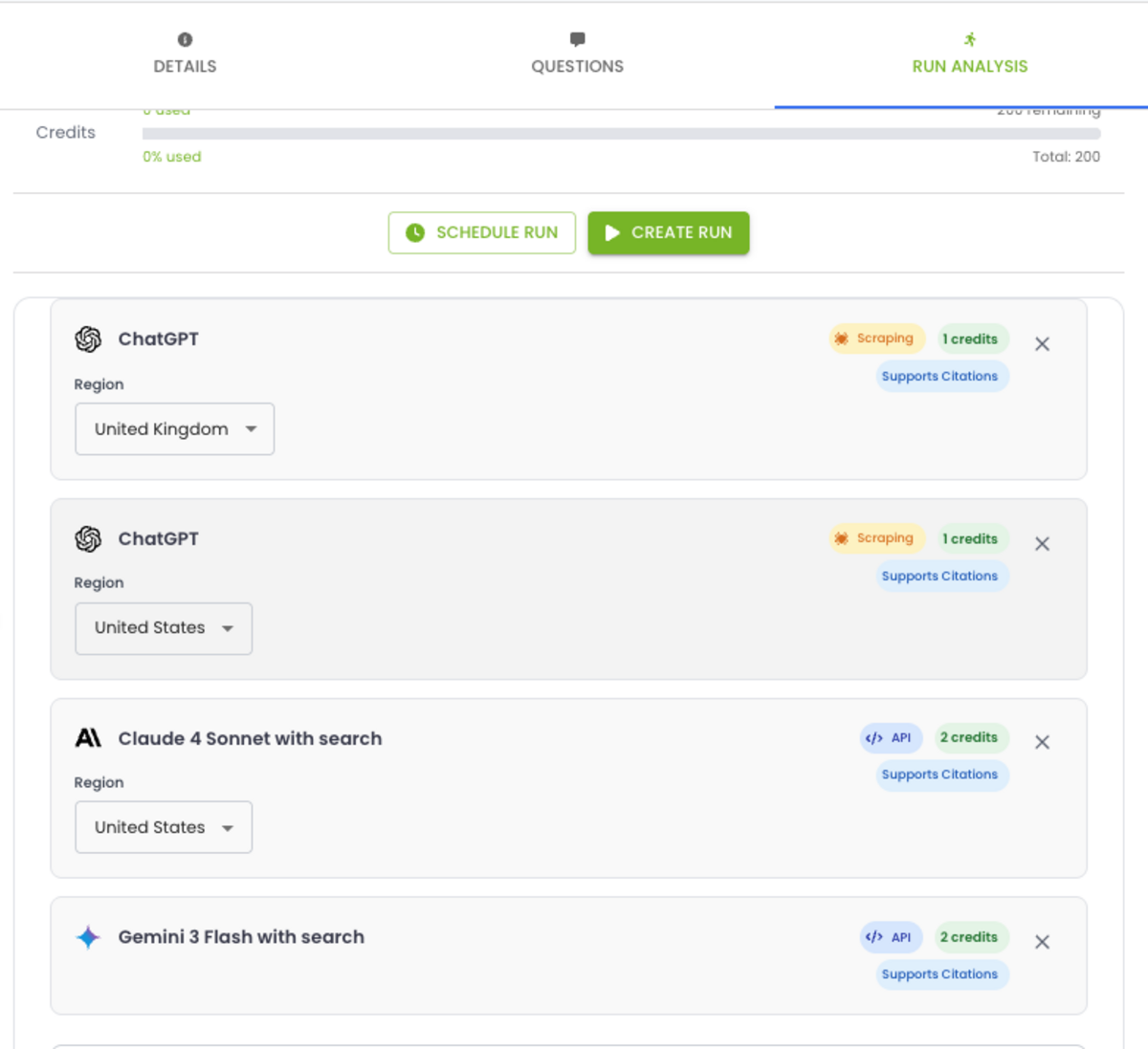
You can run the analysis immediately, or schedule it to run on a recurring basis: daily, weekly, or monthly. Each query costs one prompt credit for standard models or two credits for search-grounded models (enterprise plans only).
The platform shows you a credit estimate before you confirm the run, along with how much of your allowance is remaining. Runs can take anywhere from 5 minutes to several hours, depending on the volume of questions.
Responses Tab
In the Responses tab, you get the total prompts sent, total responses with brand mentions, and share of responses, shared or brand mentions/unique brand mentions, and the general sentiment of the conversations.
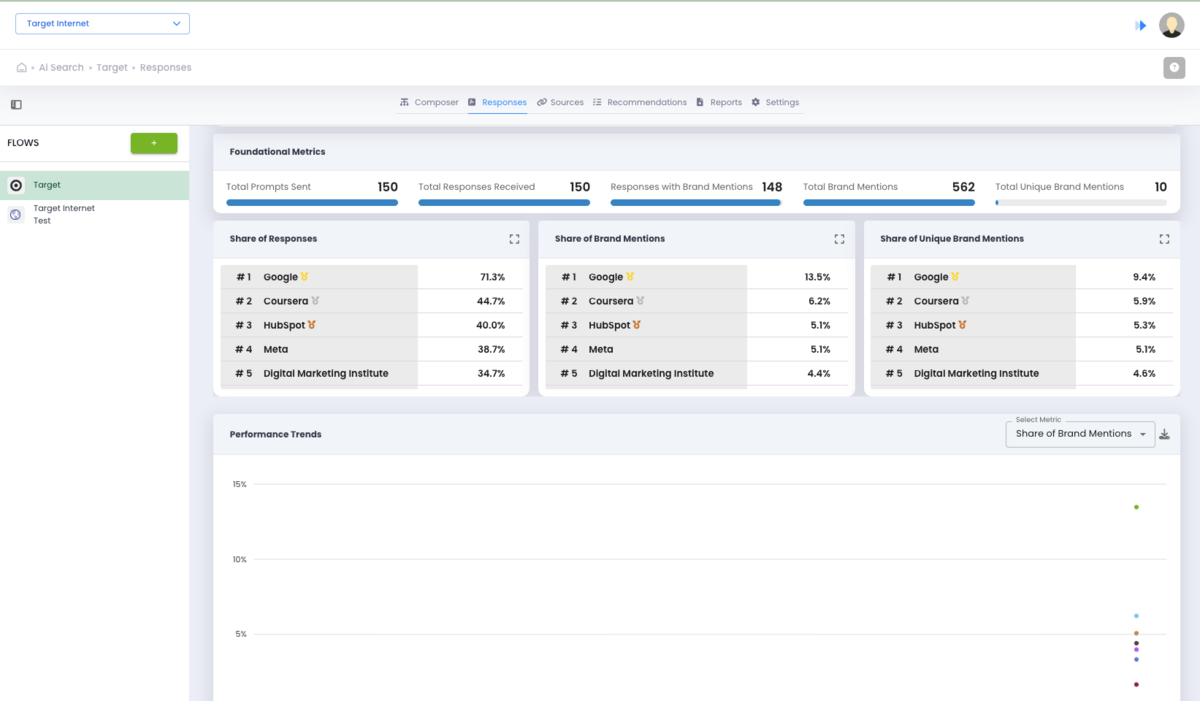
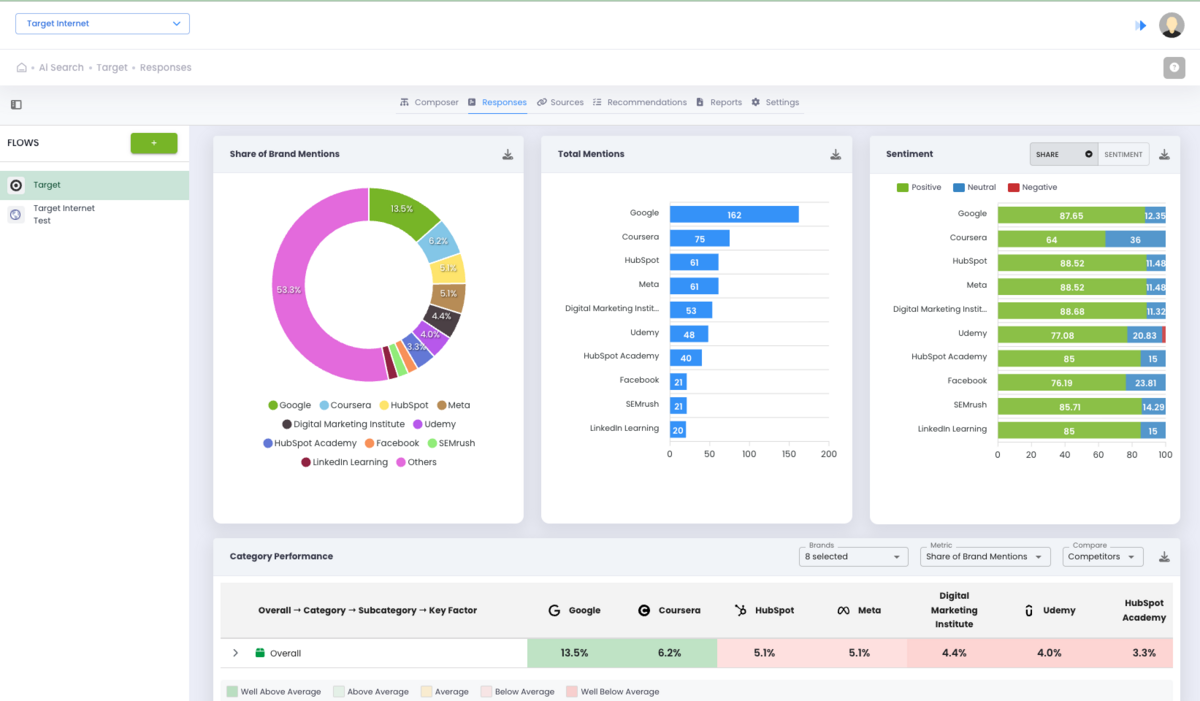
You can also see which brands are consistently mentioned when these questions are asked, and which AI models are mentioning them.
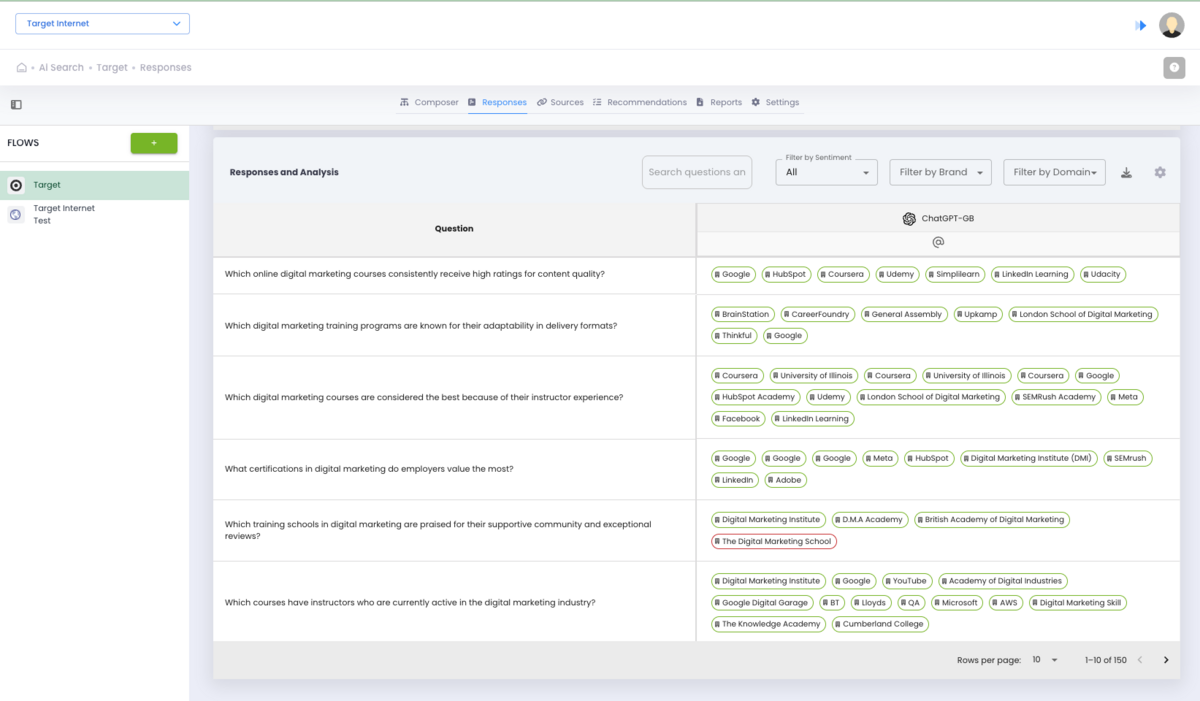
You can filter your view by product category, buyer persona, language, region, or any other tag you applied during setup.
The filtering is where the earlier Composer work pays off. Because every question is tagged with its full hierarchy path, you can slice the data in ways that are actually useful. "Show me all negative sentiment responses about our pricing from budget-conscious buyers at the consideration stage" is a real query you can run here. That level of specificity is not something we've seen in any other tool.
You're not just getting a binary "mentioned or not mentioned." You're seeing the full text of what each AI model said, who else got mentioned alongside you, and what the overall tone was.
Sources Tab
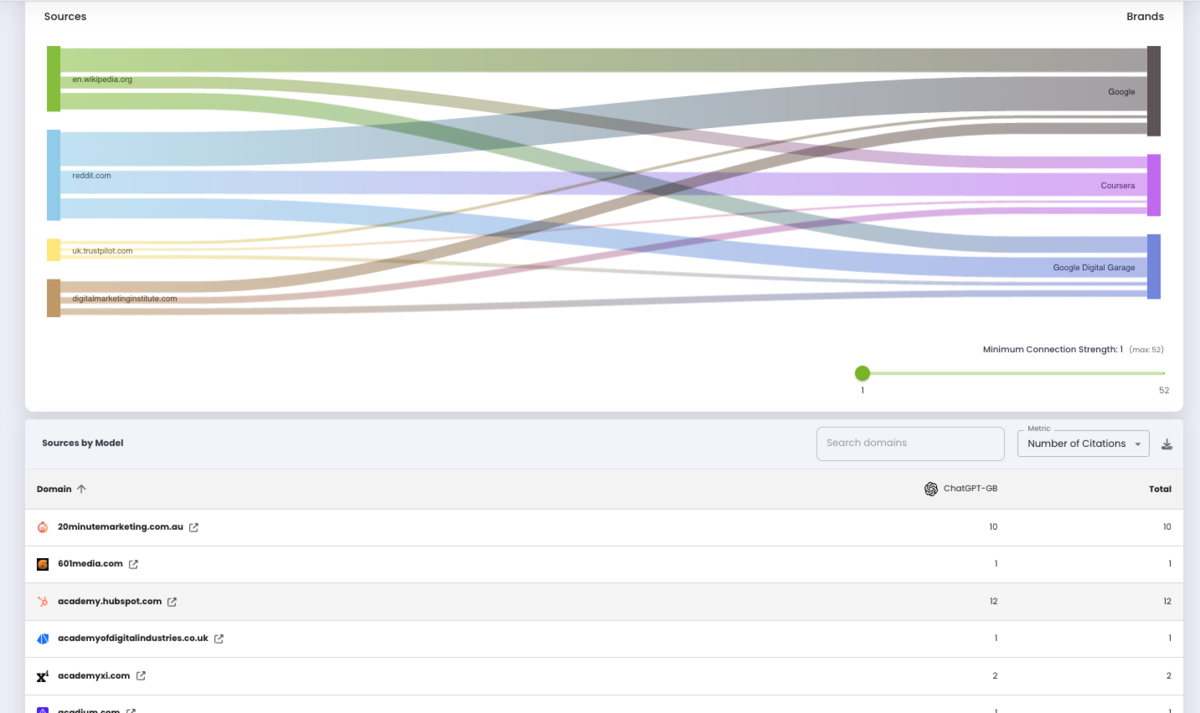
Available only when you've used search-enabled models, this tab shows which websites and pages AI models pulled from when formulating their answers.
This is arguably the most actionable part of the entire platform. If ChatGPT consistently cites three competitor websites when answering questions about your industry but never cites yours, you now have a concrete content gap to address. You can see your share of voice in AI responses, identify which publications or domains carry weight with different models, and spot opportunities for content creation or outreach.
This is like a backlink workflow, but for Generative Engine Optimisation.
Sentiment Tracking
Sentiment analysis runs across all responses. You can see whether AI models mention your brand positively, negatively, or neutrally, and track how that changes over time with scheduled runs.
For example, you might discover that Perplexity consistently recommends a competitor while mentioning your brand with caveats. Or that ChatGPT is positive about your product quality but negative about your pricing. Again, these are specific, actionable findings that you can use to inform your content strategy.
Recommendations Tab
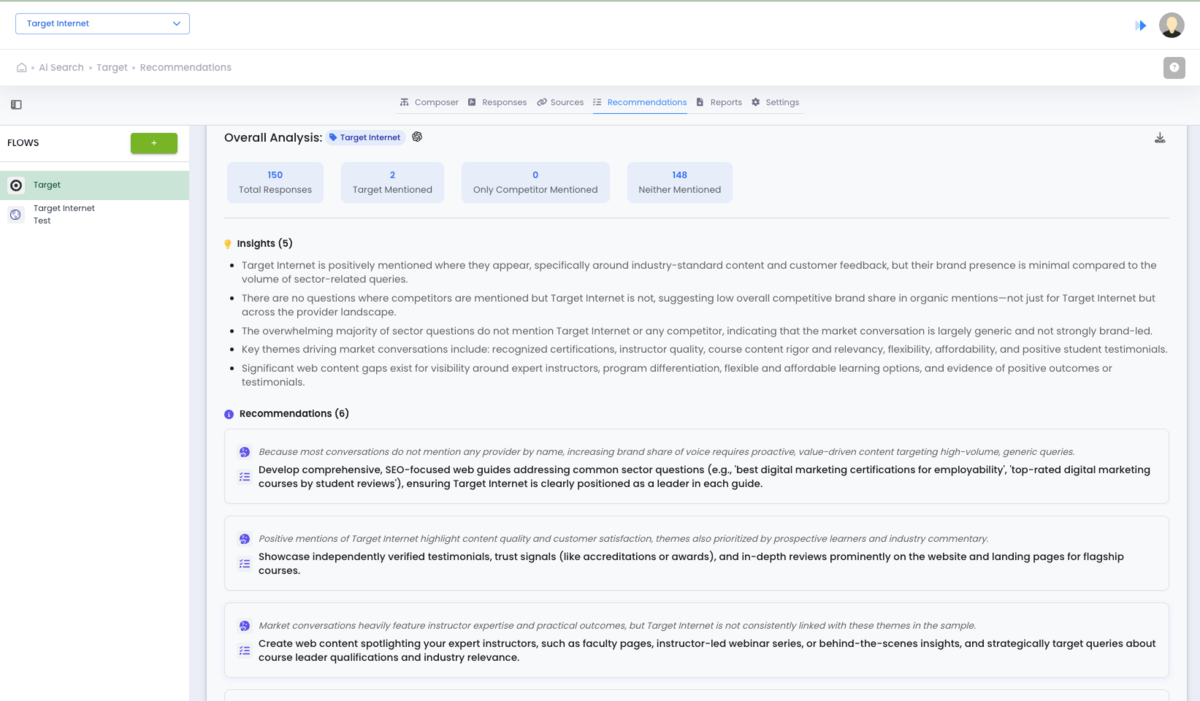
Authoritas also surfaces recommendations based on the data it collects. We won't overstate this feature since it's relatively new, but it's a logical extension of the monitoring: once you know how AI sees your brand, the platform starts suggesting what to do about it.
Some of the insights & recommendations are really simple, but actionable (sometimes it's just about creating the right content so AI models can understand your brand better).
Market Analysis and Visibility
The Market Analysis section is home to two primary tools: Visibility Explorer and Project Visibility. We've added a brief description of both the tools below. However, this entire section seems to be broken and nonresponsive, and none of the buttons or features worked at the time of our testing (March 2026).
Visibility Explorer
This is supposed to be Authoritas' market-level view of organic search. It taps into a database of 150 million keywords that Authoritas scrapes and indexes monthly using its own technology. The idea is that you enter one or more domains, pick a market (50+ countries available), and the tool shows you how many keywords each domain ranks for, how many pages are ranking, and an overall visibility score.
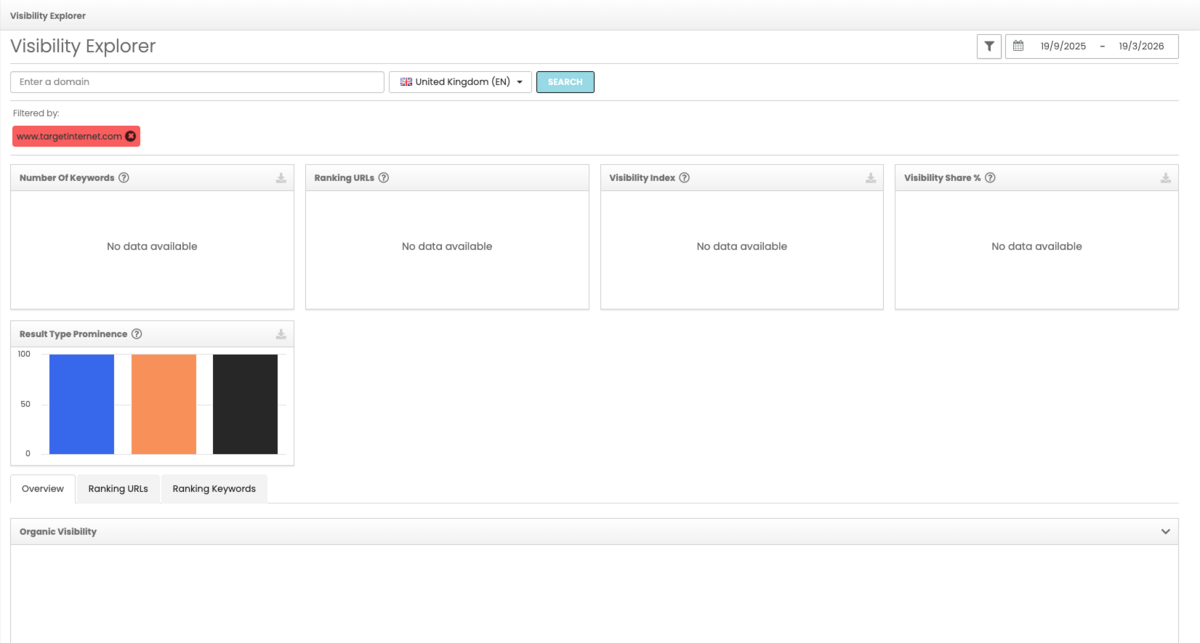
This, however, is broken and does not seem to work. There is also another glitch where, once you enter the Visibility Explorer, you can't find it again on the left-hand navigation menu. You will need to navigate to another section, refresh a few times, and then it will show up again.
Project Visibility
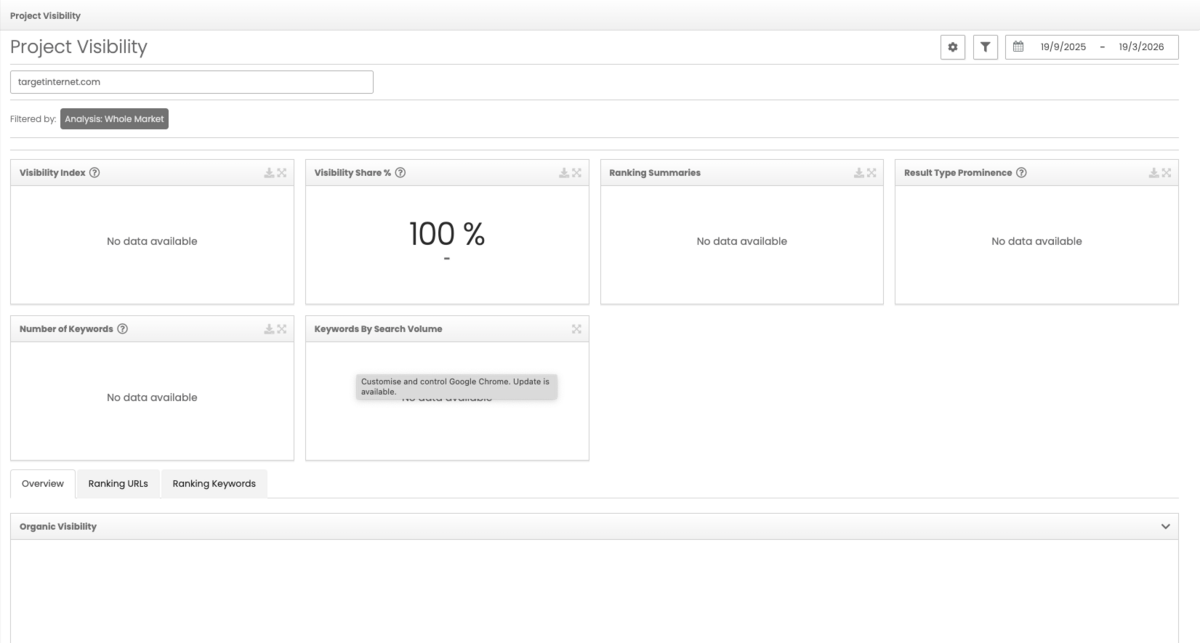
Where Visibility Explorer is for exploring, Project Visibility is supposed to be for monitoring. You define a specific set of competitor domains, and the tool delivers ongoing visibility comparisons against your site.
This too was broken and non-functional, so not much to talk about over here.
Keyword Research and Rank Tracking
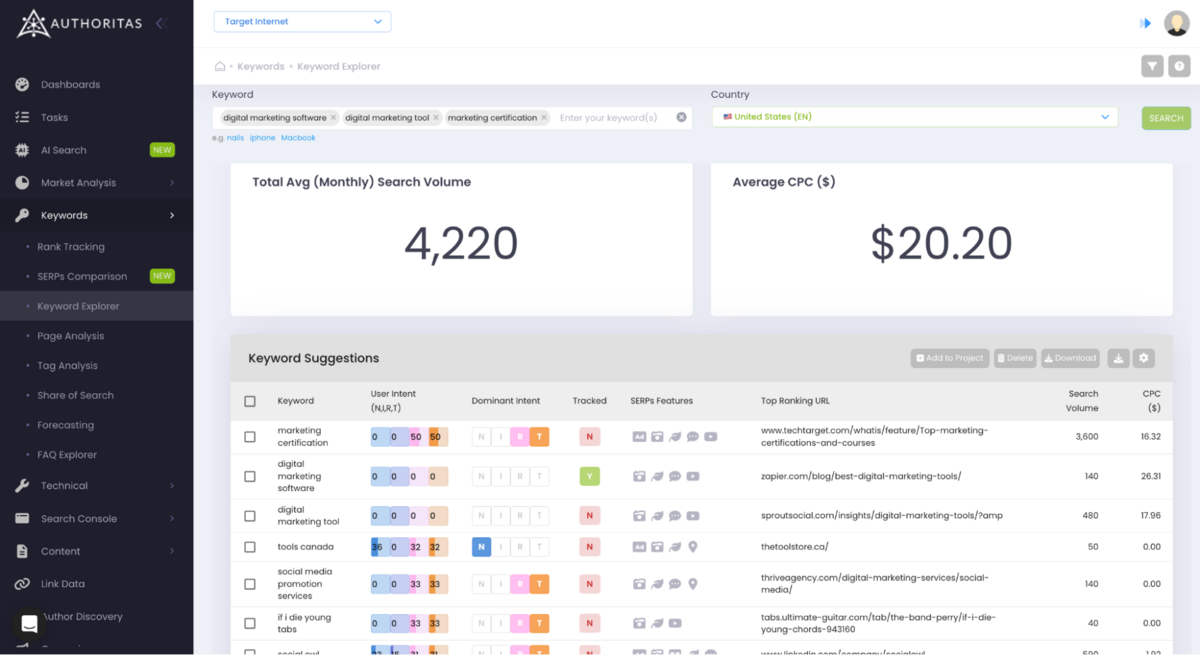
Keyword tracking is the core function of any SEO tool. You need to know what people are searching for, whether your site shows up for those searches, and how your positions change over time.
Rank Tracking
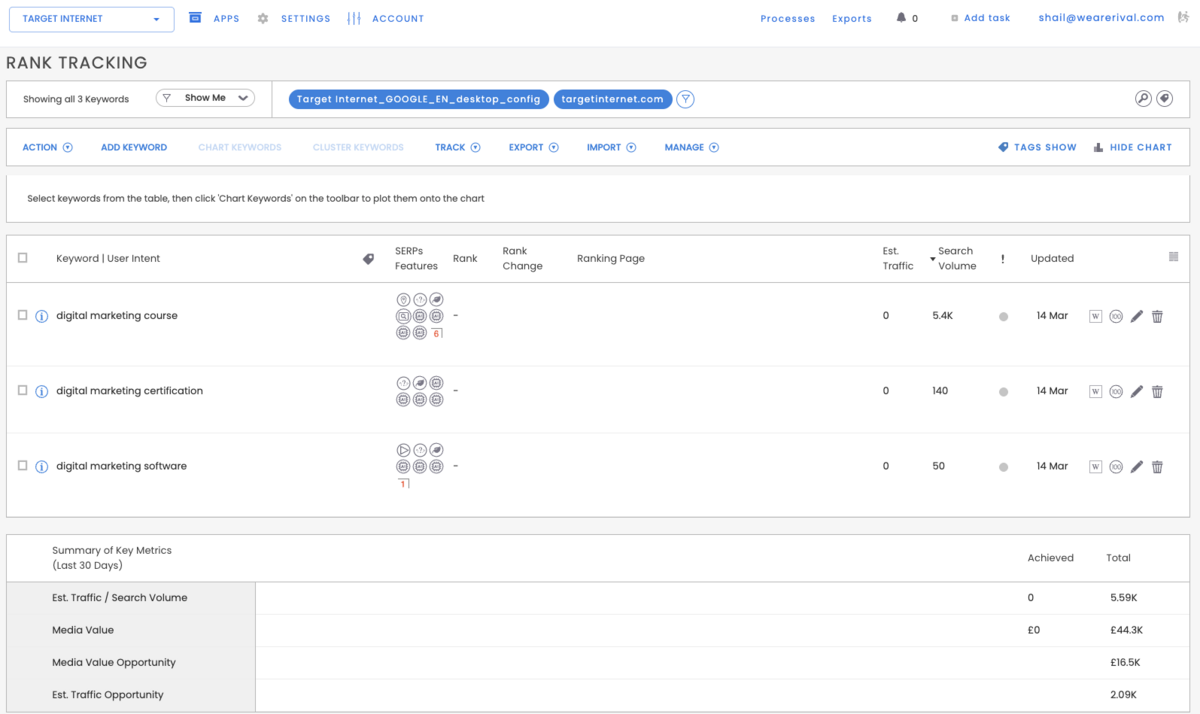
The UI for Rank Tracking is very basic and not visually friendly. All items are displayed in the same black-and-white colour scheme, which makes it take longer to scan, interpret, and find what you need.
Like all other keyword research tools, you can track keywords across search engines and devices, with scheduling options from daily to on-demand. For each keyword, you're seeing the generic keyword metrics: position history, SERP feature presence, estimated traffic, search volume, CPC, and a metric called media value. Media value estimates the equivalent PPC spend for your organic positions. That's a useful number when you need to justify SEO budgets to a stakeholder who thinks in advertising costs.
The credit system works differently from the fixed keyword limits in most tools. You get a pool of credits, and each rank check burns credits based on keyword, search engine, frequency, and device. For example, tracking 100 keywords daily on Google desktop and mobile costs more than tracking the same 100 keywords weekly on desktop only. It's flexible, but it requires planning so you don't blow through credits unexpectedly.
Despite the overall tool being quite generic, there are 2 features that stand out within this section.
First is the AI Overview tracking.
Authoritas can detect when Google shows an AI Overview for your keywords. Most SEO tools only capture the 2-3 visible AIO results on page load. Authoritas captures 10-20+ hidden ranking pages that other platforms miss entirely. If you're optimising for AI Overviews, this is a meaningful advantage. You might be ranking in AIOs without knowing it, simply because your current tool can't see the hidden pages.
Second, the "Show Me" quick filters. These are pre-built filters that surface actionable keyword segments in one click: keywords where the wrong page is ranking, keywords with the most traffic potential (low-hanging fruit), keywords where your rank has dropped recently, and keywords where local results are showing. It's a small feature, but it saves time and helps less experienced team members find the right data without building complex filters.
Keyword Clustering
Keyword clustering groups related keywords together so you know which ones should target the same page.
The logic behind it is SERP similarity. Say you're tracking "best running shoes" and "top running shoes 2026." If 7 out of 10 of the same pages rank in the top results for both keywords, Google is treating them as the same topic. That means you should target them with one page, not two. If you have separate pages competing for both, you're cannibalising your own rankings and splitting your authority.
Now imagine doing that analysis manually across 2,000 keywords; that's what Authoritas automates.
You select your keywords, set a similarity threshold (70% is the default, meaning 7 of the top 10 results overlap), and the platform clusters them. It sends every keyword's top 10 ranking URLs to its backend, compares them, and groups keywords that share enough overlap. You can process up to 10,000 keywords in one run.
Once the clusters are built, you can map each cluster to your preferred ranking page. The platform then flags when a different page is ranking instead, so you catch cannibalisation issues early. The automatic cluster names that are created by Authoritas aren't user-friendly, but you can rename them with custom tags.
Keyword Explorer
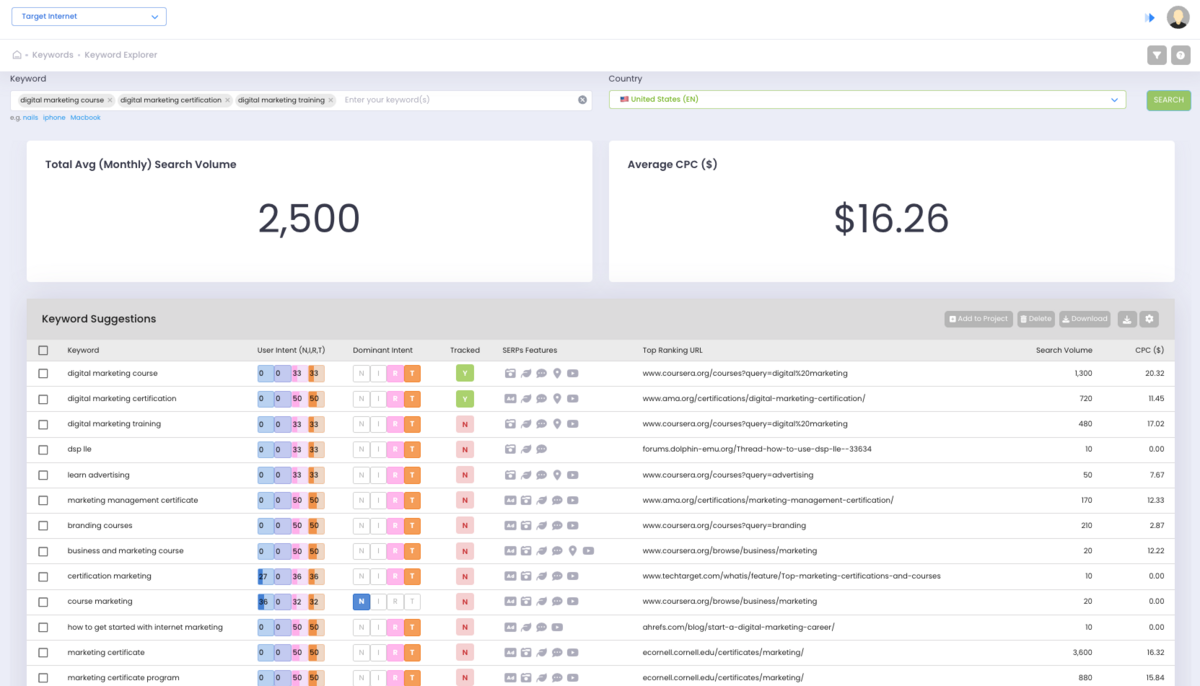
This is the main feature of all SEO suites; it lets you research new keyword ideas.
Enter a seed keyword, pick a market from 50+ regions, and get suggestions with search volume, difficulty, and related terms. It works. But it's not as deep as what Ahrefs or Semrush offer. You won't get the same range of question-based suggestions, content gap analysis, or any other insights into the keywords that you enter.
Honestly, this section is very underbuilt, so if keyword research is a primary need (which we're guessing it is), you'll still need to buy another SEO tool alongside Authoritas.
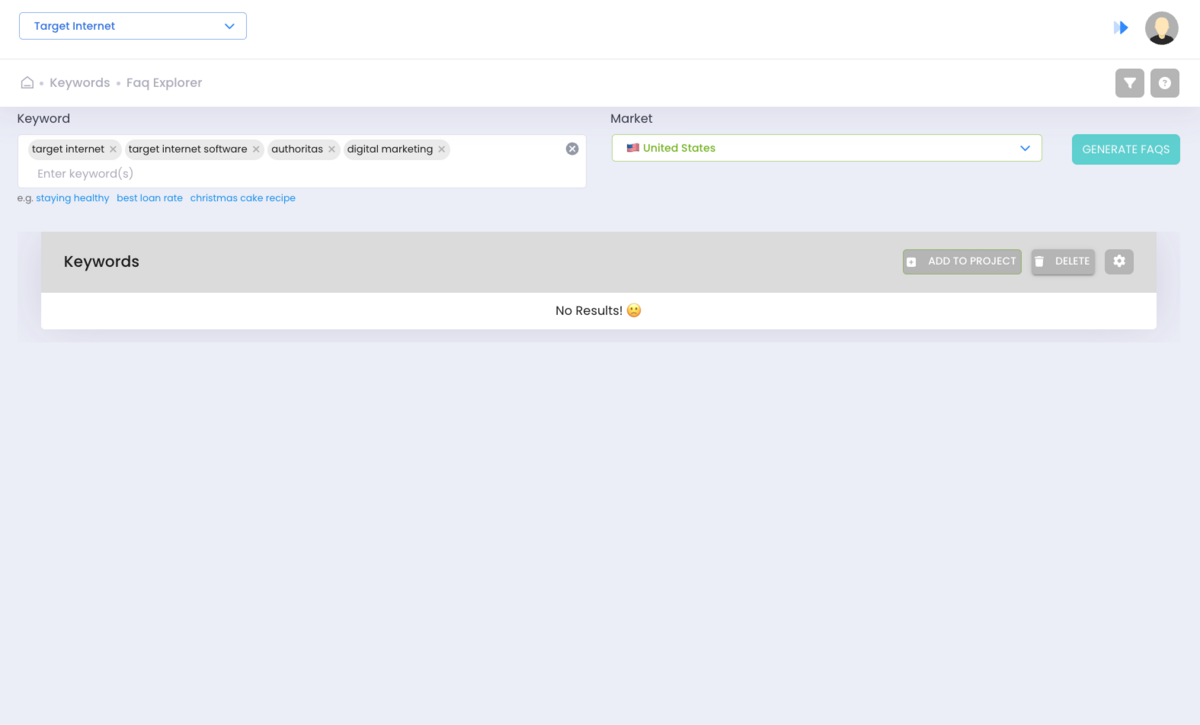
FAQ Explorer
FAQ Explorer generates question-style queries related to your keywords by pulling from Google's People Also Ask results.
However, like the previous sub-tools, Visibility Explorer and Project Visibility, this section also does not work and is broken.
Technical SEO and Search Console
Technical SEO tools audit your site for crawl errors, broken links, speed issues, and other problems that affect how search engines index your content.
Authoritas covers this area, but not in the same way as most competitors. Authoritas does have its own crawler (called linkdexbot, inherited from the Linkdex platform). You can schedule crawls weekly or monthly, set page limits up to 20,000, and exclude specific paths or parameters. The crawl data surfaces metadata issues, engagement metrics, and backlink profiles at the page level.
What it doesn't do is present the results as a structured technical audit with prioritised error lists, the way Ahrefs, Semrush, or Moz Pro do. There's no scored health check, no categorised issue list, and no "fix these 47 broken links" to-do list. The data is there, but the presentation is very basic and non-actionable.
Content Tools
Content tools help you audit what you already have and plan what to create next.
Semrush has set the bar high here with its SEO Writing Assistant, Content Briefs, and Topic Research. Authoritas is less about content creation workflows and more about auditing what's already on your site.
Content 360
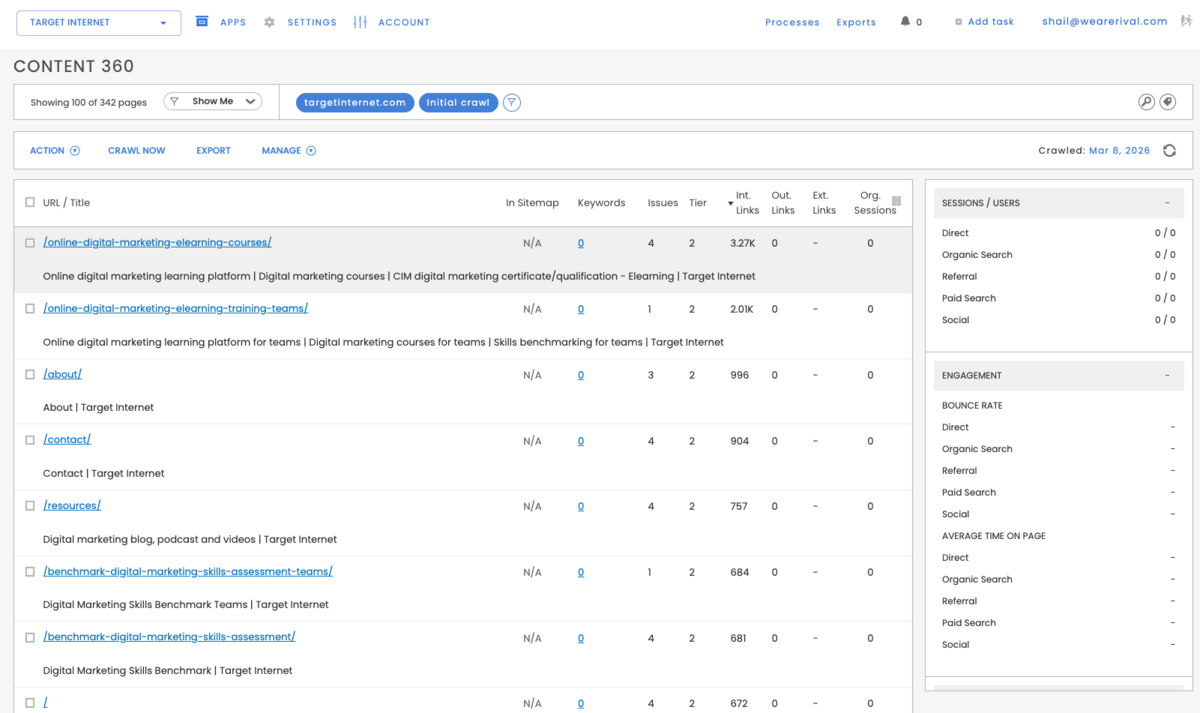
Content 360 is a content audit tool. It crawls your site and maps every page against its performance data in a single view.
For our test site, the crawl found 342 pages. Each page shows sitemap status, ranking keywords, issues, tier classification, and the number of internal links, outbound links, external links, and organic sessions. Click on any page, and a right-hand panel pulls up multiple metrics like the number of traffic sources, bounce rate, time on page, title tags, meta descriptions, and heading structure.
The problem is that you can't do anything with it.
The data just sits there as non-clickable text. You can see that a page has 4 issues, but you can't click through to find out what they are. This almost makes you question the validity of the data.
Link Data
Backlinks are links from other websites pointing to yours. Search engines treat them as votes of confidence. More high-quality backlinks generally means higher rankings.
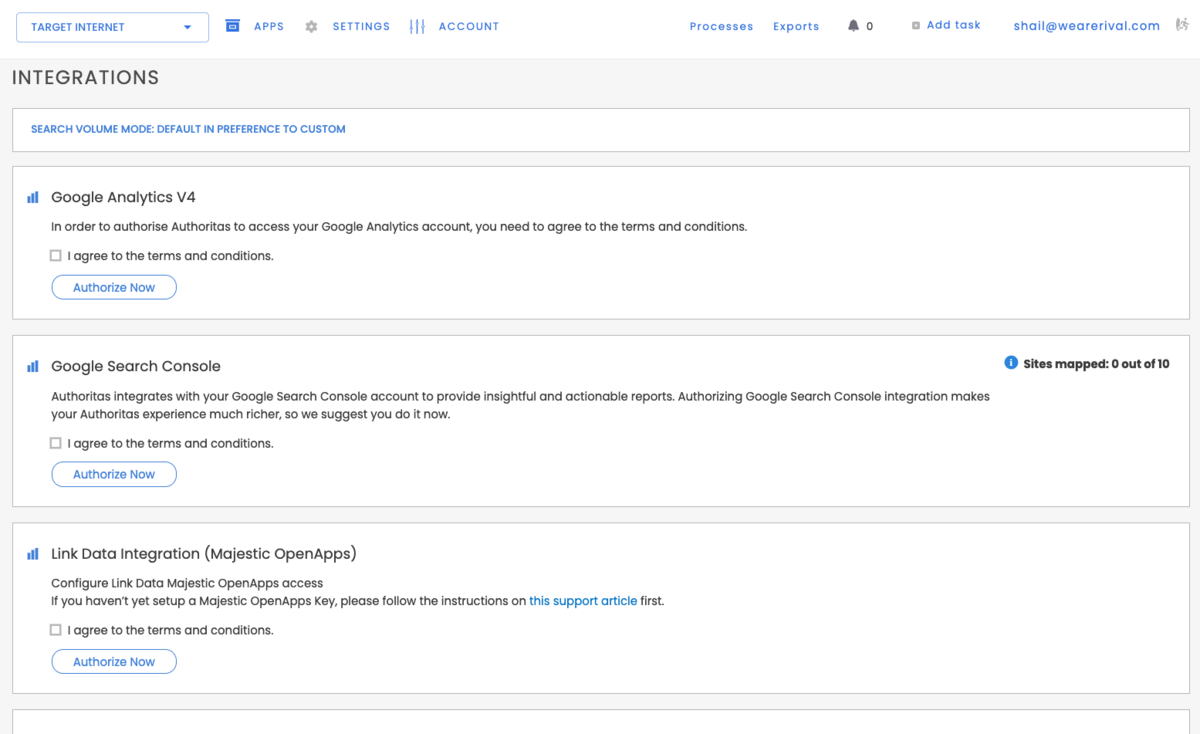
Authoritas sources its backlink data from Majestic's Fresh Index, pulling a maximum of 3 links per domain to cut through sitewide link noise. This is not included in your Authoritas plan - it only works if you already have a separate Majestic account set up and configured.
There is no backlink information given to you by Authoritas itself. This is a data visualisation tool at best. All the data comes from other sources: GA4, Google Search Console, and Majestic.
While using any SEO tool, you should at least be able to see what domains are linking to your site without a third-party integration. In Authoritas, this is not possible.
Also, you can only see links that point to your own site. This means that you can't spy on your competitors to see what links they're acquiring.
Other tools give you this data natively and come with outreach CRMs and other complex workflow additions that are completely absent here.
In every other review that we've published this year, Backlink Analysis makes up roughly a quarter of the entire article. With Authoritas, one of the core pillars of any SEO workflow, which is Link Building/Backlinks, is absent on its own. This section is a data visualisation tool, at best.
Pricing
Authoritas' pricing is a bit unusual.
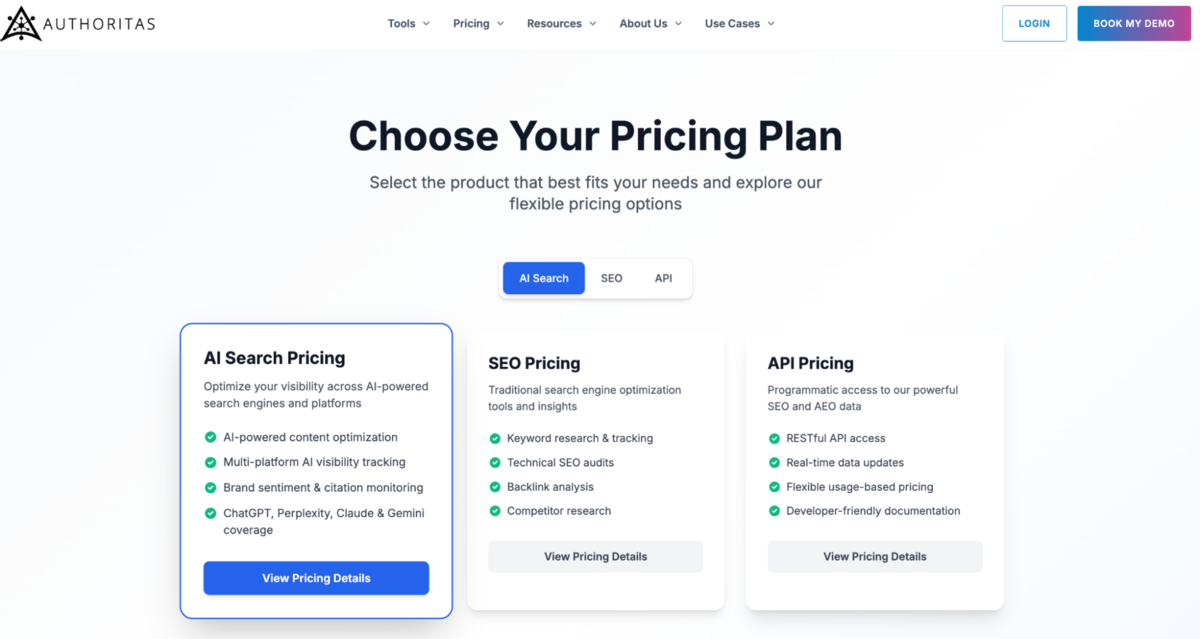
It's split across three separate products: SEO Platform, AI Search, and API. Each has its own plans, its own credits, and its own billing. If you want both SEO and AI Search, you're paying for two subscriptions. There's no combined package.
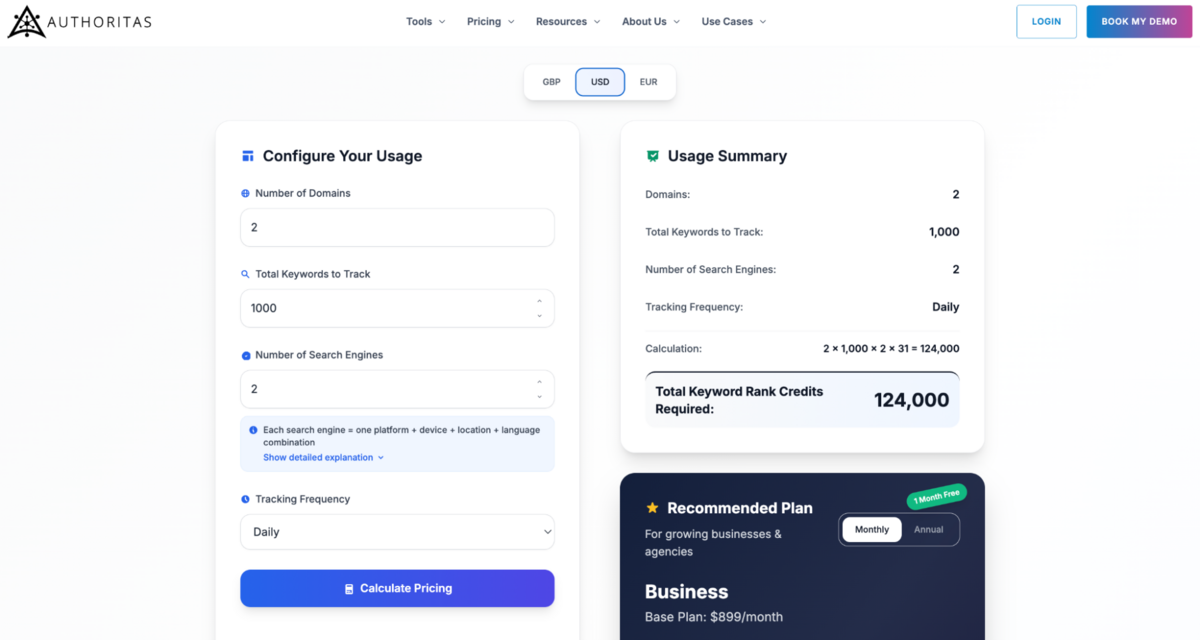
All three products have pricing calculators on the Authoritas website. We'd highly recommend using them before you make a purchase.
SEO Platform
The SEO platform charges by keyword rank credits. The formula: domains x keywords x search engines x frequency = credits required.
Frequency is the biggest cost driver. The same 1,000 keywords on 1 domain cost very different amounts depending on how often you check: monthly is 1,000 credits (fits the Free plan at $0/month), weekly is 4,300 credits (you need the Essential plan at $129/month), and daily is 31,000 credits (you need the Expert plan at $599/month).
Scale that to 4,000 keywords daily on 2 domains and you're at 248,000 credits, which is 83% of the top-tier Business plan ($899/month, 300,000 credits). Add a third domain or another search engine, and you're over.
The four tiers: Free at $0/month with 1,000 credits; Essential at $129/month with 15,000 credits (overage: $8.60 per thousand); Expert at $599/month with 100,000 credits (overage: $5.99 per thousand); and Business at $899/month with 300,000 credits (overage: $3 per thousand).
This is extremely expensive compared to the top SEO platforms, which are, in fact, better built and ahead of Authoritas.
AI Search
AI Search is billed separately. The formula: sites x questions x frequency x combined model cost = credits required.
Each standard model costs 1 credit per query. If you select two models (say Perplexity Sonar and Google AIO), each question costs 2 credits. Search-grounded models (enterprise only) cost 2 credits each, so two of those would be 4 credits per question.
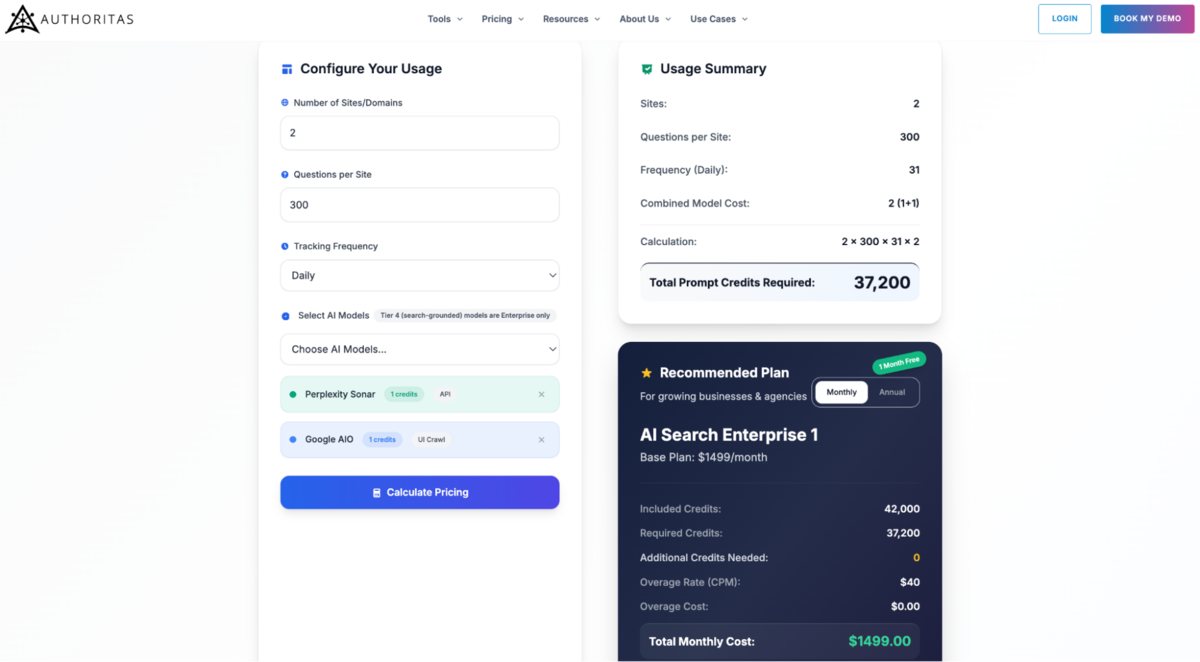
We tested this pricing with Perplexity Sonar and Google AIO (1 credit each, combined cost of 2): 300 questions, 1 site, monthly is 600 credits (fits the P1 plan at $119/month, 2,000 credits); 300 questions, 2 sites, monthly is 1,200 credits (still P1, but over half your allowance in one run); 300 questions, 1 site, weekly is 2,580 credits (exceeds P1 - you need P2 at $299/month, 6,000 credits).
Same pattern as SEO pricing. The monthly plan is manageable; weekly is where costs jump.
The tiers: Free at $0/month with 50 credits; P1 at $119/month with 2,000 credits (overage: $66 per thousand); P2 at $299/month with 6,000 credits (overage: $55 per thousand); P3 at $489/month with 15,000 credits; Enterprise 1 at $1,459/month with 42,000 credits (includes BigQuery and Looker Studio); Enterprise 2 at $2,289/month with 75,000 credits; and Enterprise 3 at $3,115/month with 125,000 credits.
The P1 overage rate of $66 per thousand is a bit steep. If you're consistently going over, then upgrading is almost always cheaper.
API
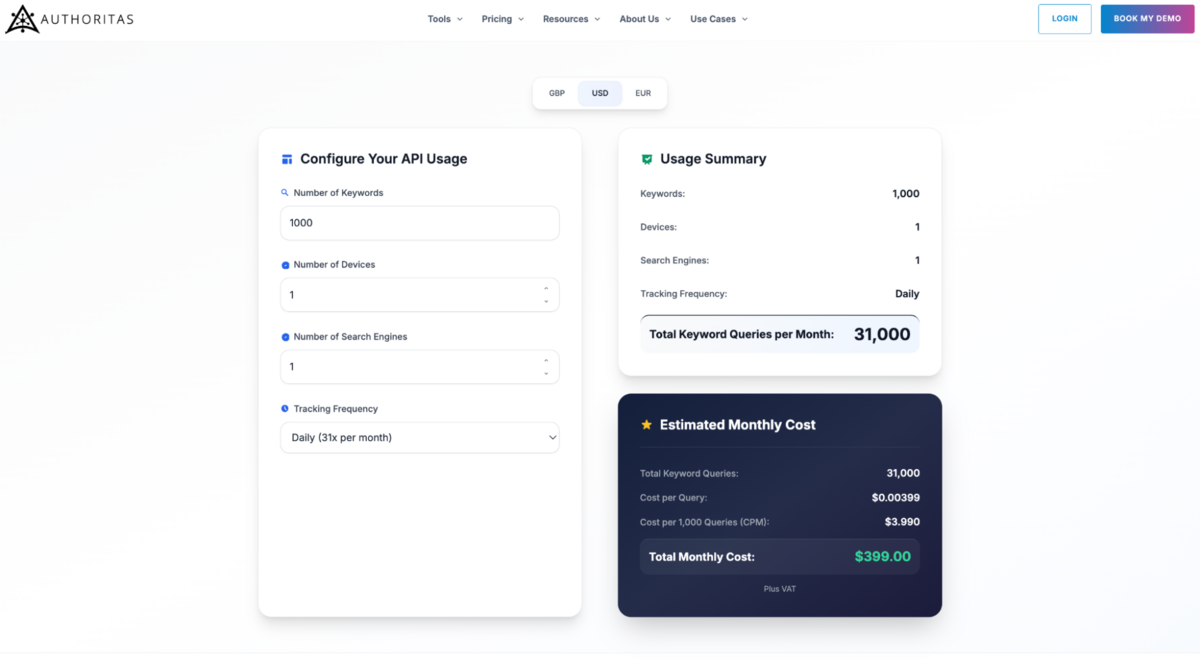
Most of us won't need this. The API gives programmatic access to SERP data, keyword rankings, and competitor analysis. It's for teams building custom dashboards or powering Looker Studio reports at scale.
Pricing is volume-based. Free tier at 1,000 queries/month. Paid tiers scale from 100,000 queries ($399/month) to 1,000,000 queries ($3,429/month). Cost per query drops as volume increases. Above 1 million is custom.
The Final Verdict
Authoritas is two products. One of them is the best in its class (AI).
The other, which is SEO, needs serious work.
Parts of it are broken. The Visibility Explorer and Project Visibility sections are non-functional. FAQ Explorer didn't work either. The backlink module requires a separate Majestic account and only shows links to your own site, not competitors. For a paid SEO tool in 2026, that's honestly very hard to overlook.
Where the SEO toolset works, it covers the basics. Rank tracking is flexible, and the credit system lets you configure exactly what you need. Keyword clustering automates work that most teams still do in spreadsheets. Content 360 shows you useful numbers at the page level, but that's all it does. You can see that a page has 4 issues, but you can't click through to find out what they are.
Beyond that, the gaps add up. Keyword research is shallow compared to Semrush or Ahrefs. The crawler gives you data, but no prioritised workflow to act on it. The interface is decent but broken in a few places. In SEO, Authoritas does enough to function but not enough to compete.
If you stripped away the AI Search Platform and judged Authoritas purely as an SEO tool, it would struggle to justify its price against Semrush, Ahrefs, or even SE Ranking or WebCEO.
Then there's the AI Search Platform, and this changes the conversation entirely. We covered this in detail earlier in the review because it deserves the space.
The Composer lets you build structured question hierarchies. Multipliers create hundreds of targeted variations across buyer personas' journey stages, languages, and custom dimensions. The Sources tab shows you exactly which websites AI models cite when they talk about your industry. Sentiment tracking tells you whether those mentions are positive or negative.
No other tool we've reviewed does any of this at this depth. Semrush has started tracking AI mentions in its Domain Overview. Ahrefs hasn't moved into this space at all. Neither comes close to what Authoritas offers here.
To be blunt: Authoritas has failed at SEO but succeeded at GEO. The traditional SEO side is broken in places, underdeveloped in others, and outclassed by cheaper competitors across the board.
But the AI Search Platform is one of the best generative engine optimisation tools on the market. Nothing else gives you this level of control over how you track your brand's visibility in ChatGPT, Perplexity, Gemini, and Google AI Overviews.
The ideal customer for Authoritas is a brand. Not because agencies can't use it, but because the credit system, the pricing structure, and the lack of volume discounts or multi-seat plans make it clear that agencies aren't who this was built for. This is a tool for a marketing team that knows AI-generated answers are affecting their brand's visibility and wants to track that systematically.
If your team is asking, "What does ChatGPT say about us?" and nobody has a good answer, Authoritas is where you start. If you need a working all-in-one SEO platform, this isn't it.
Click here to get back to the SEO tools comparison report.
Frequently Asked Questions (FAQs)
1. What is Authoritas?
Authoritas is an SEO and AI Search visibility platform. The SEO side covers rank tracking, keyword research, content auditing, and backlinks. The AI Search side tracks how your brand appears in ChatGPT, Perplexity, Claude, Gemini, and Google AI Overviews.
2. How much does Authoritas cost?
There's no single price. SEO and AI Search are two separate subscriptions. SEO starts at $129/month, AI Search at $119/month, and both run on credit systems where your actual cost depends on how many keywords, models, and how frequently you track. Run the pricing calculators on their site before you buy anything.
3. How does Authoritas compare to Semrush or Ahrefs?
It loses on SEO. Keyword research is weaker, backlinks require a third-party Majestic account, and several sections are broken throughout. However, it wins on GEO. The AI Search Platform is the most advanced AI brand monitoring tool we've tested this year, and neither Semrush nor Ahrefs has anything comparable.
4. Is Authoritas better for brands or agencies?
It's built for brands. The credit system, split billing, and absence of volume discounts or multi-seat plans all point to a single brand going deep on its own visibility. An agency tracking 10+ clients daily would burn through credits fast and find the pricing unpredictable.